4
Procedure of creating an audio CD
In the procedure described below, it is assumed that the following preparations are made.
• The MR-8HD and the CD-R/RW drive is correctly connected using the USB cable and the
both machines are turned on.
• The song which has the stereo WAV file to be burned is loaded.
1) Insert a blank disc to the CD-R/RW drive.
Operate the CD-R/RW drive to open or close the
disc tray.
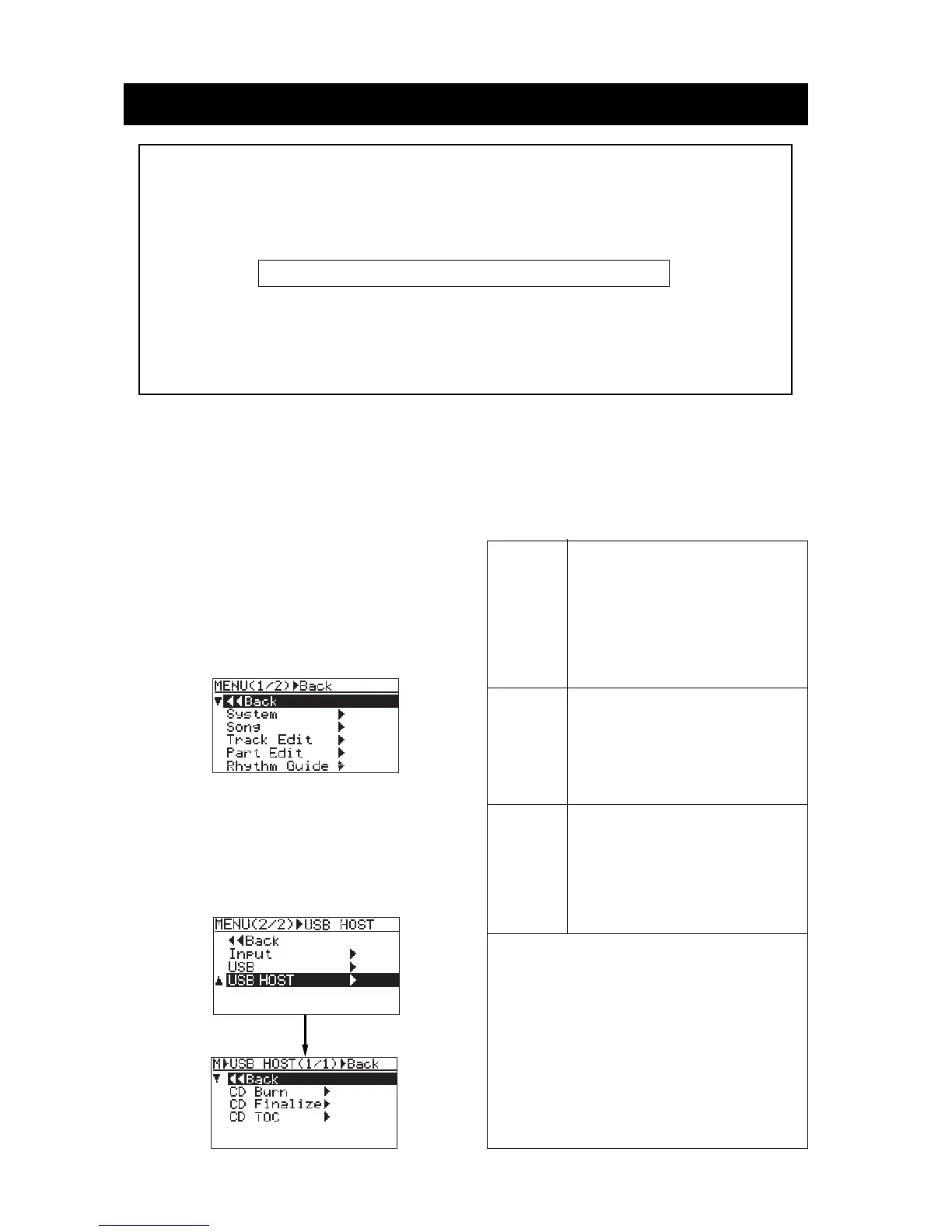
2) While the MR-8HD is stopped, press the
[ENTER] key to enter the MENU mode.
The display now shows the menu selection screen,
where "<<Back" is initially highlighted.
3) Use the [MENU] dial to select "USB HOST>"
on page 2 of the menu selection screen and
press the [ENTER] key.
The display now shows the USB HOST menu
selection screen, where "<<Back" is initially
highlighted.
CD Burn
CD Finalize
This menu item is used to record a ste-
reo WAV file in the "2 MIX" folder to a
CD-R/RW disc in the CD-DA format. By
repeating the "CD Burn" operation, you
can burn multiple tracks to a CD-R/RW
disc. After recording all desired files to
the disc, finalize the disc using the "CD
Finalize" item below.
<Note>: Before creating an audio CD, you must load the song in which the bounced track
data on tracks 7/8 has been converted to the stereo WAV file (see the example below).
The USB HOST menu has three menu items (see below).
CD TOC
To complete audio CD recording after re-
cording all desired files to a CD-R/RW
disc using the "CD Burn" operation, you
must finalize the disc using this menu
item. Finalizing a disc means you cannot
add any more tracks to it.
This menu item is used to view the TOC
information (including the number of
tracks and total recording time) of an au-
dio CD (regardless of whether it is a com-
mercially available CD or not). You can
also see the TOC information after mak-
ing "CD Burn" or "CD Finalize".
<Example>: If five songs (01 through 05) are recorded on the hard disk and the stereo
WAV file to be burned to a CD-R/RW disc is stored in the "2 MIX" folder of Song 03;
Load Song 03 before starting the operation below.
Operation example of making an audio CD
• To make an audio CD with a single track
(1) Execute "CD Burn" once.
(2) Execute "CD Finalize".
• To make an audio CD with multiple tracks
(1) Execute "CD Burn" repeatedly.
(2) After completing "CD Burn" for the final
track, execute "CD Finalize".
Especially when you burn multiple audio files from different songs to a disc, make sure to
load an appropriate song each time before you burn a file.
To load the desired song, use the "Select Song" menu item in the "Song" menu. See page
98 of the MR-8HD owner's manual for details about the "Select Song" menu item.



 To Next Page