4
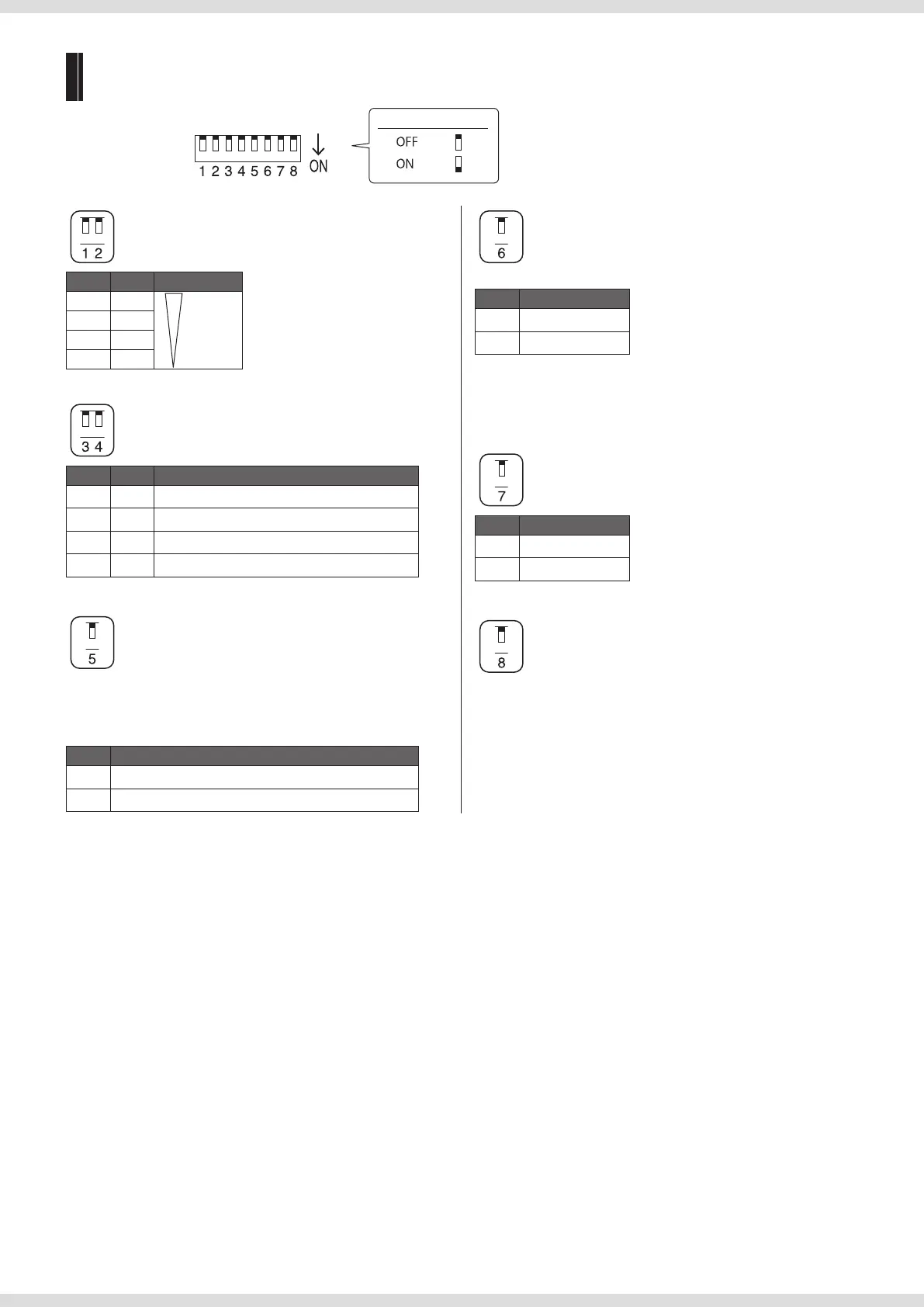
DIP switch settings
DIP switch
(default settings)
Switch position guide
Display brightness (DIMMER)
1 2 Setting
OFF OFF Bright
ON OFF
OFF ON
ON ON Dark
Level meter type
(METER PEAK/ VU)
3 4 Setting
OFF OFF VU+PEAK
ON OFF VU+PEAK HOLD
OFF ON PEAK+PEAK HOLD
ON ON VU
Reference level (REF LVL)
Choose an analog reference level indicated by 0 dB on the level
meter.
Analog input
5 Setting
OFF +4 dBu (balanced)
ON 0 dBu (balanced)
Source sound type (SOUND)
There are two sound types. Choose the appropriate sound type.
6 Setting
OFF MUSIC
ON VOICE
MUSIC: Ideal for sound sources that have a wide frequency range,
such as music.
VOICE: Ideal for sound sources that have a narrow frequency
range, such as speech.
Volume when muted (
page 6) (MUTE)
7 Setting
OFF Volume: –∞
ON Volume: –20dB
Not used.
RM-3DT.indb 4RM-3DT.indb 4 2020/11/20 10:582020/11/20 10:58


 To Next Page