SIM SIM SIM SIM SIM
SIM
SIM
SIM
SIM
SIM
1) SIM Card Setup
-Firstly, make sure you have a SIM Card that is active and can make calls and send
SMS’s.
-Record the Cell Number of the SIM Card you will be using for the Communicator.
OPTION 1-SIM PIN UNSECURED OPTION 2-SIM PIN SECURE
Step1: Insert SIM Card into Cell phone and make Step1: Insert SIM Card into Cell phone and make
REMOVE PIN CODE REQUEST. SIM PIN ‘0000’.
NB: SIM PIN options on Cell phone NB: SIM PIN options on Cell phone
Settings>Security>SIM Card Lock. Settings>Security>SIM Card Lock.
Step2: Remove the SIM from the Cell phone and Step2: Remove the SIM from the Cell phone and
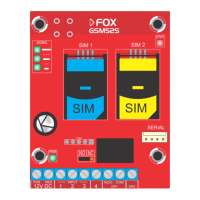
and insert it into SIM1 on the GSM52s. and insert it into SIM1 on the GSM52s.
Selecting the ’SIM PIN Secure’ option will cause the SIM PIN to be automatically encrypted by the
Communicator and will need the Command ‘.RS’ to be sent in order to remove the SIM.
If DUAL SIM cards are installed SIM1 will be the first network accessed and SIM2 the backup.


 To Next Page