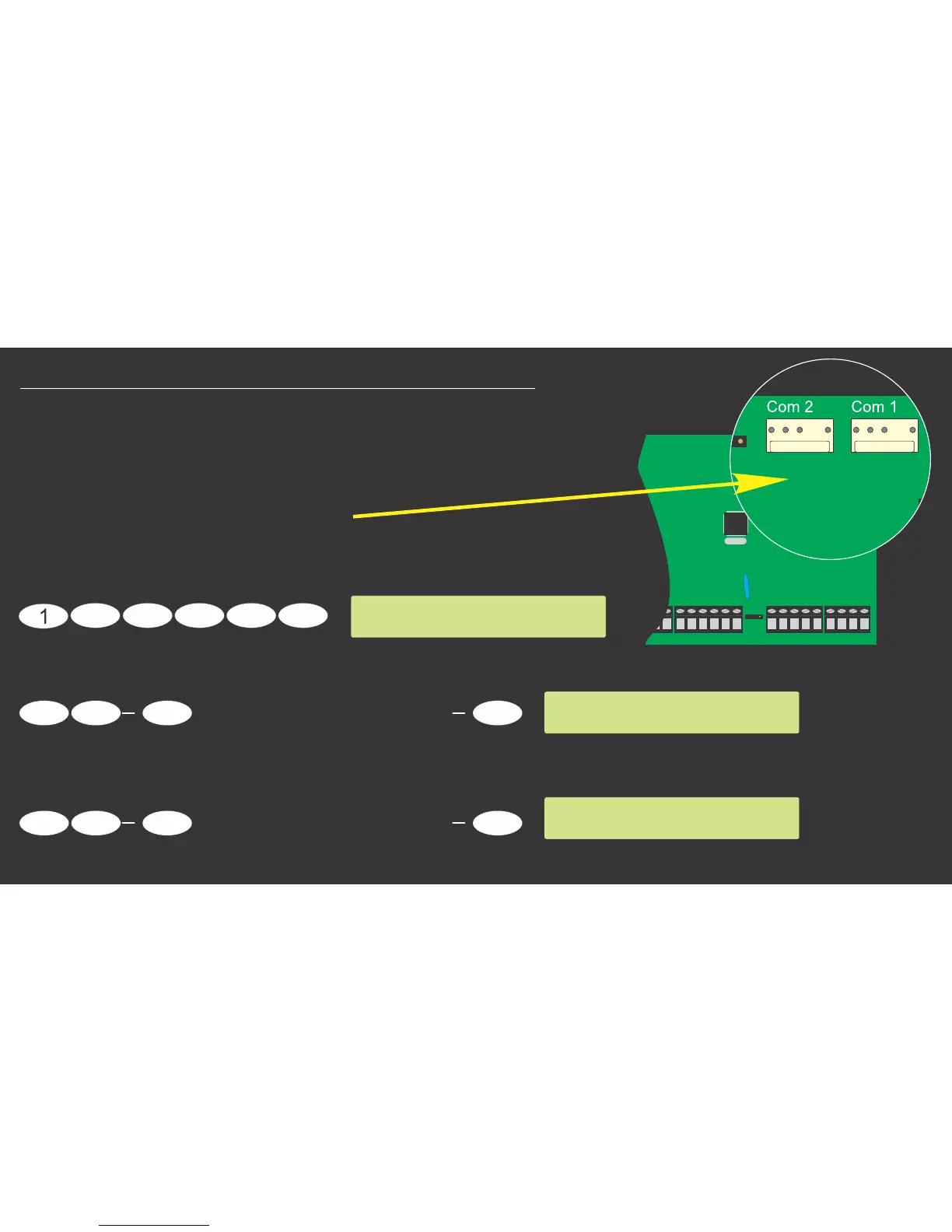
TEXECOM 412/816/832 PANEL
Com 2
T R
T1 R1
W08
2200uF
Com 1
8765
4321
AUX
INP
Z8Z7Z6Z5
Z4Z3Z2
COM
Z1
COM
COM
COM
Aux12V
+ -
Sir/Spk
+ -
Network
+ -
T R
A.C. Batt
+
-
4
Menu
9
Scroll UP/DOWN until Value = 000
Yes
Scroll UP/DOWN until Value = 000
Yes
2
3
7
6
5
7
6 9
Programming Menu
Enter Code > ??
Com1 Device Type
Enter Value: 000
Com2 Device Type
Enter Value: 000
2) Texecom 412/816/832 Com Port Setup
To set up the Texecom Panel for EVENT REPORTING,
ensure the that the following settings on Panel are set.
First Check which Com Port has been
connected to the Communicator:
Enter programming menu (Default code used)
If connecting to Device Type = 000(PC-Com)Com1
if connecting to Device Type = 000(PC-Com)or Com2


 To Next Page