EN - 33 -
USAGE INFORMATION
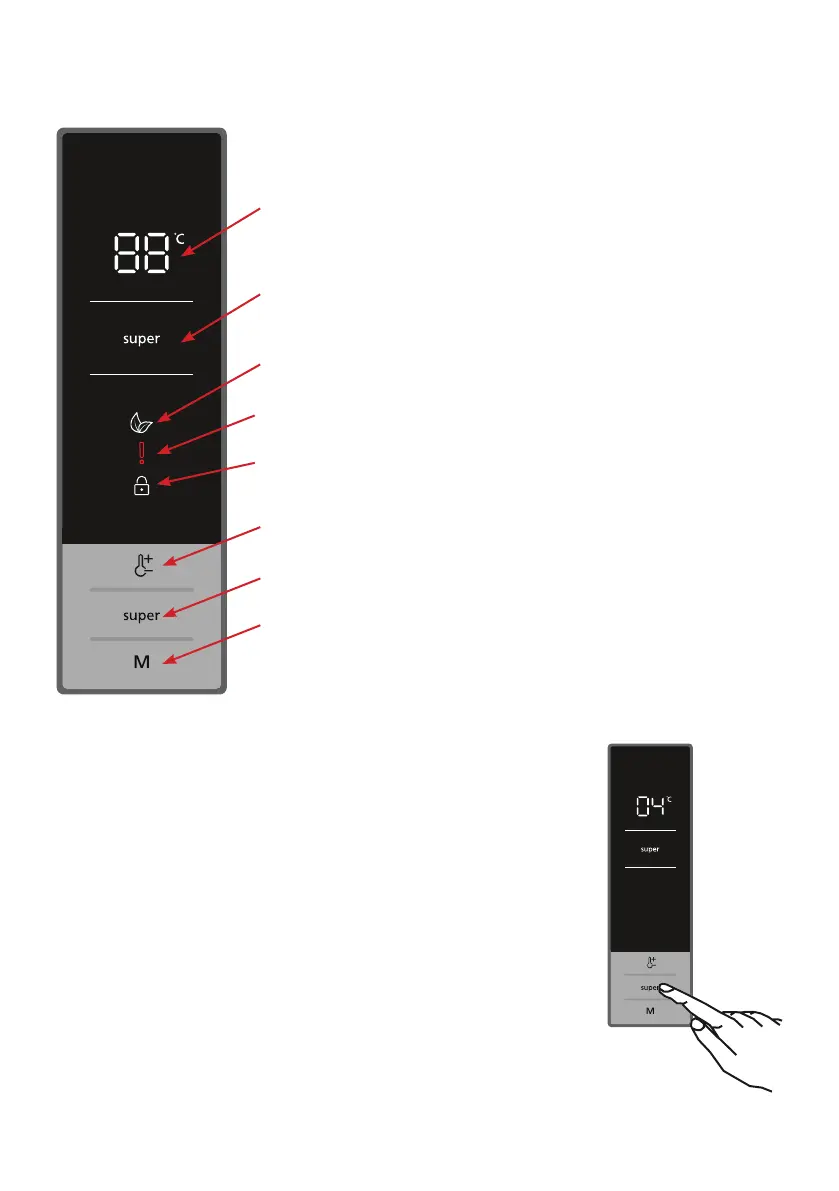
Display control panel
1. Fridge compartment temperature setting indicator.
2. Super cooling indicator.
3. Economy mode symbol.
4. Alarm / Service calling symbol.
5. Child lock symbol.
6. It allows you to change the temperature values of the
fridge compartment. Temperature value of the fridge
compartment can be set to 2, 4, 5, 6, 8°C.
7. Super cooling mode set button.
8. Mode button that activates economy mode.
Operating the Fridge
Super Cooling Mode
How to use
• Press the "super" button to activate the super cooling symbol.
• When set to super cooling mode, the buzzer emits a "beep"
sound.
• When this mode is selected, the temperature value that was set
before mode selection will be displayed on the fridge temperature
indicator.
In the mode:
• Economy mode cannot be selected.
• You can press the fridge temperature setting button again or
press the "super" button to deactivate super cooling mode.
NOTE: Depending on the ambient temperature, super cooling mode
will automatically be cancelled after 5 hours or when the fridge has
reached the required temperature.
1
2
3
4
5
6
7
8
Lighting (If available)
When the product is plugged in for the rst time, the
interior lights may turn on 1 minute late due to opening
tests.




 To Next Page