EN - 35 -
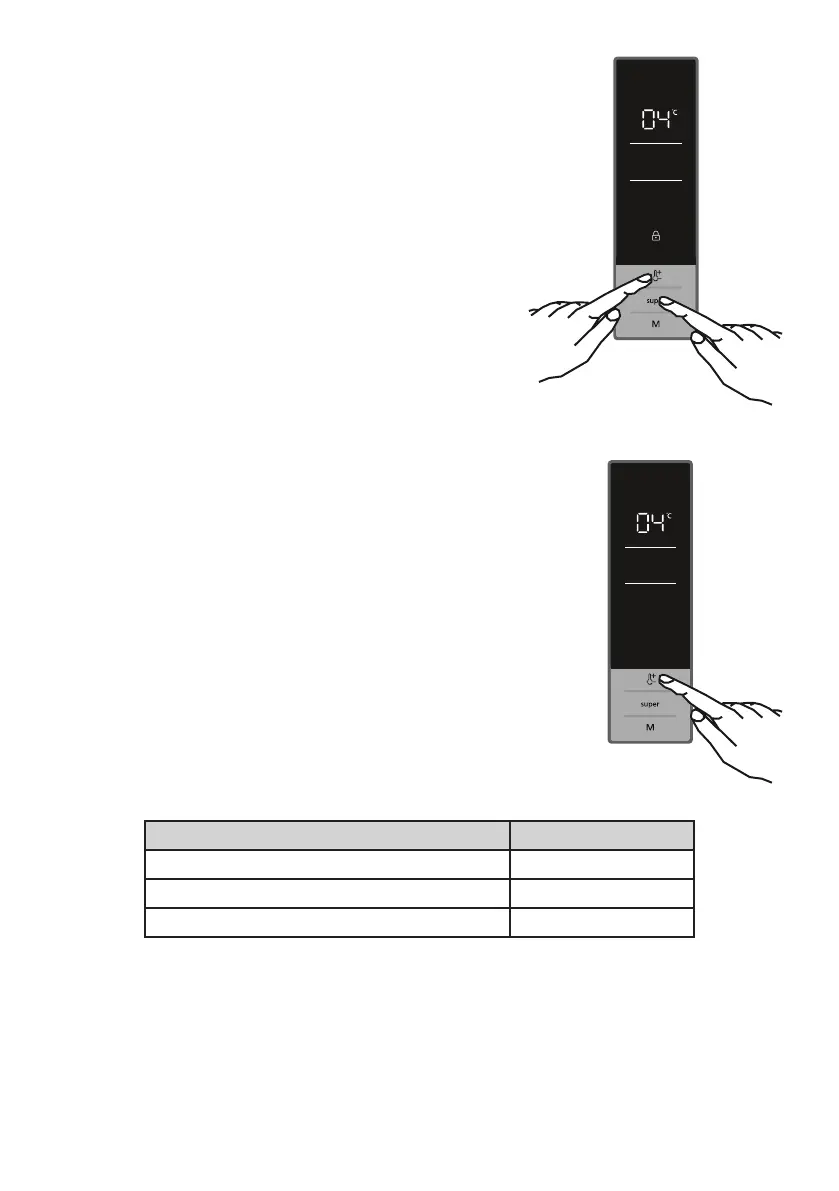
Activating the Child Lock
When to use
The appliance is equipped with a child lock function to
prevent children from playing with the buttons and changing
the settings you have made.
Activating the Child Lock
• Press and hold Super and Fridge temperature setting
buttons simultaneously for 5 seconds.
• After the mode has been selected, the lock symbol will
appear on the display.
Deactivating the Child Lock
Press and hold Super and Fridge temperature setting
buttons simultaneously for 5 seconds.
Fridge Temperature Settings
• Initial temperature value of the fridge compartment temperature
indicator is 5°C.
• Press the fridge temperature setting button once.
• When you press this button for the rst time, the most recent
value on the fridge compartment temperature indicator will ash.
• Each press on this button will set the value to a lower degree: (2,
4, 5, 6, 8°C)
• If you keep pressing, it will restart from 2°C.
• The temperature value selected before activating the fast cooling
mode or eco mode will remain the same once this mode has
been completed or cancelled. The appliance will go on operating
at these set temperature values.
Recommended Temperature Settings for Fridge
When to set Set value
When little amount of food is stored 8
o
C
For normal use 4
o
C, 5
o
C, 6
o
C
When large amount of food is stored 2
o
C
Door open alarm function
If cooler door is opened more than 2 minutes , appliance sounds ‘beep beep’.




 To Next Page