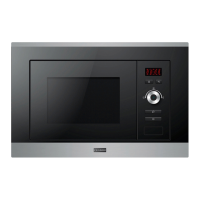
Order
Microwave
Power
Display
1
2
3
4
5
100%
80%
50%
30%
10%
1) Press "
" once, the screen display " ".
3) Press " " to confirm, and the screen displays "C-1".
4) Turn " " to adjust the cooking time until the oven displays "10:00".
5) Press " " to start cooking.
2) Press " " for times or turn " " to choose combi. 1 mode.
"Micro./Grill/Combi." Pad instructions
P100
P 80
P 50
P 30
P 10
3. Grill or Combi. Cooking
Press " " once, the screen will display " ", and press
repeatedly or
turn
the
"
"
to
choose
the
power
you
want,
and
for each added press. Then press
" " to confirm, and turn
" "
to
set
cooking
time
from
0:05
to
95:00
.
Press
"
"
again
to
start
cooking.
Example: If you want to use 55% microwave
power and 45% grill power(C-1) to cook
for 10 minutes, you can operate the oven as the following steps.
Start/+30Sec./Confirm
Start/+30Sec /Confirm
Start/+30Sec./Confirm
Start/+30Sec./Confirm
"
"
P100
s P100
Note: the step quantities for the adjustment time of the coding switch are as follow:
0---1 min : 5 seconds
1---5 min : 10 seconds
5---10 min : 30 seconds
10---30 min : 1 minute
30---95 min : 5 minutes
"
"P100", "P 80", "P 50", "P 30
, "P10", "G" , "C-1" or "C-2" will display
Micro./Grill/Combi.
Micro./Grill/Combi.
Micro./Grill/Combi.
Micro./Grill/Combi.
100%
45%
64%
0%
55%
36%
G
C-1
C-2
Grill
Power
6
7
8



 To Next Page
 Loading...