14
Freecom Mobile Drive
GB
5
Chapter 5: The User Interface of the Freecom Personal
Media Suite (PC only)
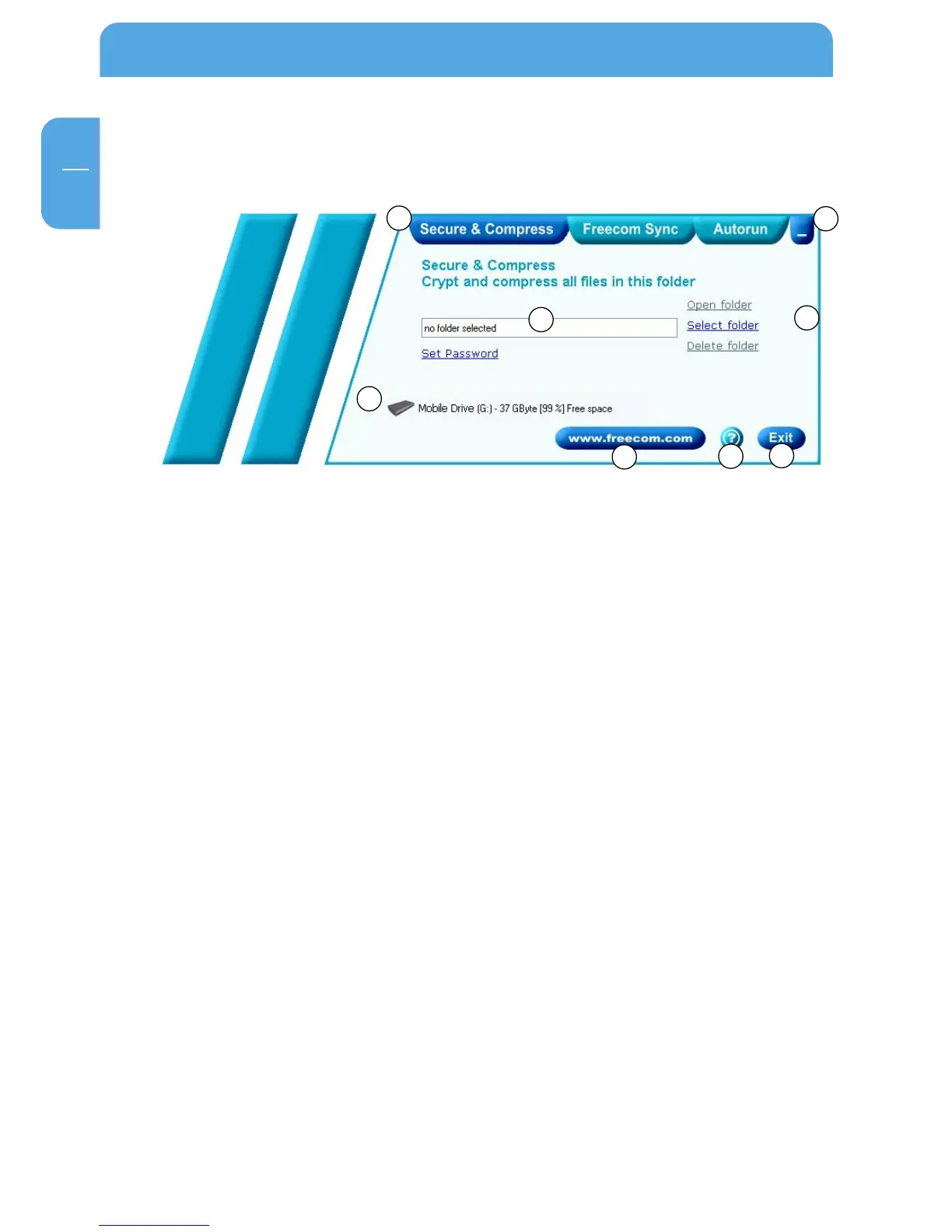
1 Tabs for configuration of the Freecom Personal Media Suite components
- Secure & Compress
- Freecom SYNC
- Autorun
2 Minimizes Freecom Personal Media Suite in the taskbar
3 Input field (also shows the selected folder)
4 User menu
5 Connected Freecom Mobile Drive (drive letter + available memory capacity)
6 Link to www.freecom.com. Click on this to access the Freecom homepage. Here you
can find further information about your Freecom Mobile Drive.
7 Quick Help for Freecom Personal Media Suite
8 Minimizes Freecom Personal Media Suite in the system tray.
5.1 Configuration
To open the configuration menu, please right-click on the Freecom Personal Media Suite
icon in the system tray and select "Configuration":
1. "Show splash screen": Deactivate this function to prevent the display of the start
screen when starting the program.
2. "Start program on Windows start": Starts the Freecom Personal Media Suite in the
background with every Windows start. You will know this by the icon of the Freecom
Personal Media Suite in the system tray.
1
2
3
4
5
6
7
8



 To Next Page