EasyManua.ls Logo

Freedom Won Lite Home 5/4 - User Manual

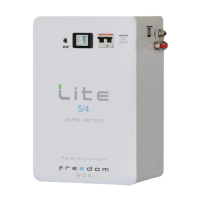
Freedom Won Lite Home 5/4
14 pages
Print Icon
To Next Page IconTo Next Page
Loading...
2019-05-07 10:25 1/14 Victron & Freedom Won LiFePO4 batteries - Freedom Lite
Victron Energy - https://www.victronenergy.com/live/
Victron & Freedom Won LiFePO4 batteries -
Freedom Lite
Introduction
Freedom Won (www.freedomwon.co.za) produces two ranges of LiFePO4 batteries for 48V systems:
Freedom Lite Home and Business: Eight models available ranging from the smallest 5kWh
model (Freedom Lite Home 5/4) up to the 80kWh model (Freedom Lite Business 80/56)
Freedom Lite Commercial: Ten models available ranging from the 100kWh model (Freedom Lite
Commercial 100/70) up to the 700kWh model (Freedom Lite Commercial 700/490).
Note: Refer to Freedom Won website for detailed specification sheets covering all models
These Freedom Lite batteries are fully compatible with the Victron Multiplus, MultiPlus II, Multiplus GX,
and Quattro inverter/chargers, Solar charge controllers (Ve Direct and Ve CAN), and system
controllers (Color Control GX, Venus GX, and Octo GX).
The Freedom Lite batteries contain an advanced battery management system (BMS) that
communicates, using a CAN Bus protocol, with the Victron Venus device, which in turn communicates
as required to the other Victron devices on the system.
All Freedom Lite models can be connected in parallel with other models of the same capacity, where
one Lite (Master) communicates with the Venus device as well as all the other Lite’s in the system
(Slaves). The Victron and Freedom Won integration has been extensively developed and tested and is
certified and supported by both companies.
The system is suitable for all applications, namely:
Grid Connected with solar and storage including continued operation in grid outage (ESS or self-
consumption mode)
Backup storage or UPS mode
Off Grid plant with storage and solar
Figure 1 Typical Installation: Freedom Lite 60/42 with Victron 15kVA Quattro and 3x Ve Direct MPPT’s

Other manuals for Freedom Won Lite Home 5/4

Questions and Answers

  • D
    deannablackAug 22, 2025
    What to do if my Freedom Won Camera Accessories LiTE has no voltage on the main output cables?
    • L
      Lisa MartinAug 22, 2025
      If your Freedom Won LiTE Camera Accessories shows no voltage on the main output cables, first check that you've switched on the main breaker switch. This should only be done once the installation is complete and there are no DC or control wires that could short out. Ensure you're ready to accept AC voltage onto the inverter output before switching the breaker on. Also, confirm that you've energized the BMS by pressing the “ON” button for 5 seconds, and check for lights on the SoC display. Make sure the breaker lever is fully up, not in a tripped position; if it's in the '60% position', push it down before pushing it up. If voltage is still absent, the breaker may be damaged.
  • A
    Austin WigginsAug 25, 2025
    Why won't the BMS power stay on for my Freedom Won Lite Home 5/4 Camera Accessories?
    • J
      Jennifer MartinAug 26, 2025
      If the BMS power (indicated by the battery SoC display lighting up) doesn't stay on after pressing the ON button on your Freedom Won Camera Accessories, it could indicate an error on the BMS. Check if the red error light is illuminated on the SOC display while holding the ON button. Try resetting the error by pressing the RESET button for about 2 seconds and then releasing it. This should clear the error and allow the BMS to stay on after releasing the ON button.
  • J
    James WrightAug 28, 2025
    What to do if the main breaker still won't stay up after resetting the BMS on Freedom Won Lite Home 5/4 Camera Accessories?
    • J
      Julie CarrollAug 28, 2025
      If the main breaker still won't stay up after resetting the BMS on your Freedom Won Camera Accessories, ensure that no load is being applied to the battery by isolating the AC output from the inverter. Also, verify that the AC input to the inverter is live, allowing the charger to begin charging the battery after you switch it on.
  • R
    Rhonda WhiteAug 31, 2025
    Why isn't the charger turning on for my Freedom Won Camera Accessories?
    • H
      harringtonamandaAug 31, 2025
      If the charger isn't turning on, even with power on the AC input of the inverter and the charger activated in the inverter settings for your Freedom Won Camera Accessories, the battery might be full. Try discharging the battery for a while and then observe if the charger activates.
  • P
    Patricia RodriguezSep 3, 2025
    Why does the SoC jump up and down on my Freedom Won Lite Home 5/4?
    • T
      Timothy King MDSep 3, 2025
      The SoC "jumps" up or down on your Freedom Won Camera Accessories usually because the SoC is losing calibration. Ensure that the battery receives a full charge at least once every 5 days.
  • M
    Martin MartinSep 6, 2025
    What does it mean if the Freedom Won Lite Home 5/4 Camera Accessories LiTE error light keeps illuminating after each reset?
    • M
      Mark WoodSep 6, 2025
      If the Freedom Won Camera Accessories LiTE error light continues to illuminate after each reset, and the main breaker does not trip (meaning it's not a critical error), you may continue using the battery while seeking assistance.
  • S
    Samantha MooreSep 9, 2025
    What to do if the rawl bolt head doesn't fit into the hole on the back of my Freedom Won Lite Home 5/4 LiTE?
    • J
      jdavisSep 9, 2025
      If the rawl bolt head doesn't fit into the hole on the back of your Freedom Won Camera Accessories LiTE (wall-mounted models), ensure you're using the correct size Rawl Bolt as specified in this manual. After tightening the internal gripping collar, turn the bolt out again, exposing about 5mm of the bolt shank so the back plate fits easily behind the bolt head. If the wall is uneven, turn the bolt head out a little more, but not so far that less than the full thread length engages on the internal locking collar.
  • J
    James WilliamsSep 12, 2025
    How to screw eye bolts into the hard point on top of Freedom Won Lite Home 5/4?
    • B
      Bryan ColemanSep 12, 2025
      If the eye bolts do not screw into the hard point on top of your Freedom Won Camera Accessories LiTE, check that you have the correct eye bolt with the correct thread pitch – M12 x 1,75.
  • S
    Sandra ReeseNov 15, 2025
    Why does the main breaker switch keep tripping on my Freedom Won Lite Home 5/4 Camera Accessories?
    • U
      uhansenNov 15, 2025
      The main breaker switch might be tripping on your Freedom Won Camera Accessories due to several reasons: 1. The Battery Management System (BMS) may not be switched on. Ensure you press the 'ON' button for 5 seconds until the SoC Display remains illuminated. 2. High inrush current on certain inverters. In this case, pre-charge the DC bus by switching on the solar charge controllers (if present and in daytime). If not possible, switch on the AC feed into the inverter and then switch on the inverter. Alternatively, use a pre-charge resistor. 3. A short circuit on the DC Bus or a faulty inverter or MPPT might be causing high currents. 4. In a system with multiple LiTEs in parallel, the battery you're trying to switch on might be at a different voltage than the others. Ensure voltages are...
  • N
    ndavisNov 18, 2025
    How to fix an inverter that won't turn on for Freedom Won Camera Accessories?
    • M
      Matthew MartinezNov 18, 2025
      If your inverter isn't turning on, even when the switch is in the 'on' position, the enable command may not be coming from the BMS, might not be properly connected to the inverter, or the inverter might not be properly configured to deal with the enable command. If you're using a CAN Bus control with a compatible inverter, check that the CAN High and CAN Low wires are connected correctly, ensuring the correct orientation and the presence of the two end-of-line 120 Ohm resistors in the appropriate locations. Also, confirm that you have the correct CAN profile programmed onto the BMS for the inverter in use (baud rate or CAN messages may be for another inverter brand) and that you have configured the inverter or system controller correctly. Check that your CAN Cable is properly made up on th...

Summary

Introduction

Product Compatibility

Venus Device Requirement

A Victron Venus device is mandatory for processing and transmitting battery commands and information.

Firmware Updates

Install latest firmware on Victron devices; Freedom Lite may benefit from updates.

Battery Sizing Guidelines

Size batteries based on power limits and energy needs, referring to spec sheets.

Operating Philosophy

CAN Bus Wiring and Communication

Connect Lite to Venus via CAT5e Ethernet cable, ensuring proper termination.

Ve Configure Settings

Charger Settings Configuration

Set battery type to Lithium Iron Phosphate and configure charge parameters carefully.

ESS Assistant Configuration

Configure battery capacity, type, sustain voltage, and dynamic cut-off in ESS assistant.

Venus Device Configuration

CAN-bus Profile Setup

Set CAN-bus Profile to 500kbit/s or 250kbit/s as required for system compatibility.

System Setup Parameters

Enable DVCC, SVS, and ensure BMS Control is "On" in system setup.

MPPT Configuration

MPPT Voltage and Current Settings

Set MPPT voltage setpoints to 55.8V and adjust current limits for system safety.

Troubleshooting and Support

Troubleshooting Assistance

Contact support@freedomwon.co.za for any difficulties with the Victron interface.

DISQUS Forum

Discussion Thread Access

Access the discussion thread for community support and further information.

Freedom Won Lite Home 5/4 Specifications

General IconGeneral
BrandFreedom Won
ModelLite Home 5/4
CategoryCamera Accessories
LanguageEnglish

Related product manuals