INTRODUCTION
IMPORTANT
PRECAUTIONS
ASSEMBLY
BEFORE
YOU BEGIN
TREADMILL
OPERATION
LIMITED
WARRANTY
9
TROUBLESHOOTING
& MAINTENANCE
CONDITIONING
GUIDELINES
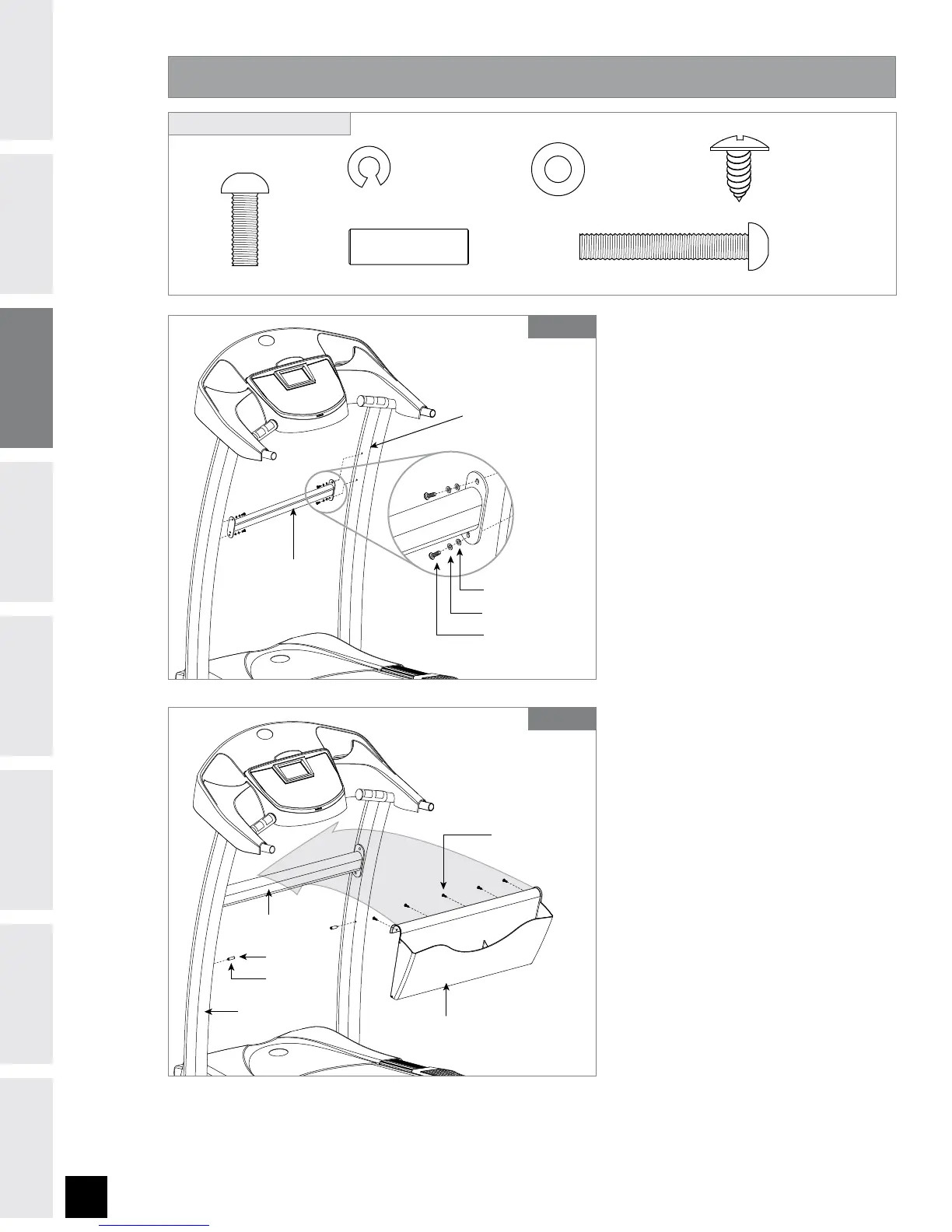
ASSEMBLY STEP 3
#0-5&
NN
2UZ
#0-5+
NN
2UZ
'-"58"4)&3(
NN
2UZ
4-&&7&*
NN
2UZ
413*/(8"4)&3'
NN
2UZ
4$3&8)
NN
2UZ
HARDWARE BAG 3 CONTENTS :
$0/40-&."45
#0-5&
413*/(8"4)&3'
'-"58"4)&3(
$3044#"3
STEPS A-C
4$3&84)
#0-5+
4-&&7&*
4503"(&3"$,
$0/40-&."45
$3044#"3
STEPS D-G
A Open HARDWARE BAG 3.
B Align CROSS BAR with holes in
CONSOLE MAST.
C Insert 1 BOLT (E), 1 SPRING
WASHER (F) and 1 WASHER
(G) into the bottom holes of
the CROSS BAR.
NOTE: Do not insert the top
bolts until Step 3-F, after
the STORAGE RACK has been
attached.
D Attach 2 SLEEVES (I) to BOLTS
(J). Insert 2 BOLTS (J) into
CONSOLE MASTS.
E Slide STORAGE RACK over
SUPPORT BAR and snap
bottom of STORAGE RACK to
BOLTS (J).
F Now you may insert the top 2
BOLTS (E) into the SUPPORT
BAR. Tighten all 4 BOLTS (E).
G Attach STORAGE RACK to
CROSS BAR using 5 SCREWS
(H).


 To Next Page