MPC
Genesis - Vintage
First start
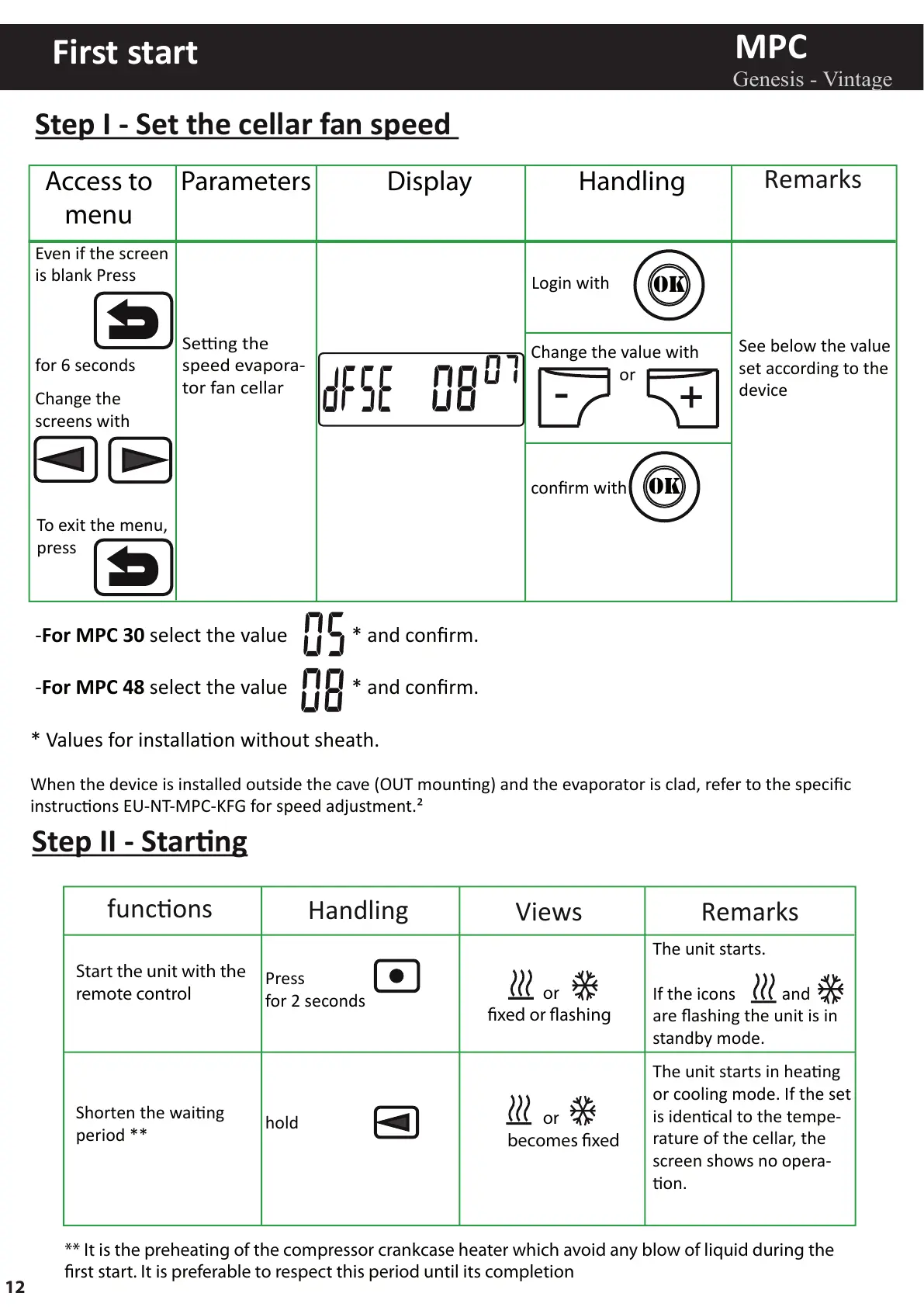
Step I - Set the cellar fan speed
-For MPC 30 select the value * and confirm.
-For MPC 48 select the value * and confirm.
* Values for installaon without sheath.
When the device is installed outside the cave (OUT mounng) and the evaporator is clad, refer to the specific
instrucons EU-NT-MPC-KFG for speed adjustment.²
Step II - Starng
Seng the
speed evapora-
tor fan cellar
Even if the screen
is blank Press
for 6 seconds
Change the
screens with
OK
OK
confirm with
-
+
Change the value with
or
Access to
menu
Parameters Display Handling
See below the value
set according to the
device
Login with
Shorten the waing
period **
hold
Start the unit with the
remote control
The unit starts in heang
or cooling mode. If the set
is idencal to the tempe-
rature of the cellar, the
screen shows no opera-
on.
The unit starts.
If the icons and
are flashing the unit is in
standby mode.
Press
for 2 seconds
or
becomes xed
or
xed or ashing
** It is the preheating of the compressor crankcase heater which avoid any blow of liquid during the
rst start. It is preferable to respect this period until its completion
To exit the menu,
press
funcons
Handling
Views Remarks
Remarks
12



 To Next Page