MPC
Genesis - Vintage
Sengs: temperature and humidity *
OK
Seng
Handling
Display Remarks
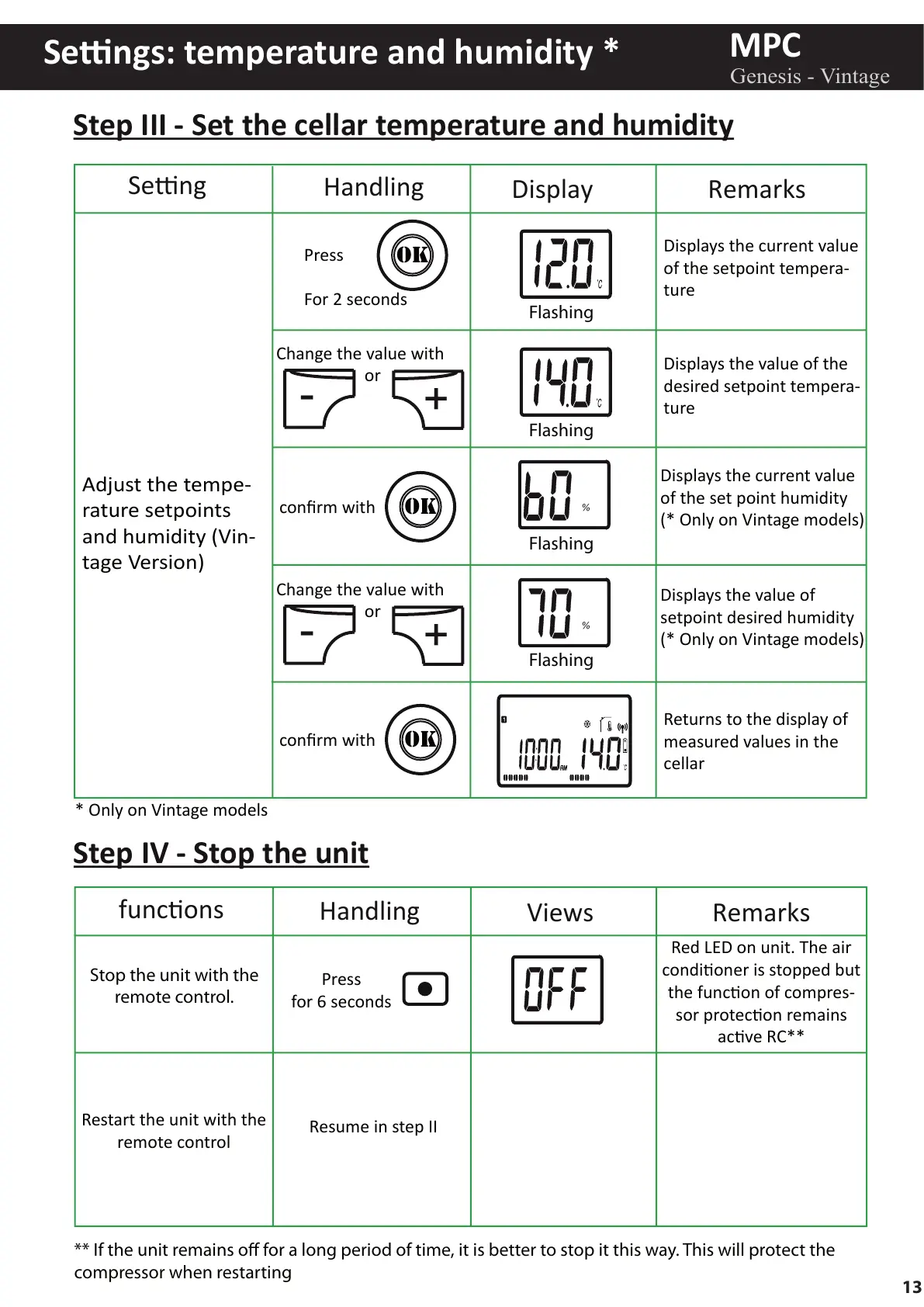
Adjust the tempe-
rature setpoints
and humidity (Vin-
tage Version)
Press
For 2 seconds
Flashing
Flashing
Flashing
Flashing
Displays the current value
of the setpoint tempera-
ture
Displays the current value
of the set point humidity
(* Only on Vintage models)
Displays the value of
setpoint desired humidity
(* Only on Vintage models)
Displays the value of the
desired setpoint tempera-
ture
Returns to the display of
measured values in the
cellar
%
%
OK
confirm with
OK
confirm with
-
+
Change the value with
or
-
+
Change the value with
or
Step III - Set the cellar temperature and humidity
Restart the unit with the
remote control
Resume in step II
Stop the unit with the
remote control.
Press
for 6 seconds
funcons
Handling
Views Remarks
Step IV - Stop the unit
Red LED on unit. The air
condioner is stopped but
the funcon of compres-
sor protecon remains
acve RC**
** If the unit remains o for a long period of time, it is better to stop it this way. This will protect the
compressor when restarting
* Only on Vintage models
13



 To Next Page