EasyManua.ls Logo

Friax MPC 48 - User Menu Functions; Operation Modes and Defrost

Default Icon
24 pages
Print Icon
To Next Page IconTo Next Page
To Previous Page IconTo Previous Page
Loading...
MPC
Genesis - Vintage
User menu
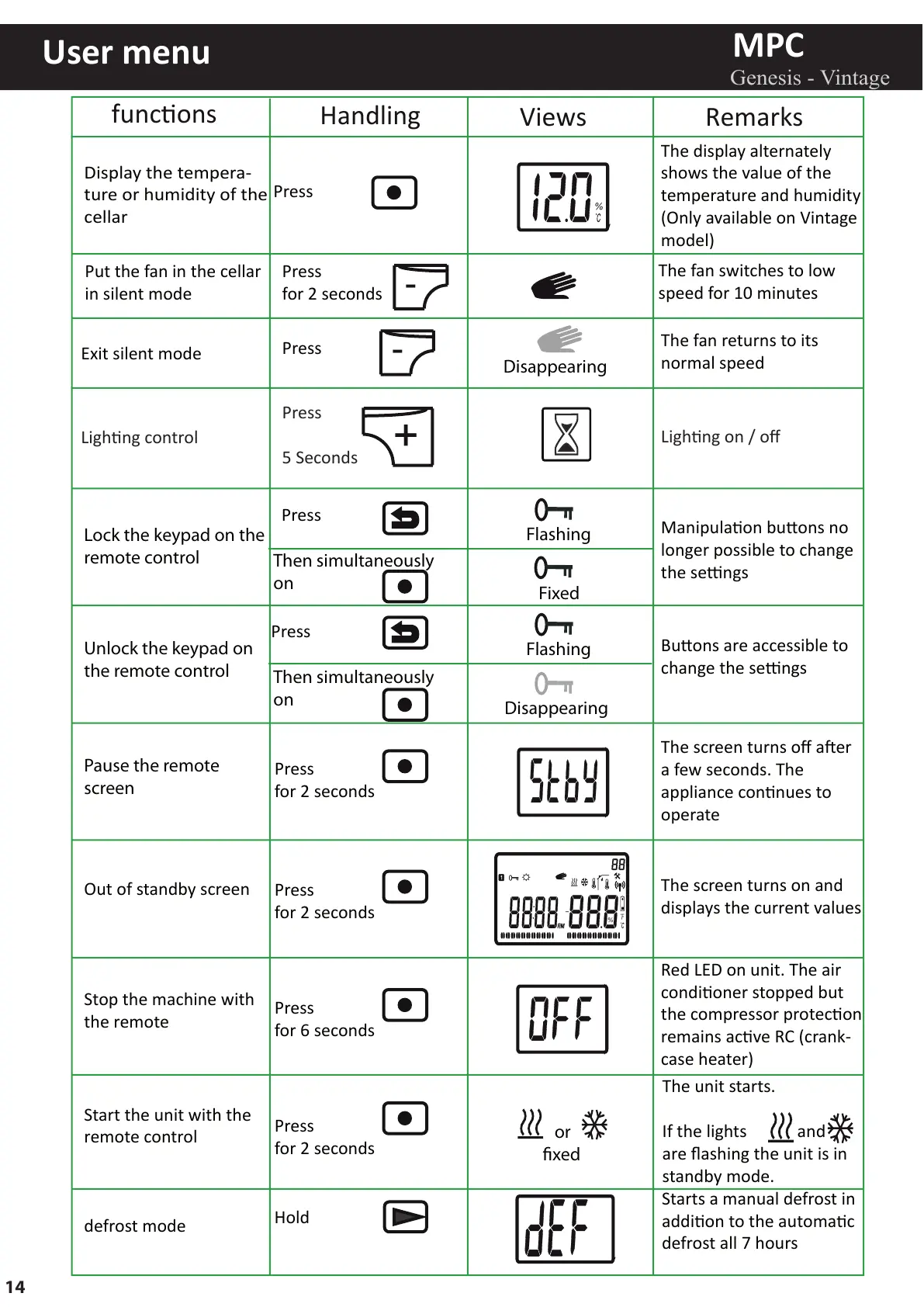
funcons
Handling
Views Remarks
Display the tempera-
ture or humidity of the
cellar
Put the fan in the cellar
in silent mode
Exit silent mode
Press
Press
Lock the keypad on the
remote control
Unlock the keypad on
the remote control
Pause the remote
screen
Out of standby screen
Stop the machine with
the remote
Start the unit with the
remote control
Flashing
Fixed
The display alternately
shows the value of the
temperature and humidity
(Only available on Vintage
model)
The fan switches to low
speed for 10 minutes
The fan returns to its
normal speed
Manipulaon buons no
longer possible to change
the sengs
Buons are accessible to
change the sengs
The screen turns off aer
a few seconds. The
appliance connues to
operate
The screen turns on and
displays the current values
Red LED on unit. The air
condioner stopped but
the compressor protecon
remains acve RC (crank-
case heater)
%
-
Press
-
Then simultaneously
on
Then simultaneously
on
Press
Disappearing
Disappearing
Flashing
%
The unit starts.
If the lights and
are flashing the unit is in
standby mode.
or
xed
defrost mode
Hold
Starts a manual defrost in
addion to the automac
defrost all 7 hours
Press
for 2 seconds
Press
for 2 seconds
Press
for 2 seconds
Press
for 2 seconds
Press
for 6 seconds
Lighng control
Press
5 Seconds
+
Lighng on / off
14

Related product manuals