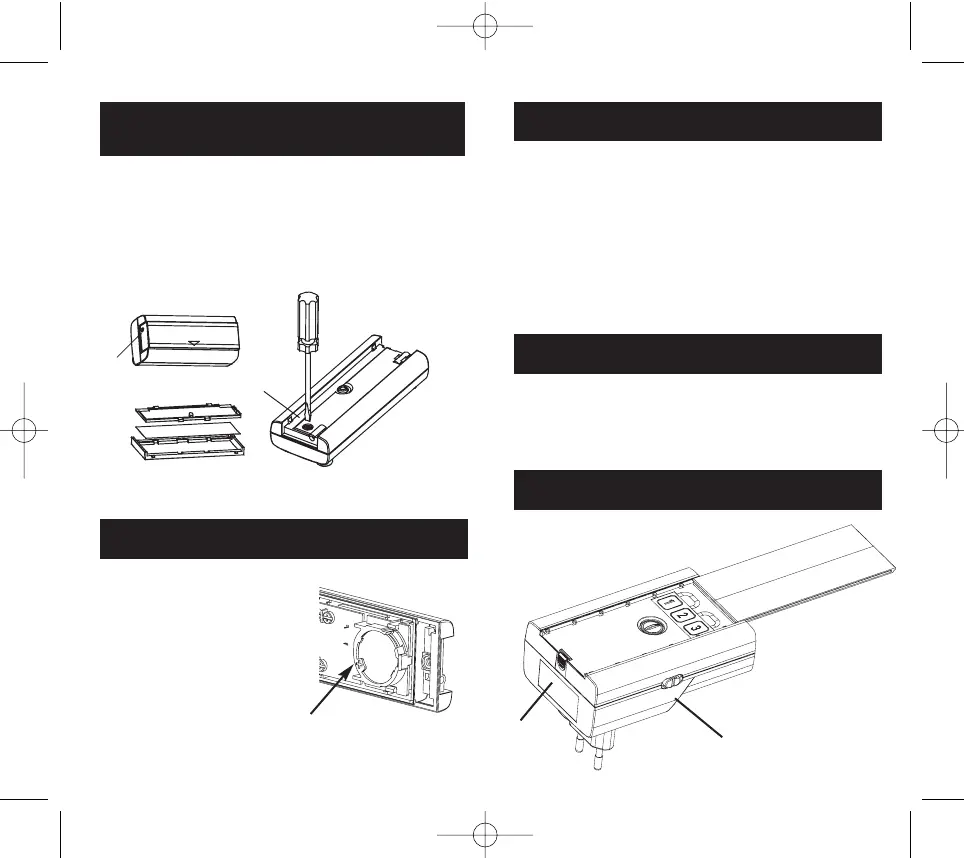
Fig. 1
Mute
To turn the sound off, set switch (C) to position 1.
Flash off
To turn the flashing light off, set switch (C) to
position 3.
Normal operation
For normal operation (sound + flashing light) set
switch (C) to position 2.
Chime switch positions
The volume control is behind the sliding window on
the front of the chime. Initially, set the control to
mid-point. After you have tested your system, adjust
to the desired volume.
Volume control
Using a ball point pen, press at point shown in
Fig 1 (A) and remove the name plate. If desired,
you can prise apart the two halves of the name
plate and write on the card. Undo the retaining
screw (B) and remove the back of the push.
Open the bell push/converter
remove nameplate
Insert the CR2032 coin
cell. Ensure the face
marked ‘+’ is uppermost
(Fig. 2).
To fit the push/converter battery
Fig. 2
Sliding window
Release the catch (D) and slide open the
window (Fig. 3).
C
D
Fig. 3


 To Next Page