Need help?
Do you have a question about the FRIEDLAND SPECTRA 140 and is the answer not in the manual?
Guides on tilting and swiveling the detector head for optimal performance.
Explains PIR sensitivity to movement direction and optimal facing angles.
Advice on siting the PIR away from heat sources and reflective surfaces.
Solution for persistent false activations by masking the detector lens.
Instructions for removing the unit's top cover using a screwdriver.
Guidance on positioning the back plate, marking holes, drilling, and inserting plugs.
Details on routing cables either through the wall or along the surface.
Ensuring a watertight seal by piercing grommets and feeding cables correctly.
Instructions on screwing the unit to the wall, warning against over-tightening.
Guidance to connect cables as per diagrams in Section 3.
Final step to re-assemble the unit after wiring.
Crucial safety advice and compliance requirements for installation.
Details on wiring for automatic and permanent off lighting control.
Details on wiring for automatic and permanent on lighting control.
Wiring for automatic, manual on, and manual off lighting control.
Guidance on wiring multiple light fittings in parallel to the detector.
Steps for testing the PIR detector's functionality after installation.
Setting TIME and LUX controls for the initial walk test.
Turning on power, system warm-up, and lamp behavior.
Testing lamp illumination as zones are crossed and standing still.
Repeating walk tests at various distances and angles to map coverage.
Tips on angling the sensor head to increase or decrease detection range.
Carrying out final tests and specific adjustments for vehicle detection.
Setting the duration for which the lamp remains illuminated after motion ceases.
Adjusting the darkness level required for the unit to start operating.
Solutions for lights staying on continuously or false random activations.
Troubleshooting continuous illumination during both day and night.
Steps to diagnose why the PIR detector is not functioning at all.
Resolving issues where the PIR detector fails to operate during nighttime.
Diagnosing and fixing the unit activating unintentionally during daylight hours.
Advice on improving or fixing inconsistent detection range and coverage.
Understanding and adjusting for daily variations in detection range due to temperature.
Instructions for environmentally responsible disposal of the product and packaging.
Details of the manufacturer's guarantee, terms, and conditions for claims.
Contact details for customer support and troubleshooting assistance.
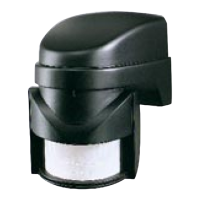
The Friedland SPECTRA 140 is a PIR (Passive Infra Red) Detector designed to activate lighting based on detected movement. It is suitable for outdoor use and operates by sensing body heat.
The PIR Detector features multiple detection zones at various horizontal and vertical angles. When a moving human body crosses or enters one of these zones, the detector activates, typically illuminating a connected lamp. The unit requires connection to a 240Vac 50Hz mains electricity supply, ideally to the domestic lighting circuit using 3-core round flexible cable of at least 1mm² gauge. Alternatively, it can be connected to the domestic socket ring main with a 5 amp fused spur.
The detector incorporates false activation reduction technology, making it less prone to activation by environmental factors like wind, rain, or moving branches. However, careful siting is recommended to avoid heat sources such as central heating outlets, tumble dryer exhausts, and extractor fans. Under extreme conditions, reflective surfaces like pools of water or white painted walls can also cause interference. If an object repeatedly activates the detector, masking the lens with the provided blanking strip or electrical tape can help mitigate the issue. The top half of the lens corresponds to long-range detection, while the bottom half corresponds to short-range.
Installation: The detector should be mounted at a height of 2.5m for optimal all-round coverage, though it can be positioned up to 4m high for a greater detection range, albeit with less effective detection. The unit is more sensitive to movement across its field of vision rather than movement directly toward it, so it's recommended to face the PIR across the approach to the property.
Installation involves removing the top cover, marking and drilling mounting holes, inserting wall plugs, and securing the back plate. Cabling can be routed directly behind the unit through the wall or along the surface from below via provided gaps. Grommets should be pierced to feed the cable, ensuring a watertight seal. Connections are made according to specific wiring diagrams.
Wiring Options: The SPECTRA 140 offers several wiring configurations to suit different lighting needs:
Multiple light fittings can be wired in parallel to the detector, provided the combined wattage does not exceed the 'Maximum Switchable Load'.
Walk Testing: After installation, the unit is ready for testing. This involves setting the TIME control fully anti-clockwise and the LUX control fully clockwise. In this mode, the unit operates during daytime and night, illuminating the floodlight for approximately 5 seconds each time movement is detected. Users walk across the detection area at various distances and angles to establish the detection pattern. If the detection area is too small, angling the sensor head upwards increases coverage; angling downwards reduces it. For very short-range requirements, masking part of the sensor lens may be necessary.
Setting up for Automatic Operation:
Troubleshooting Guide: The manual provides a comprehensive troubleshooting guide for common issues:
Disposal: At the end of its useful life, the product and packaging should be disposed of via a suitable Recycling Centre, not with normal household waste. Do not burn the unit.
Guarantee: Novar ED&S provides a 2-year guarantee against defects due to faulty materials and workmanship. The guarantee is invalidated if the product is not installed, operated, or maintained according to instructions, used inappropriately, or if any attempt has been made to rectify, dismantle, or alter it. It covers the product itself but not consequential loss, damage, or installation costs. For faults within the guarantee period, the item should be returned to the point of sale with proof of purchase and a full description of the fault.
 General
| Brand | FRIEDLAND |
|---|---|
| Model | SPECTRA 140 |
| Category | Security Sensors |
| Language | English |

 To Next Page