EasyManua.ls Logo

FRIEDLAND Spectra Wirefree - User Manual

FRIEDLAND Spectra Wirefree
2 pages
Print Icon
To Next Page IconTo Next Page
Loading...
Fixing
holes
System code
slider switches
9v Alkaline
Battery
BATTERY POWERED
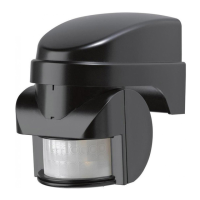
140° PIR MOVEMENT
DETECTOR
fig 1
LN
L1 N
12345678
ON
12345678
ON
fig 2
fig 3
12M
12M
fig 7
fig 4
0
fig 5 fig 6
fig 8
fig 9
fig 10
fig 11
12345678
ON
fig 12
Fixing
holes
System code
slider switches
9v Alkaline
Battery
fig 13
Fixing
holes
fig 14
fig 15 fig 16
15S 15M
1M
2M
3M
6M
12M
9M
fig 17
Instructions
and Guarantee
140
o
PIR Movement
Detector/Transmitter
For easy installation
and earlier detection
1. SPECTRA WIREFREE PIR MOVEMENT DETECTOR
This PIR Movement Detector with radio transmitter is only for use with the Spectra Wirefree
PIR Movement Detector and Receiver System. Use of an additional movement detector will
allow approach from other directions to activate lighting connected to a Receiver Unit. The
system code in this additional Detector must be set to the same system code as in the
Receiver Unit.
There is no limit to the number of PIR Movement Detectors which can be used with one
Receiver Unit.
2. PACK CONTENTS
1 wirefree (battery powered) 140° coverage PIR Movement Detector with built-in radio
transmitter. (Requires 1 x PP3/6LR61 9V Alkaline Battery)
2 Slot-in PIR lens screening panels
2 Plastic wall plugs plus 2 securing screws
3. TOOLS YOU WILL NEED
Flat bladed screwdriver, cross-head screwdriver, electric hand drill, drill bit to suit wall plug
dimensions.
4. SYSTEM CODING
The wirefree PIR detector communicates with its Receiver by means of a system code. This
is to prevent activation by other systems - such as a neighbour’s wirefree system, or your
own additional but separate system.
THE SYSTEM CODE in the Detector must match that in the Receiver Unit (see figs 2 and
3). See fig 11 on page 5 for instructions on how to open the Dectector unit. Make a note of
the Receiver Unit settings and, if necessary, simply move the slider-switches in the PIR
Detector unit to match.
IMPOR-
TANT:Mains electricity supply to the
5. PIR MOVEMENT DETECTOR FITTING INSTRUCTIONS
5.1. Where to position the PIR Movement Detector
Position the wirefree PIR Detector anywhere within 50 metres of the Receiver Unit, but avoid
mounting it on or near a large metal object, on something which is likely to move - such as a
small tree or loose fence panel - or where the light can shine directly at the PIR Detector. Also
avoid siting where the unit may detect any of the following: heat sources (extractor fans, tum-
ble dryer exhausts, etc.), reflective surfaces (pools of water, white-painted walls, etc.), nearby
overhanging branches (see fig 4).
The ideal height to mount your PIR Detector is 2.5 metres, which makes the best use of the
unit’s detection zones as shown in the diagrams (see figs 5 and 6). Mounting the PIR
Detector in a higher position (maximum 4 metres) may give a greater range, but the detec-
tion pattern will be less effective. The PIR Detector is much more sensitive to movement
across its field of vision (see fig 7A) than movement directly towards it, so site the unit so
that it looks across the normal approach to your property.
The Wirefree PIR Movement Detector has a swivel sensor head to allow you to adjust
the area of detection (see Testing Procedure in Section 6): tilting the head upwards will
increase the detection distance, tilting it downward will reduce the detection distance.
The sensor head will also turn to the left and right (see figs 8 and 9).
You can further tailor the detection area to suit your needs by using the slot-in lens
screening panels provided (see fig 10). To discover how much screening is needed, first
obscure the PIR unit’s lens with masking tape, progressively covering more of the lens until
the required detection area is achieved. Then simply cut a piece of the plastic screening
to cover the same area as the tape, remove the tape - being sure to remove any adhe-
sive residue left behind - and slot the screening into the PIR Detector (see fig 10).
N.B. If in normal conditions you find that something such as a tree or shrub is repeatedly acti-
vating the system, you can partially ‘mask’ the detector lens with electrical tape to stop the
detector ‘seeing’ the disturbance. As a guide, the top half of the PIR detector lens deals with
long-range detection, the bottom half is for short range. Alternatively, the PIR detector can
be easily re-positioned in a more suitable location.
5.2. Fitting the Wirefree PIR Movement Detector
NOTE: Before fixing the PIR unit to the mounting surface, it is advisable to check that the
system works correctly (i.e. that the transmitter and receiver are within radio range of each
other) by temporarily fixing the PIR Detector in the chosen location.
Open the PIR Detector by inserting a small slotted screwdriver into the slot at the base
of the unit. Push screwdriver gently to release catch and to allow front cover to be
opened fully - the cover is hinged at the top (see fig 11).
Check inside to identify the battery connector and the row of eight slider-switches (see fig 12).
Make sure you have set the same code in the PIR Detector as in the Receiver Unit (section 4).
Place the backplate of the unit in the desired position and mark the locations of the fix-
ing holes (fig 13). Next drill the holes to the required depth and insert the wall plugs.
Clip a 9V PP3 (6LR61) ALKALINE battery to the connector and place the battery in its
holder (see fig 14).
Fit the unit in place, close the cover and click it shut.
6. TESTING YOUR SYSTEM
Once your wirefree Detector is installed, test it by following the ‘Walk Test’ steps below.
1.
Set the two adjustment controls on the underside of the PIR Detector as follows:
TIME - turn fully anticlockwise to min. (see fig 15)
LUX - turn fully clockwise to max.
(see fig 16)
With these settings the system is in test mode and will work in full daylight. A small red light
(LED) behind the PIR Detector lens will illuminate briefly each time movement in front of the
PIR is detected.
6500

0
0
15s 15m
Question and Answer IconNeed help?

Do you have a question about the FRIEDLAND Spectra Wirefree and is the answer not in the manual?

Summary

Spectra Wirefree PIR Movement Detector Overview

Pack Contents

Lists all items included in the detector package for installation.

Tools Required for Installation

Lists necessary tools for fitting the PIR movement detector.

System Coding for Wirefree Communication

Explains how to match system codes between detector and receiver for proper communication.

PIR Movement Detector Fitting Instructions

Guidance on positioning and physically installing the PIR detector unit.

System Operation and Maintenance

Testing Your System

Steps to verify the PIR detector's functionality and detection pattern.

Setting Automatic Operation

Adjusts time and light sensitivity controls for automatic light activation.

Battery Replacement

Instructions and indicators for replacing the detector's battery.

Cleaning the PIR Unit

Guidance on how to clean the PIR detector unit gently.

Troubleshooting and Technical Specifications

Fault Finding Guide

Addresses common problems like no light operation, intermittent function, or continuous light.

Technical Specifications

Details on transmitter range, detection range, battery life, and operating temperature.

Summary

Spectra Wirefree PIR Movement Detector Overview

Pack Contents

Lists all items included in the detector package for installation.

Tools Required for Installation

Lists necessary tools for fitting the PIR movement detector.

System Coding for Wirefree Communication

Explains how to match system codes between detector and receiver for proper communication.

PIR Movement Detector Fitting Instructions

Guidance on positioning and physically installing the PIR detector unit.

System Operation and Maintenance

Testing Your System

Steps to verify the PIR detector's functionality and detection pattern.

Setting Automatic Operation

Adjusts time and light sensitivity controls for automatic light activation.

Battery Replacement

Instructions and indicators for replacing the detector's battery.

Cleaning the PIR Unit

Guidance on how to clean the PIR detector unit gently.

Troubleshooting and Technical Specifications

Fault Finding Guide

Addresses common problems like no light operation, intermittent function, or continuous light.

Technical Specifications

Details on transmitter range, detection range, battery life, and operating temperature.

Overview

The Friedland Spectra Wirefree 140° PIR Movement Detector/Transmitter (model 6500) is a battery-powered device designed for easy installation and early detection within a Spectra Wirefree PIR Movement Detector and Receiver System. It functions as a radio transmitter, sending signals to a Receiver Unit when movement is detected.

Function Description:

The primary function of this device is to detect movement within a 140° field of view and transmit a radio signal to a compatible Receiver Unit. This allows for the activation of lighting connected to the Receiver Unit when approach from various directions is detected. Multiple PIR Movement Detectors can be used with a single Receiver Unit, provided they are all set to the same system code. The device is designed to operate within 50 meters of the Receiver Unit.

Important Technical Specifications:

  • Transmitter Range: Up to 50 meters
  • Detection Range: Up to 12 meters
  • Angle of Detection: 140°
  • Battery Life: Minimum 18 months, based on 8 activations per day and a constant 15°C temperature.
  • Battery Type: PP3 (6LR61) 9 volt alkaline battery (one required).
  • Time On Adjustment: 15 seconds to 15 minutes
  • Photocell Adjustment: 5 lux to daylight
  • Temperature Operating Range: -20°C to +35°C
  • Pack Contents: Includes one wirefree 140° coverage PIR Movement Detector with built-in radio transmitter, two slot-in PIR lens screening panels, two plastic wall plugs, and two securing screws.

Usage Features:

System Coding:

The PIR detector communicates with its Receiver using a system code to prevent interference from other wirefree systems. The system code on the detector must match that on the Receiver Unit. This is set using a row of eight slider-switches inside the detector.

Positioning the PIR Movement Detector:

  • Placement: Position the detector within 50 meters of the Receiver Unit. Avoid mounting it on or near large metal objects, moving objects (small trees, loose fence panels), or where direct light can shine on it. Also, avoid areas with heat sources (extractor fans, tumble dryer exhausts), reflective surfaces (pools of water, white-painted walls), or nearby overhanging branches.
  • Height: The ideal mounting height is 2.5 meters for optimal use of its detection zones. While mounting higher (up to 4 meters) may increase range, it can reduce detection effectiveness.
  • Sensitivity: The detector is more sensitive to movement across its field of vision than directly towards it. It should be sited to look across the normal approach to the property.
  • Adjustable Sensor Head: The swivel sensor head allows adjustment of the detection area. Tilting it upwards increases detection distance, while tilting it downwards reduces it. The head can also be turned left and right.
  • Lens Screening Panels: The detection area can be further tailored using slot-in lens screening panels. Users can determine the required screening by temporarily obscuring the lens with masking tape, then cutting a piece of the plastic screening panel to match the masked area and slotting it into the detector. If environmental factors like trees or shrubs cause false activations, the lens can be partially masked with electrical tape. The top half of the lens handles long-range detection, while the bottom half is for short-range.

Installation:

  • Before permanent fixing, it's advisable to temporarily fix the PIR Detector in the chosen location to confirm it works correctly within radio range of the Receiver Unit.
  • To open the unit, insert a small slotted screwdriver into the slot at the base and push gently to release the catch. The front cover is hinged at the top.
  • Identify the battery connector and the eight slider-switches inside.
  • Ensure the system code matches the Receiver Unit.
  • Mark and drill holes for the backplate, then insert wall plugs.
  • Clip a 9V PP3 (6LR61) ALKALINE battery to the connector and place it in its holder.
  • Fit the unit in place, close the cover, and click it shut.

Testing Your System (Walk Test):

  • Set the "TIME" control fully anticlockwise to minimum and the "LUX" control fully clockwise to maximum. These settings put the system in test mode, allowing it to work in full daylight.
  • A small red LED behind the PIR Detector lens will briefly illuminate each time movement is detected.
  • Walk across the detection area, approximately 5 meters from the detector. The LED should light up, and the light fitting wired to the Receiver Unit should turn on for 3 seconds. Stand still until the LED goes out, then move again, crossing each zone. Repeat this process at various distances and angles to determine the detection pattern.

Setting for Automatic Operation:

  • TIME Control: Adjust this control to set the duration the security light stays on after all motion stops. The minimum is about 15 seconds, and the maximum is approximately 15 minutes.
  • LUX Control: This control enables the system to become active at a specific level of darkness. Turn the control fully anticlockwise, wait until darkness falls, then slowly turn the control clockwise while moving your hand in front of the PIR until the light activates. Leave the control at this point.

Maintenance Features:

Battery Replacement:

The 9-volt battery should last around 18 months. Approximately 30 days before battery failure, the PIR Detector will send a message to the receiver, causing the light to briefly turn on, then off, then on again in quick succession. This indicates the battery needs to be changed. A reminder sticker is included to help remember this.

Cleaning:

Occasionally clean the PIR unit lens and plastic case gently with a soft damp cloth. Be careful not to accidentally move the detector head.

Fault Finding:

  • Light does not operate: Check bulb, mains supply, battery, system codes, and PIR range. If intermittent, it could be an incorrect LUX setting or occasional radio interference.
  • PIR view obscured: Objects partially hiding persons (e.g., posts, pillars) can obscure the PIR's view. Try repositioning or adjusting the angle/direction of the PIR.
  • PIR detects but light doesn't operate: Radio transmission may not be received due to distance, obstructions, or radio interference. Large metal objects (including vehicles) near the Detector Transmitter or Receiver Unit can also interfere. Try repositioning the detector for a stronger signal.
  • Light stays on continually at night: This could be due to false activation. Cover the detector lens completely with a thick cloth or masking tape. If the light switches off and doesn't reactivate, it indicates the sensor was picking up movement. Adjust the position/angle or mask the lens area corresponding to the interference. Alternatively, the light level at the detector might be too low for the current photocell LUX setting, activating it as if it were night-time. Adjust the LUX control slightly anticlockwise in normal daylight.
  • PIR Detector activates light in daytime: The level of light at the detector may be too low for the current photocell LUX setting. Adjust the LUX control slightly anticlockwise.
  • Detection range varies from day to day: The PIR Detector senses temperature differences. It is more effective on cold nights due to greater contrast in body heat and less effective on warm nights. Seasonal adjustments may be necessary.
  • Light activates for no obvious reason, at random: This could be false activation. Cover the detector lens to check. If the light switches off, it indicates movement was picked up. Adjust the position/angle or mask the lens area. Wind, small animals/pets (mask the bottom half of the lens), or nearby traffic/pedestrians can also cause false activations. Check if a nearby wirefree system is operating with the same code; if so, change the coding.

FRIEDLAND Spectra Wirefree Specifications

General IconGeneral
BrandFRIEDLAND
ModelSpectra Wirefree
CategorySecurity Sensors
LanguageEnglish

Related product manuals