3. RECORDING CHAINS (Speaker Selection)
REC CHAINS:
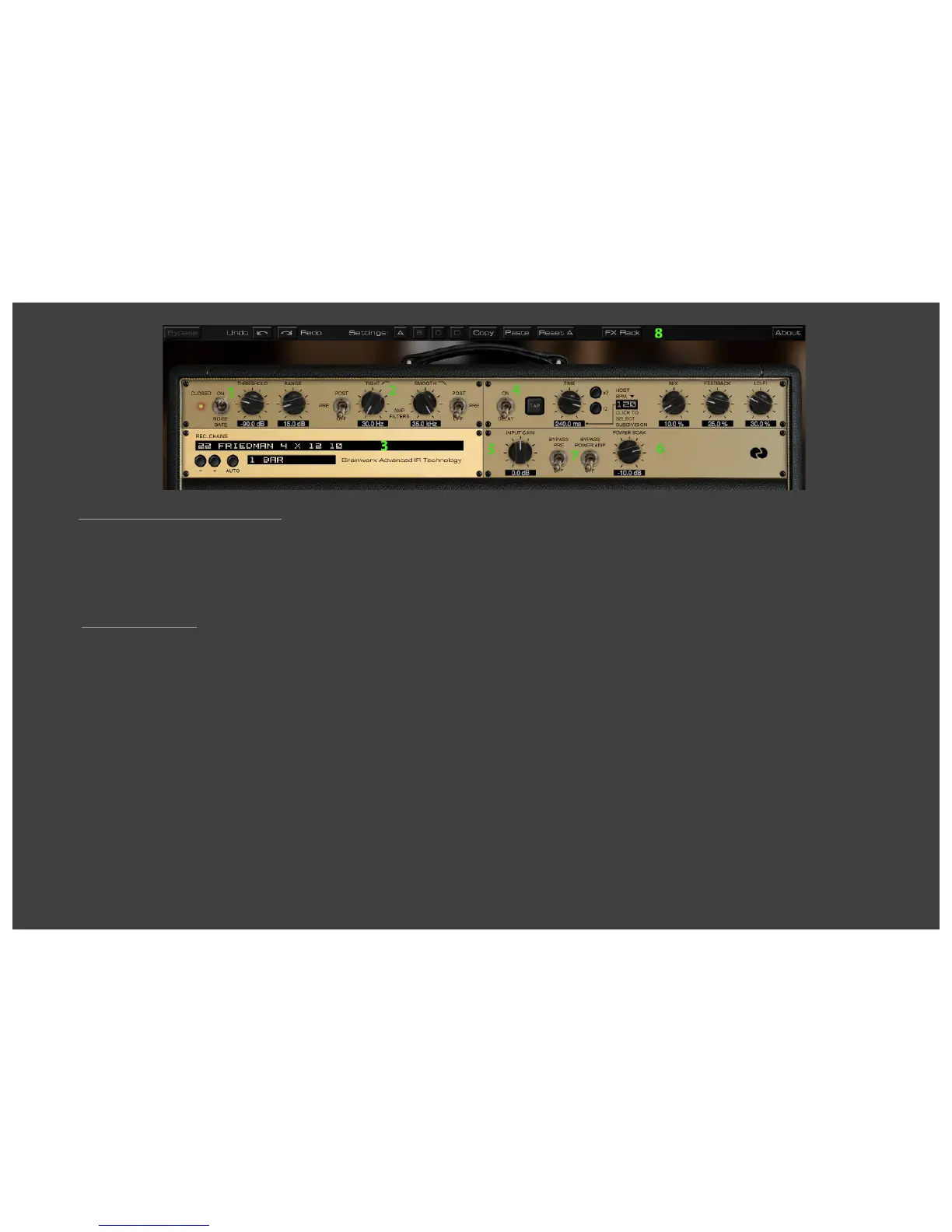
Simply select a speaker and a complete studio setup by browsing through the REC
CHAINS pull-down menu!
In the past two decades Brainworx owner Dirk Ulrich has produced and recorded
with members of DREAM THEATER, TOTO, MICHAEL JACKSON, and with many
more famous and infamous acts. The Brainworx Studio in Germany
(www.brainworx-studio.de) is equipped with one of only nine NEVE VXS 72 Consoles
ever made, and it also hosts some of the finest outboard EQs and mic pre-amps
available.
Using this impressive setup Dirk has produced a huge variety of customized
‘Recording Chains’ for the Friedman amplifiers, which you can apply to your plug-in
amp settings. Imagine a selection of 66 perfectly miked and EQ-ed guitar cabinets
that you can select and use instantly with a single mouse click!
Many amp simulations give you some captured impulses of a selection of cabinets
and microphones, then they leave it up to you to EQ and further process these in-
complete setups. Mixing different microphone setups, adjusting phase and EQ, and
so on. But this really is not an easy job; it takes years of experience to get it right.
Now all you have to do is select the Recording Chain that sounds best for your amp
channel, and setting, adjust the Tone Stack and Gain and you´re good to go! Re-
callable, reliable, flexible and fast.
And if for any reason you should not like any of the Recording Chains the plug-in of-
fers you may use the very last setting (labeled EMPTY - PLAY VIA REAL CAB) and
use your own miked cabinet. This setting will give you the sound of a tube guitar
amp wired straight into a Console, which also may be a nice effects sound.
+ / - Switches (Plus / Minus):
Browse through the REC CHAINS by either using the pull-down menu of the
REC CHAIN text box (see above) or just click through the settings using the
‘+’ and ’-‘ symbols.
AUTO & BAR selection:
If you are trying to find the best sounding REC CHAIN for your song it can be
a hassle to have to play a few chords, grab the mouse to select the next REC
CHAIN, play a few notes again, grabbing the mouse again, etc.
For this reason the BE100 offers you AUTO mode:
Just select a pattern (1 Bar, 2 Bars or 4 Bars) and the plug-in will activate
the available REC CHAINS automation, following the actual tempo setting of
your DAW. You can now play uninterrupted and simply listen to the sound of
the various REC CHAINS as the plug-in switches through all of them every
single bar, every two bars or every four bars, depending on your setting.
As soon as you hear the speaker setup you like best just stop AUTO mode by
clicking the AUTO button again and manually select the desired REC CHAIN.
Afterwards just fine-tweak the TONE Section and GAIN and there you are.


 To Next Page
 Loading...