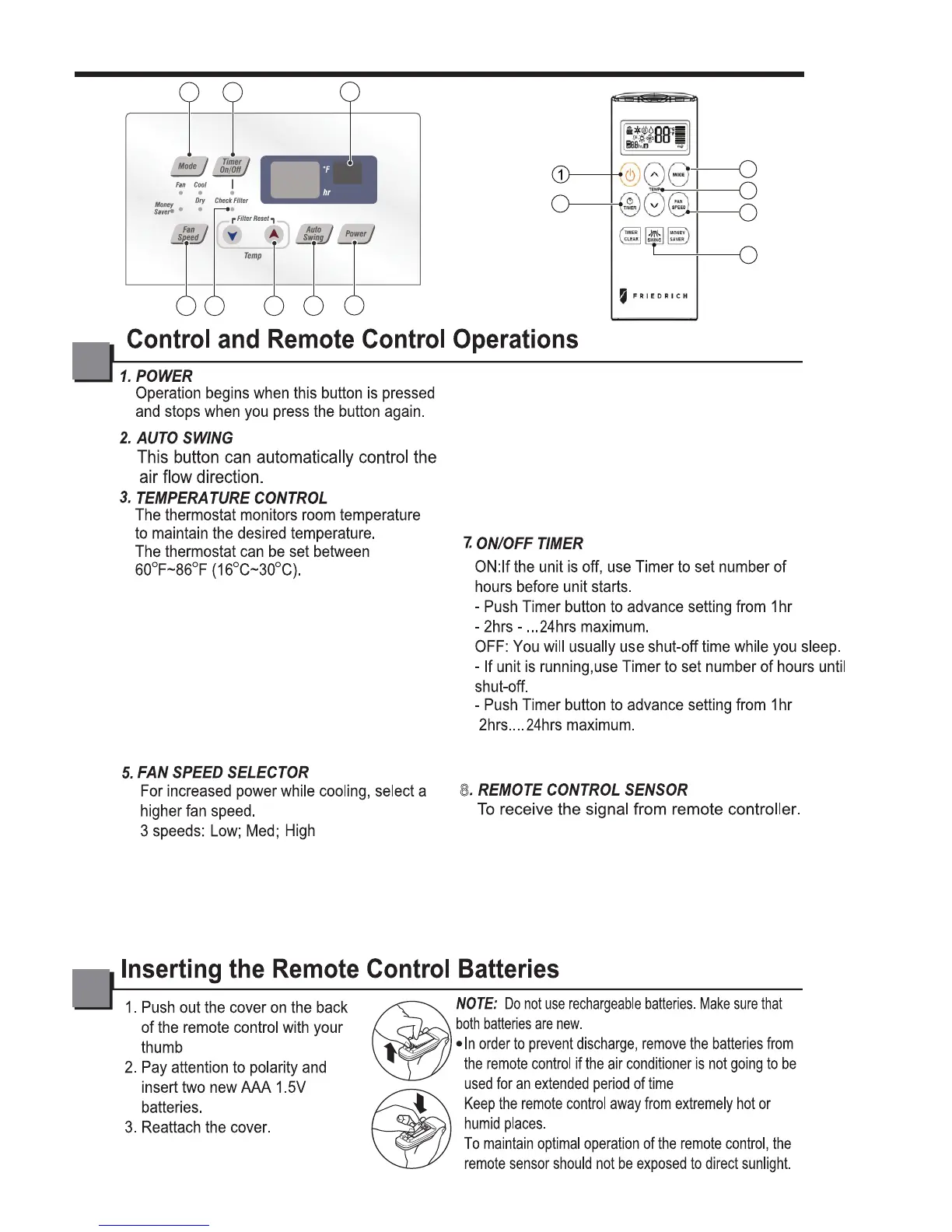
Check Filter: Your ‘Check Filter’ LED will
light up after approximately 250 hours of
operation, notifying you that your filter needs
to be cleaned.
*Timer Clear: On remote control, ‘Timer Clear’ button
will cancel the timer setting
8
2
1
3
4
5
6
7
8
3
2
5
6
7
Filter Reset: press ‘Temp ∨∧’ together to
turn off ‘Check Filter’ light.
*Filter Reset must be done from unit control
panel, not remote control
Push the ‘Mode’ button to rotate between
MoneySaver → Fan → Dry→Cool modes.
(select Dry mode for dry/dehumidifier
operation)
MoneySaver: The fan will stop when the compressor
stops cooling. The fan will turn on approximately
every 3 minutes to sample to room air and determine
if more cooling is needed.
Cool: fan runs continually for normal cooling operation
Fan Only: Fan-only operation
*MoneySaver has it’s own button on your remote
control
4. CHECK FILTER & FILTER RESET
6. OPERATION MODE SELECTOR
1.4 OPERATING INSTRUCTIONS
—4—



 To Next Page