29 PB
OPERATION
Wi-Fi SET UP INSTRUCTIONS (Continued)
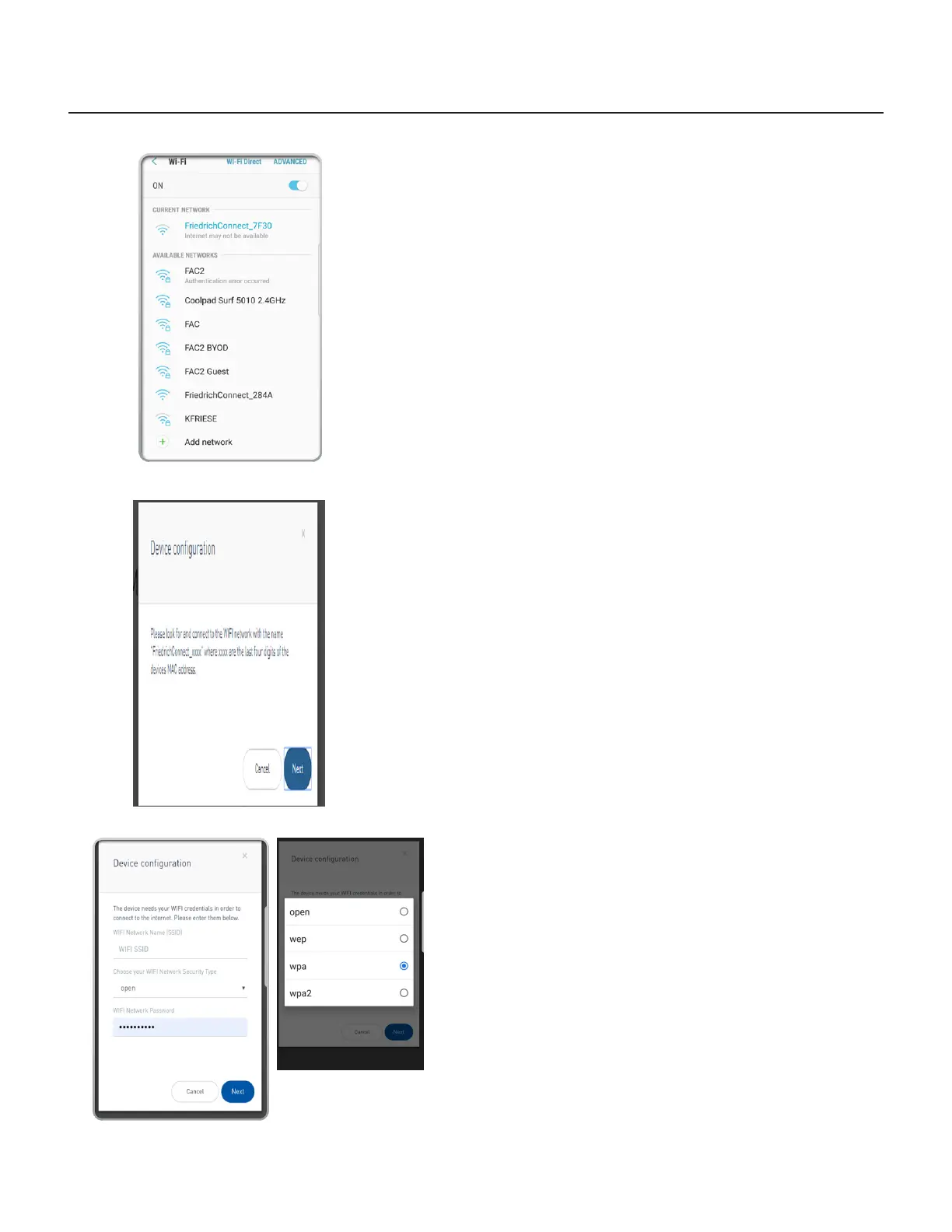
10. Go to the Wi-Fi settings on your mobile device and connect to
“FriedrichConnect_xxxx” network. (xxxx is the network name of the
Friedrich unit)
Step 10 (Connect WiFi to “Friedrich”)
Step 11 (Click next)
12. A screen will appear asking you to enter your Wi-Fi credentials.
13. Enter the information as you recorded it at the beginning of the
process.
NOTE: Your device may auto populate the elds incorrectly.
NOTE: Be sure to enter the WIFI SSID, Network Security Type, and
Wi-Fi network password exactly as you recorded them.
NOTE: These elds are case-sensitive.
Step 12 an 13 (Enter WiFi Credentials)
11. Go back to the Friedrich instructions on your mobile device and click
next.



 To Next Page