Surface Cooking (continued)
ModeJs with Ceramic GJass Cooktop (continued)
To Operate the Bridge Surface Element
(Model A Only):
1. Placecorrectly sizedcookware on the Bridge surface element.
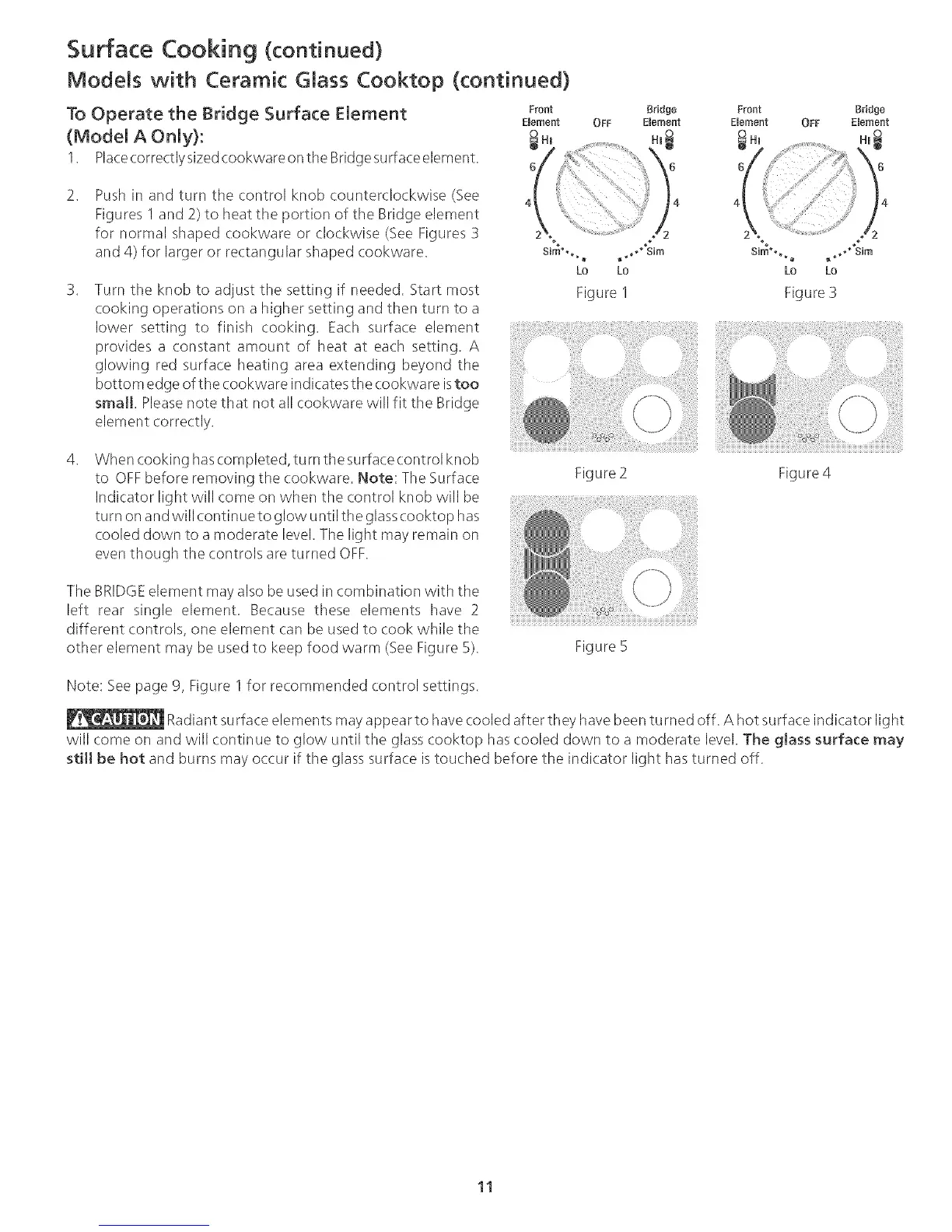
Push in and turn the control knob counterclockwise (See
Figures 1 and 2) to heat the portion of the Bridge element
for normal shaped cookware or clockwise (See Figures 3
and 4) for larger or rectangular shaped cookware.
Turn the knob to adjust the setting if needed. Start most
cooking operations on a higher setting and then turn to a
lower setting to finish cooking. Each surface element
provides a constant amount of heat at each setting. A
glowing red surfa__eheating area extending beyond the
bottom edge of the cookware indicates the cookwa re istoo
small. Pleasenote that not all cookware will fit the Bridge
element correctly.
Figure I
Front Bridge
Emernent OFF Emement
4
%1
, _ o_m
Lo Lo
Figure 3
When cooking hascompleted, turn the surfacecontrol knob
to OFFbefore removing the (ookware. Note: The Surface
Indicator light will come on when the control knob will be
turn on and will (ontinue to glow until the glasscooktop has
cooled down to a moderate level. The light may remain on
even though the controls are turned OFF.
Figure2 Figure4
The BRIDGEelement may also be used in combination with the
left rear single element. Because these elements have 2
different controls, one element can be used to cook while the
other element may be used to keep food warm (SeeFigure 5).
Figure 5
Note: See page 9, Figure I for recommended control settings.
Radiant surface elements may appear to havecooled after they havebeen turned off. A hot surface indicator light
will come on and will continue to glow until the glass cooktop has cooled down to a moderate level. The gJass surface may
stitt be hot and burns may occur if the glass surface is touched before the indicator light has turned off.
11




 To Next Page