EasyManua.ls Logo

Frigidaire FAA086P7A - Air Conditioner Features; Control Panel and Remote Overview; Basic Operation: Turning On

Frigidaire FAA086P7A
12 pages
Print Icon
To Next Page IconTo Next Page
To Previous Page IconTo Previous Page
Loading...
5
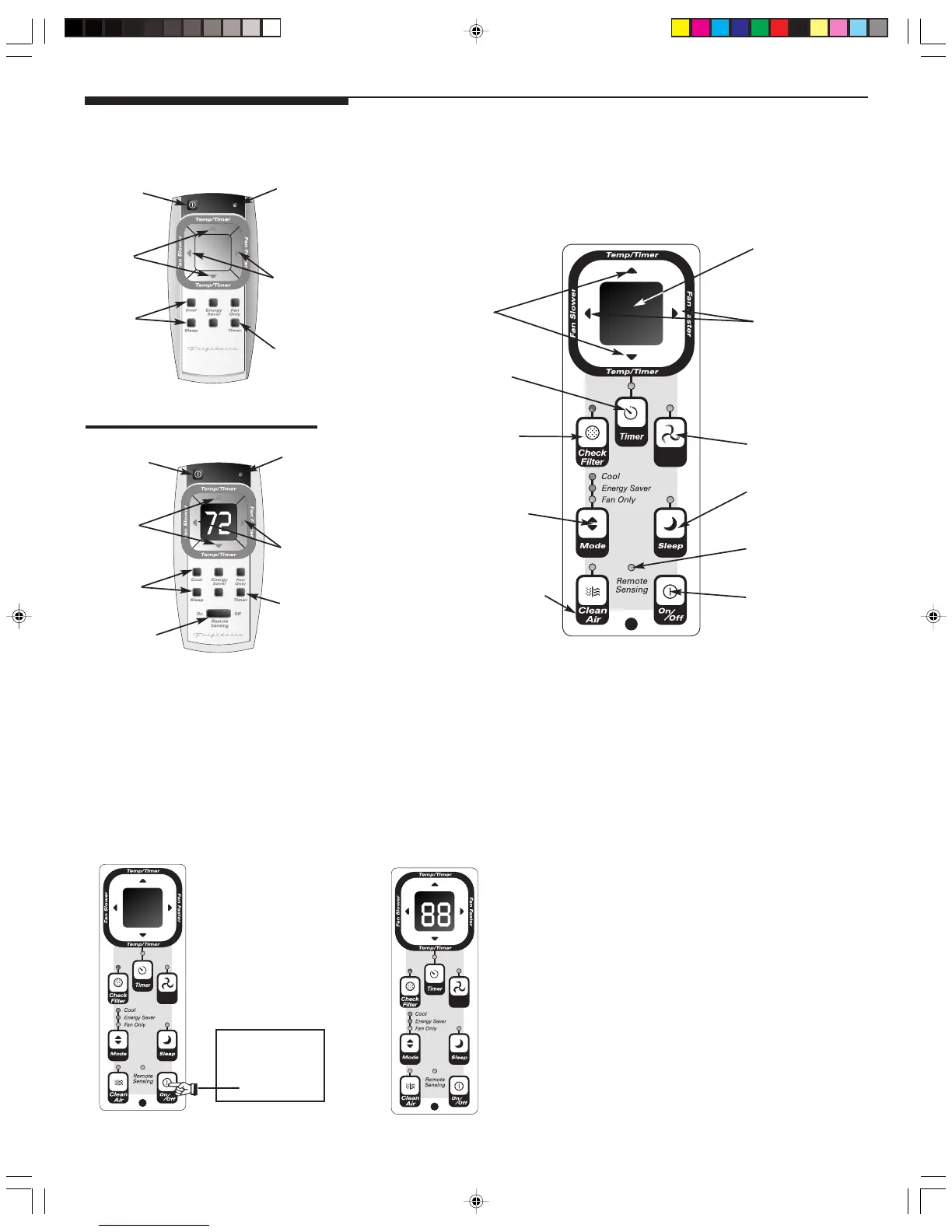
Air Conditioner Features
Fig. “A”
TOUCH PAD
Fig. “B”
ELECTRONIC CONTROL OPERATING INSTRUCTIONS
Before you begin, thoroughly familiarize yourself with the control panel and remote as shown
below and all its functions, then follow the symbol for the functions you desire. The unit can
be controlled by the touch pad alone or with the remote.
ADJUSTS
TEMP &
TIMES
ON/OFF
LIGHT
FAN
SPEEDS
ACTIVATE
S
TIMER
REMOTE CONTROL
w/DISPLAY &
REMOTE SENSING
BUTTON
ACTIVATES
REMOTE
THERMOSTAT
SETS
MODES
Auto
Temp
LIGHT
ON/OFF
REMOTE CONTROL
ACTIVATE
S
TIMER
FAN
SPEEDS
SETS
MODES
ADJUSTS
TEMP &
TIMES
Auto
Temp
Auto
Temp
DISPLAYS
TEMPERATURE/TIME
FAN SPEED
ADJUSTS
TEMPERATURE
OR TIME
ACTIVATES
TIMER
CHECK FILTER
RESET BUTTON
SETS MODE
CLEAN AIR FEATURE
(some models)
TURNS UNIT
ON OR OFF
REMOTE TEMP.
SENSING INDICATOR
(SOME MODELS)
AUTO TEMP FEATURE
SLEEP MODE
SETS FAN SPEEDS
Auto
Temp
Auto
Temp
TO TURN UNIT ON: YOU WILL SEE:
NOTE: The following instructions represent the Touch Pad, the same instructions can be used for the Remote Control.
DO THIS:
PRESS ON/
OFF PAD
SZ000705(En)-YaoKong 09/2/2005, 2:20 PM5

Other manuals for Frigidaire FAA086P7A

Related product manuals