9
Auto
Temp
Auto
Temp
Auto
Temp
Note: This feature can be activated from the remote control
ONLY, the unit must be in a cooling mode.
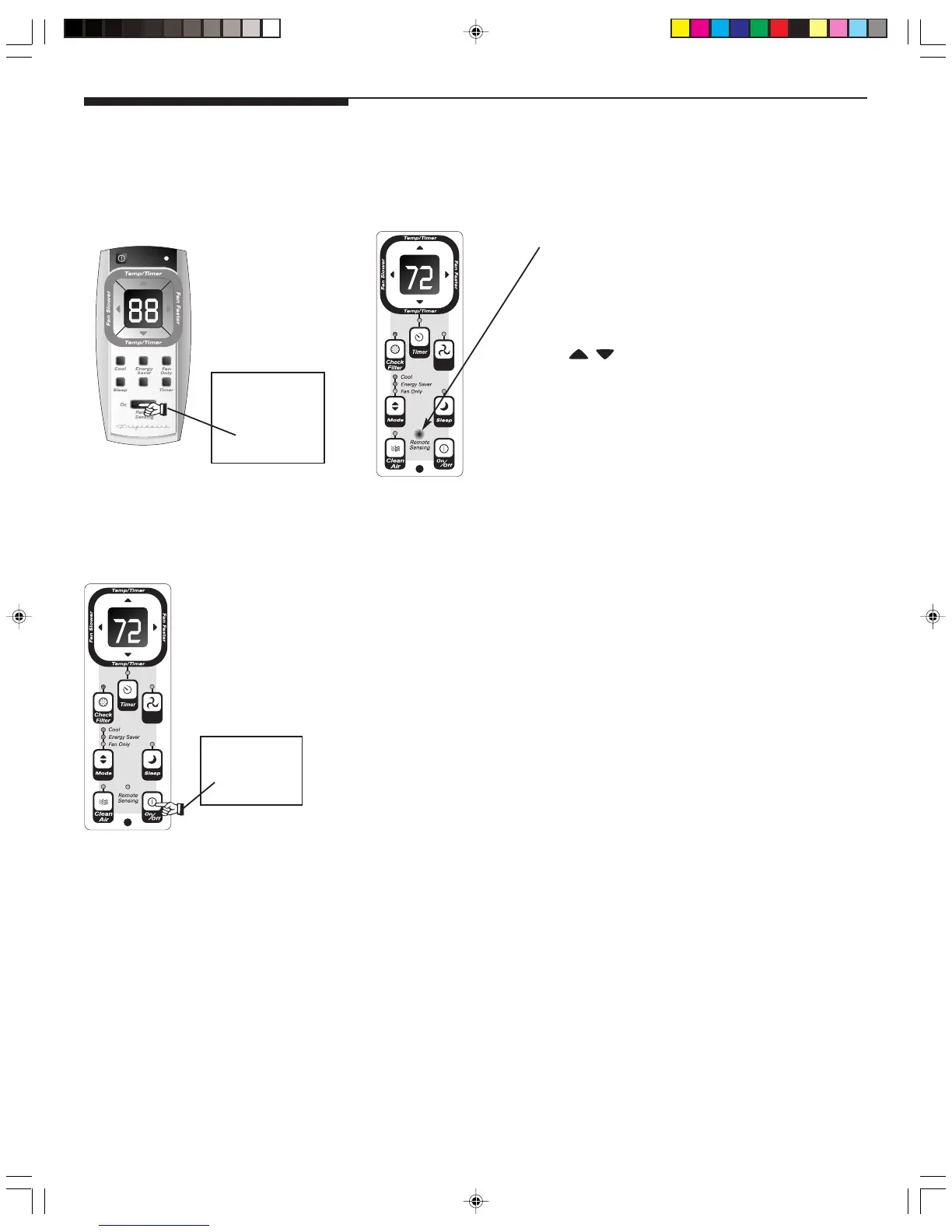
To activate the remote sensing feature, point the remote control
towards the unit and press the remote sensing button. Next,
use the
buttons to set the desired temperature at the
remote. (Note that the set temperature will only be displayed
on the unit itself). The LIGHT on the unit control will pulse to
indicate it received the signal. The LIGHT on the remote control
will pulse each time it sends a signal. It will continue to send
this signal until the feature is deactivated by pressing the remote
sensing button. If the unit does not receive the remote sensing
signal during any 3 minute interval, the unit will beep to indicate
the remote sensing mode has ended. The display on the remote
control indicates the temperature at the remote ONLY.
Air Conditioner Features
(continued)
REMOTE SENSING FEATURE
(on some models):
LIGHT pulsing On & Off intermittently.
YOU WILL SEE:
DO THIS:
PRESS REMOTE
SENSING
BUTTON ON
TO TURN UNIT OFF:
DO THIS:
PRESS ON/
OFF BUTTON
SZ000705(En)-YaoKong 09/2/2005, 2:20 PM9



 To Next Page