Setting Oven Controls
(continued)
To Start the Oven to Begin Convection Baking Now and Turn Off
Automatically
1. Besureclockis setto thecorrecttimeof day,asthis controlsthe automatictiming.
2. Arrangeovenrackswhilethe ovenisstill cool.Preheatthe ovenif necessaryandplacethe
foodin the oven.
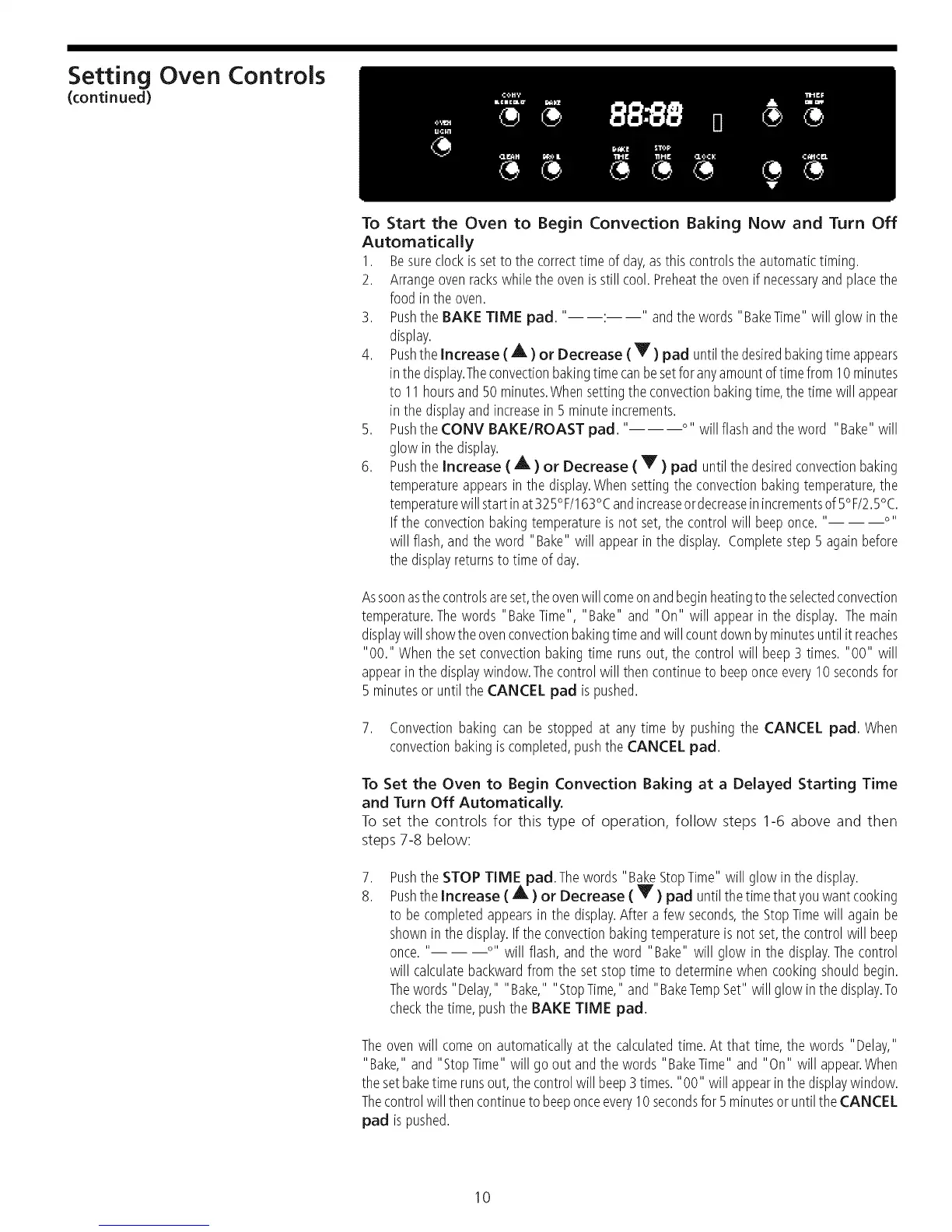
3. Pushthe BAKE TIME pad. " : " andthewords "BakeTime"will glowin the
display.
4. Pushthe Increase (A) or Decrease ( Y ) pad untilthedesiredbakingtimeappears
inthe display.Theconvectionbakingtimecanbesetforanyamountoftimefrom10minutes
to 11 hoursand50 minutes.Whensettingthe convectionbakingtime,thetimewill appear
in the displayandincreasein 5 minuteincrements.
5. PushtheCONV BAKE/ROAST pad. '.... willflashandthe word "Bake"will
glow inthe display.
6. Pushthe Increase ( A ) or Decrease ( Y ) pad untilthedesiredconvectionbaking
temperatureappearsin the display.Whensettingthe convectionbakingtemperature,the
temperaturewill startinat325%/163°Candincreaseordecreaseinincrementsof5°F/2.5°C.
If the convectionbakingtemperatureis not set,the controlwill beeponce.'....
will flash,and theword "Bake" will appearinthe display. Completestep 5 againbefore
thedisplayreturnsto time of day.
Assoonasthecontrolsareset,theovenwillcomeonandbeginheatingtothe selectedconvection
temperature.Thewords "BakeTime", "Bake" and "On" will appearin the display. Themain
displaywillshowtheovenconvectionbakingtimeandwill countdownbyminutesuntilitreaches
"00." Whenthe setconvectionbakingtime runs out,the controlwill beep3 times."00" will
appearin the displaywindow.Thecontrolwill then continueto beeponceevery10secondsfor
5 minutesor until the CANCEL pad is pushed.
7. Convectionbakingcan be stoppedat anytime bypushingthe CANCEL pad. When
convectionbakingiscompleted,pushthe CANCEL pad.
To Set the Oven to Begin Convection Baking at a Delayed Starting Time
and Turn Off Automatically.
To set the controls for this type of operation, follow steps 1-6 above and then
steps 7-8 below:
,
8.
Pushthe STOP TIME ad.The words "BakeStopTime" will glowin the display.
Pushthe Increase (AP) or Decrease ( Y ) pad untilthe timethat youwantcooking
to becompletedappearsin the display.After a few seconds,theStopTimewill againbe
showninthe display.If the convectionbakingtemperatureis not set,thecontrolwill beep
once.'.... will flash,andthe word "Bake" will glow in the display.Thecontrol
will calculatebackwardfrom the setstoptime to determinewhen cookingshouldbegin.
Thewords"Delay," "Bake," "StopTime,"and "BakeTempSet"will glow in the display.To
checkthe time,pushthe BAKE TIME pad.
Theovenwill comeon automaticallyat the calculatedtime.At that time,the words "Delay,"
"Bake," and "StopTime"will goout andthewords "BakeTime" and "On" will appear.When
thesetbaketime runsout,thecontrolwill beep3 times."00" will appearinthedisplaywindow.
Thecontrolwill thencontinueto beeponceevery10secondsfor 5minutesoruntil theCANCEL
pad ispushed.
10




 To Next Page