Operating Instructions
(continued)
Operating Instructions
7
2019 Electrolux Home Products, Inc. All rights reserved.
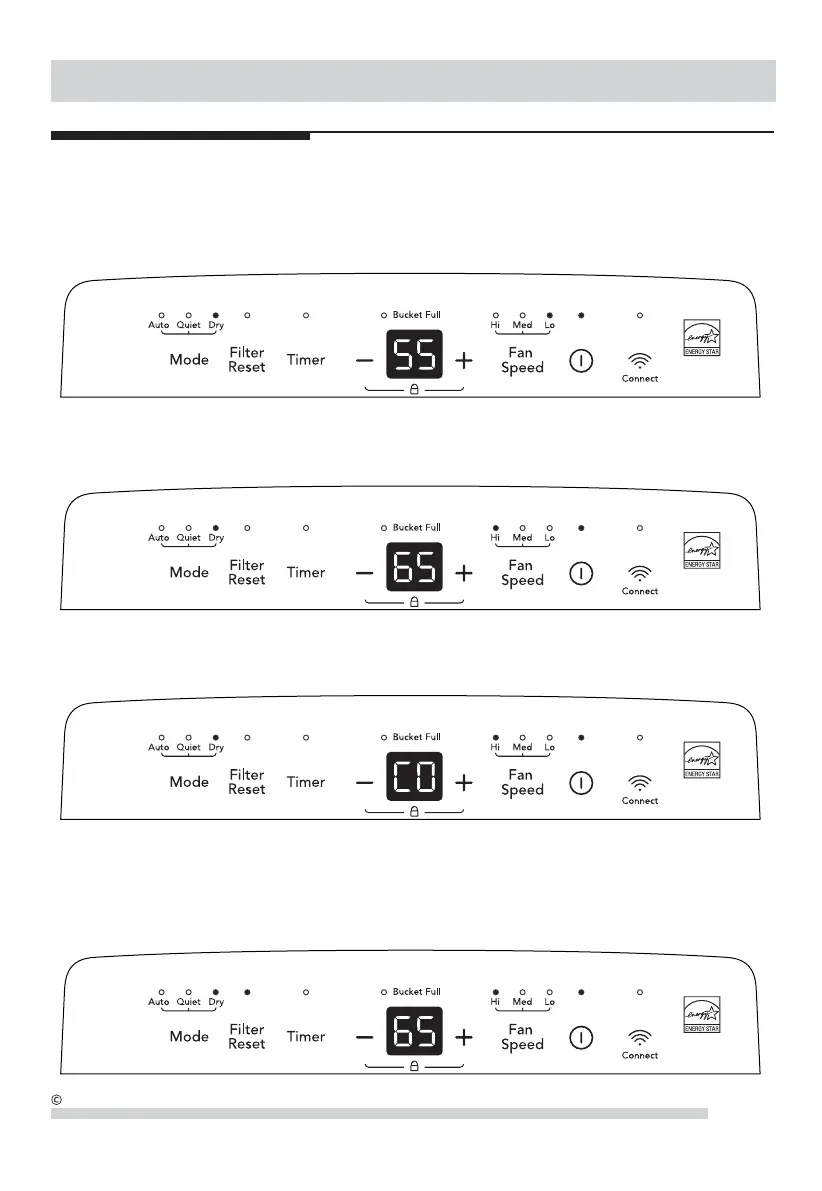
7RXVH'U\PRGHSUHVVWKH0RGHEXWWRQWRFKRRV'U\PRGH,QWKLVPRGH\RXFDQSUHVVWKH+80,',7<RUEXWWRQV
WRFKRRVHDYDOXHEHWZHHQWRVRWKHURRPLVNHSWDWDFRPIRUWDEOHKXPLGLW\3UHVVLQJWKHRUEXWWRQVZLOO
change the humidity selection in 5% increments. 5 seconds after you have set the desired humidity, the readout will display
the actual room humidity.
7RXVH&217,18286PRGHZKHQLQ'U\PRGHSUHVVLQJWKH³´EXWWRQXQWLOWKHGLVSOD\UHDGV&2,QWKLVPRGHWKH
XQLWZLOOFRQWLQXRXVO\RQDQGWKHXQLWZLOORQO\GLVSOD\&2QRWWKHURRPKXPLGLW\7ROHDYHWKLVPRGHSUHVVWKH³´
button.
5. During the Dry mode, You can also use the FAN SPEED button to change the fan speed to Hi, Med or Lo. The indicator
light will show the setting you have selected. A higher fan speed will result in quicker moisture removal.
7. The Filter reset light will illuminate after 250 hours of operation. At this time refer to the care and cleaning section
to remove and clean the filter. Once the filter has been cleaned and replaced, simply press the Filter reset button
to extinguish the light.



 To Next Page