Operating Instructions
Operating Instructions
(continued)
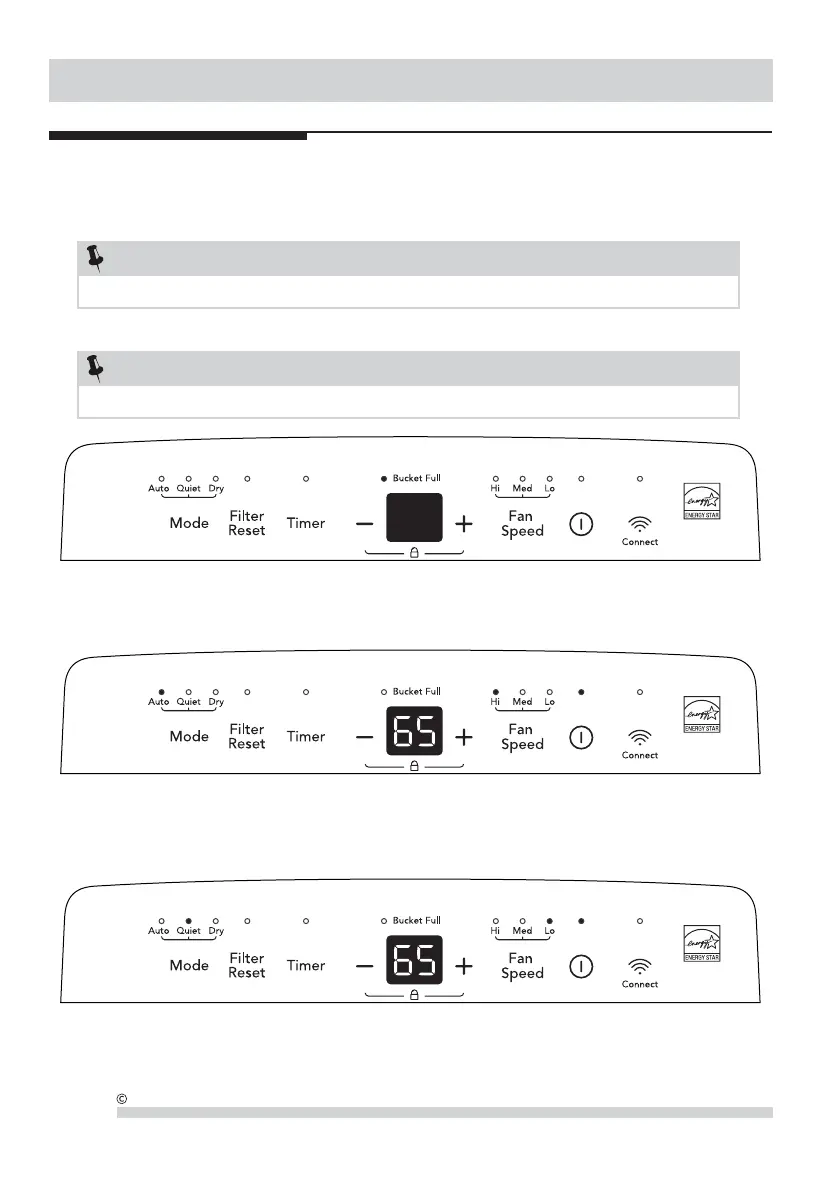
2. To turn the unit on, press the ON/OFF button. The unit will run in the factory setting of Auto mode. In this mode, the
unit will automatically set a comfortable humidity and fan speed according to the indoor environment.
Note: In this mode, set humidity and fan speed can not be changed manually and the display will show actual room humidity.
6
2019 Electrolux Home Products, Inc. All rights reserved.
Allow the unit to reach room temperature before operating.
To begin operating the dehumidifier, follow these steps:
1. Plug the power cord into a properly grounded 115 volt AC outlet.
If the "BUCKET FULL" light is flashing, remove the bucket and re-install to reset the float switch.
NOTE:
Unit must be upright for one hour prior to operating.
NOTE:
3. To use Quiet mode, press the Mode button to choos Quiet mode. The unit will run in low fan speed for the whole time and
the unit will automatically set a comfortable humidity according to the indoor environment.
Note: In this mode, set humidity and fan speed can not be change manually and the display will show actual room humidity.



 To Next Page