22
CONVENIENT FEATURES
This section gives instructions for operating each
function. Please read this section carefully.
USER REFERENCE
SETTING CONTROL LOCK ON/OFF
The
microwave oven has settings that allow you to
customize the operation for your convience. Below is
the table showing the various settings. Touch the User
setting function.
•
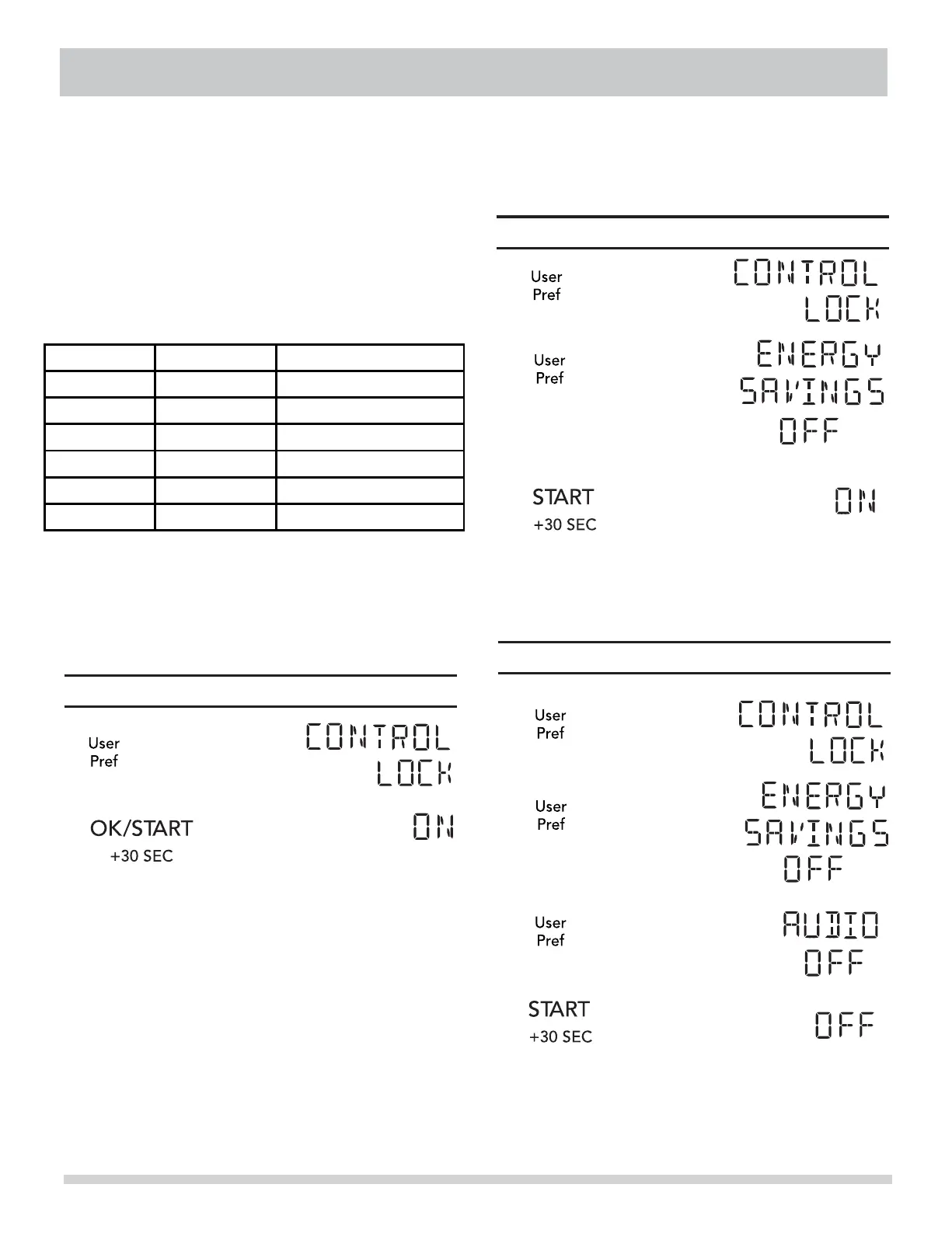
Display Shows:Touch
1.
2.
Display for 2 seconds then clear.
SETTING
Display Shows:Touch
1.
2.
Display for 2 seconds then clear.
3.
SETTING AUDIO LOW/MED/HIGH/OFF
Display Shows:Touch
1.
2.
3.
USER PREF
Suppose you want to turn on the Control Lock.
Pref key multiple times to scroll to the desired
• Suppose you want to turn on energy savings.
• Suppose you want to turn on the Audio Off.
ENERGY SAVINGS
Lbs / KG
English / French
ON / OFF
Turning On energy savings turns off the time
of day clock display.
Display for 2 seconds then clear.
4.



 To Next Page