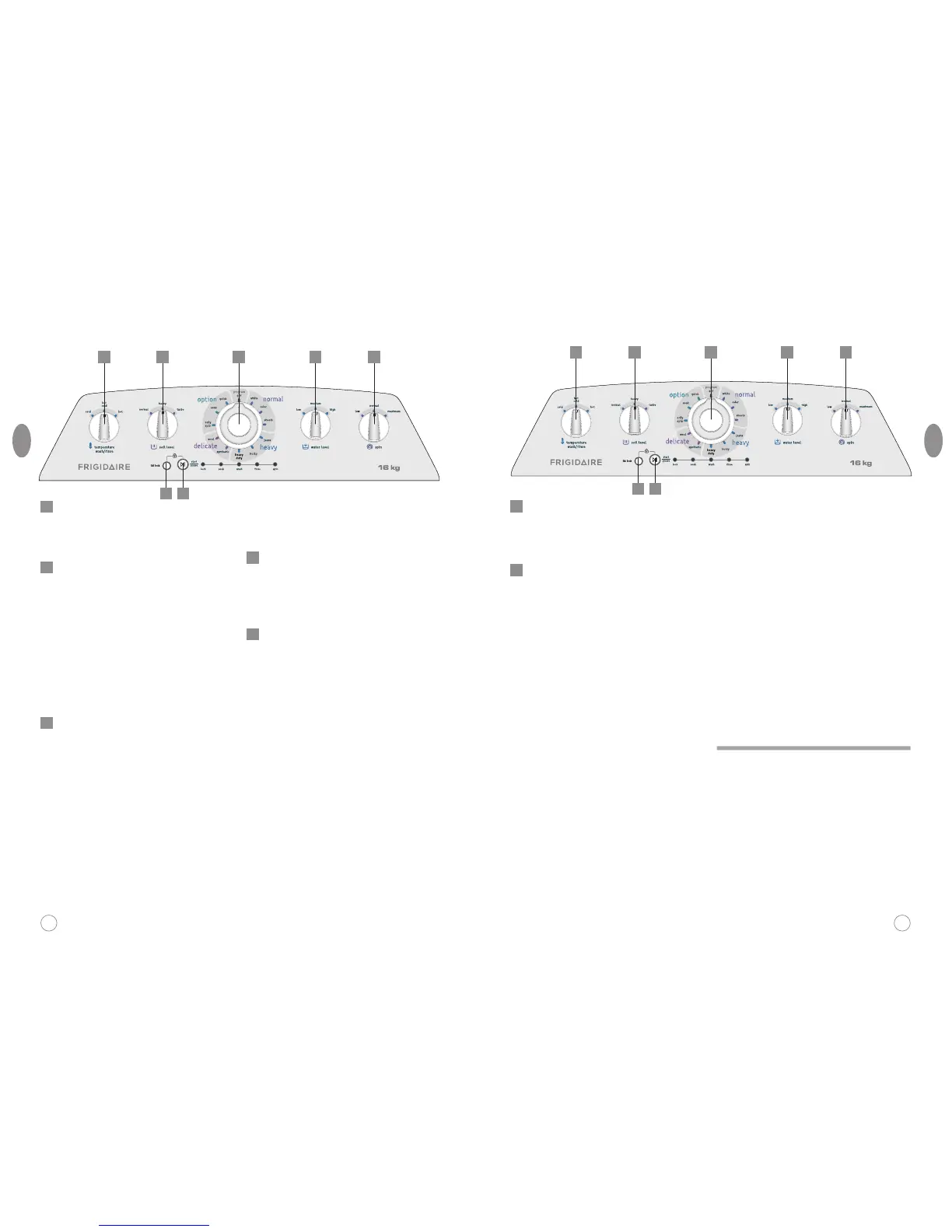
Water temperature
Turn the knob to select the
temperature: Hot , Hot/Cold,
Cold.
Soil level
Corresponding to different
program areas, the washing time
various:
Normal is clockwise as: 12min-
15min-18min.
Heavy is clockwise as: 15min-
18min-20min.
Delicate is clockwise as: 5min-
7min-9min.
Program selection
Program divide into five washing
modes: OFF,NORMAL,HEAVY,
DELICATE,OPTION.
OFF: Power switch, cutting off
power supply.
NORMAL contain three programs:
WHITE, COLOR, SHEETS.
HEAVY contain three programs:
JEANS, BULKY and HEAVY
DUTY.
DELICATE contain two programs:
WOOL and SYNTHETIC.
OPTION contain three programs:
ONLY SPIN, SOAK, and QUICK.
Water level
This machine have three water
level.
Followed by rotation: Low -
Medium - High
Spin time
Followed by rotation: Low -
Normal - Maximum.
In normal and heavy program
areas, spin time is 5min,
7min,9min.
In delicate program is
3min,5min,7min.
1
2
4
3
5
Control panel
2827
ENG
ENG
1
6 7
2 3 4 5
Lid lock
To lock and unlock the door lock
when it is in function.
Start/pause
Start/pause button has both
function of start and pause.
Continuously press this button,
the machine will be switched
between start and pause mode.
All graphics in this manual are just for
purposesexplanatory. Could be a little
different to the characteristics of the
washing maching you purchased.
The control panel description is based
on a typical model, the function is the
same as your washing machine while
it may be some differences in
appearance.
Attention
6
7
1
6 7
2 3 4 5




 To Next Page