17
BEFORE SETTING OVEN CONTROLS
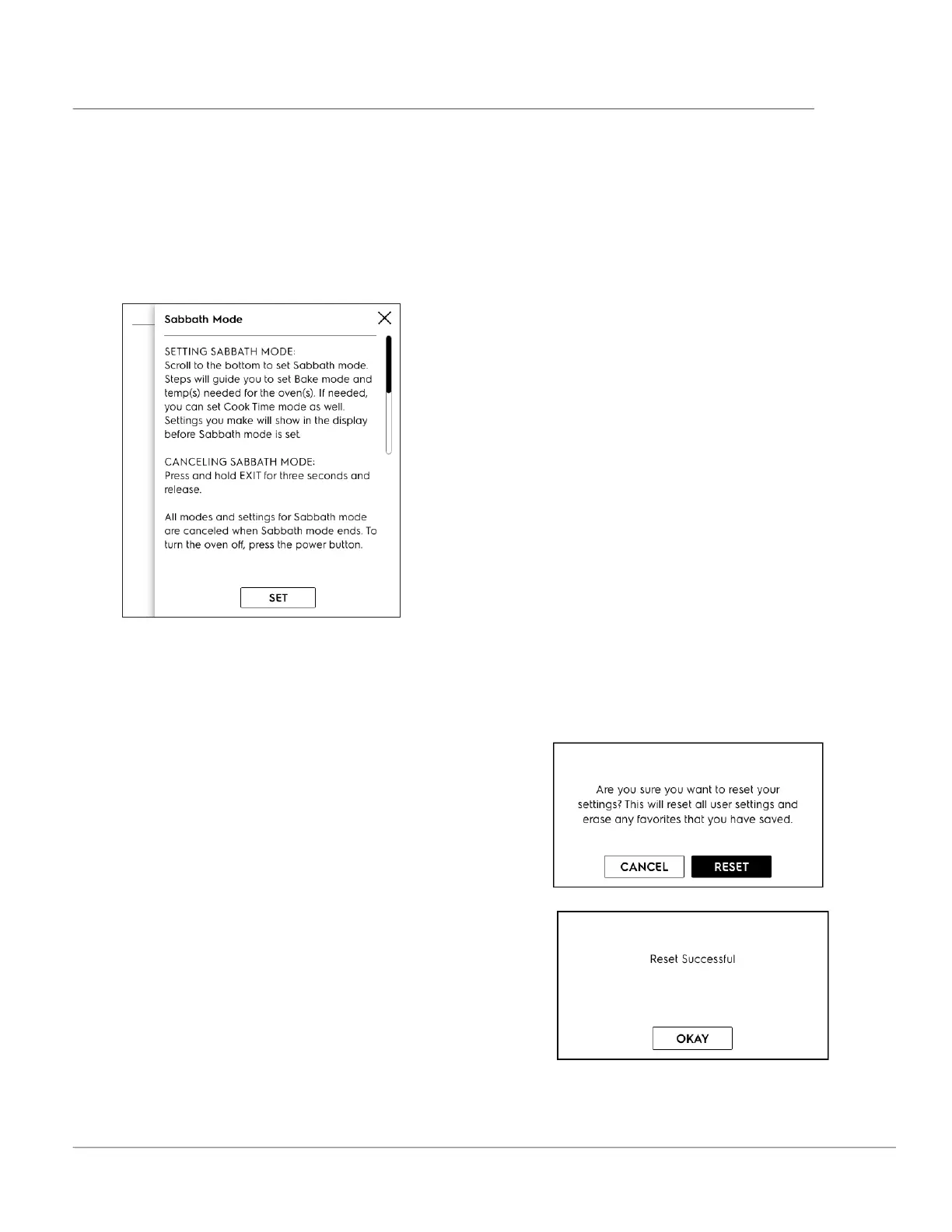
Sabbath Mode
1. Scroll to Sabbath Mode.
2. Read and follow all instructions to set and
when finished cancel. See “Setting the Sabbath
Feature for the Jewish Sabbath and Holidays
(some models)” on page 38 or complete details
on how Sabbath mode works with your oven
controls.
Factory Reset
1. Scroll to Factory Reset and touch.
2. Follow screen prompts.
Note: Your appliance was set with predetermined
(default) oven control settings. Over time, users
may have made changes to these settings. The fol-
lowing options may have been modified since the
appliance was new:
• 12 or 24 hr display mode
• Screen Brightness
• Language
• Favorites
• Show Clock
• All Food Probe settings
• Continuous bake or 12 hour energy savings
mode
• Silent or audible control
• Oven temperature display (Fahrenheit or Cel-
sius)
• Oven temperature adjustments (UPO)
If Reset is touched all the settings will return to
default.
3. Are you sure?
4. Reset.
5. O KAY.



 To Next Page