4
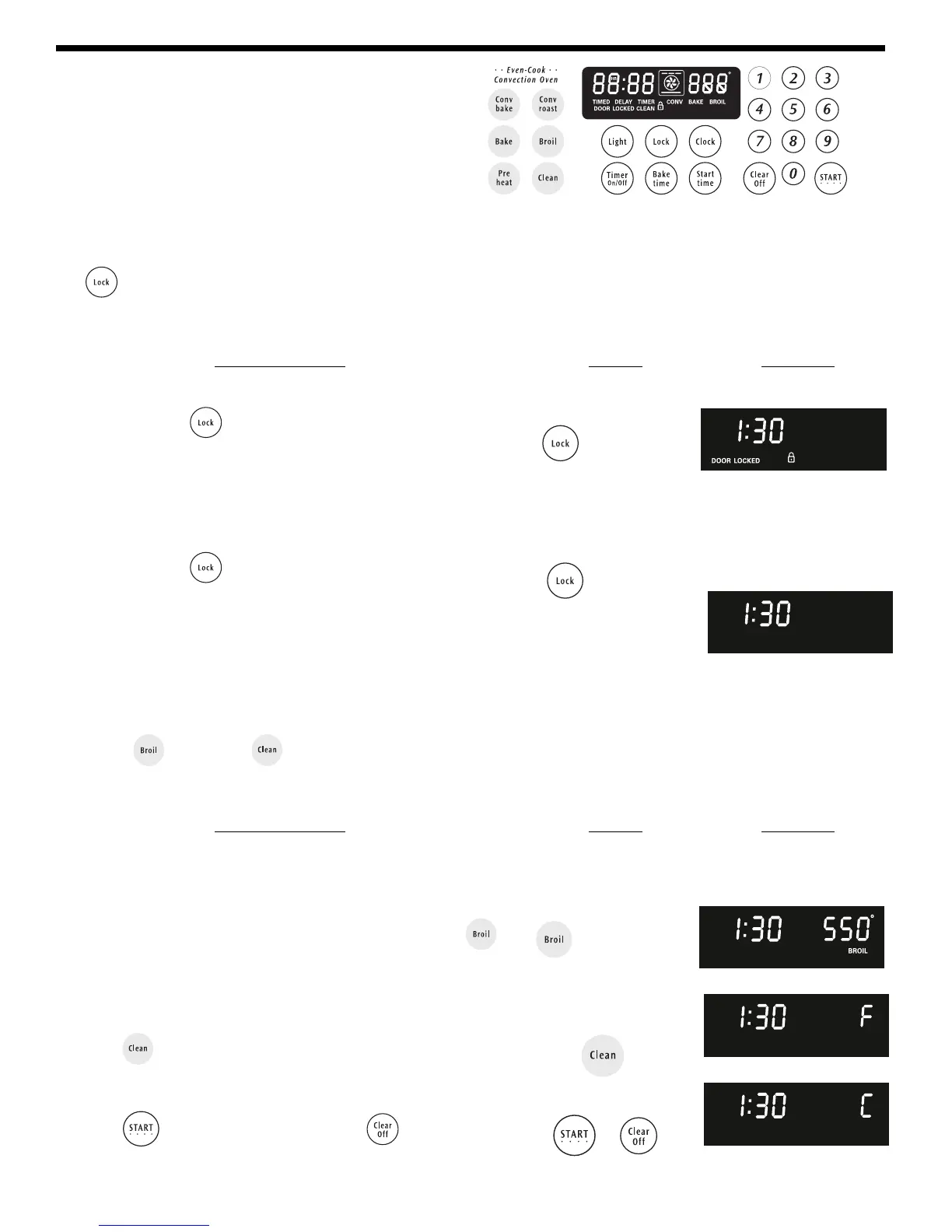
Push buttons or pads may be shaped differently.
Setting Oven Lockout Feature
The pad controls the Oven Lockout feature. The Oven Lockout feature automatically locks the oven door and prevents
the Warmer Drawer from being turned on. It does not disable the clock, Timer, electric or gas urface gas burners, Warmer
Zone or the interior oven lights.
for 3 seconds
for 3 seconds
To activate the Oven Lockout feature:
1. Press and hold for 3 seconds (Figure 1).
2. After 3 seconds the lock icon light will appear, a beep will sound
and "DOOR LOCKED" will flash in the display. Once the oven
door is locked the "DOOR LOCKED" indicator will stop flashing
and remain on along with the lock icon light.
To reactivate normal oven operation:
1. Press and hold for 3 seconds. A beep will sound. The
"DOOR LOCKED" will continue to flash until the oven door has
completely unlocked and the lock icon light will clear
(Figure 2).
2. The range is again fully operational.
Figure 1
Figure 2
INSTRUCTIONS PRESS DISPLAY
Consumer Defined Controls
for 7seconds
Setting Temperature Display — Fahrenheit or Celsius:
The BROIL and CLEAN pads control the Fahrenheit or Celsius temperature display modes. The oven control can
be programmed to display temperatures in Fahrenheit or Celsius. The oven has been preset at the factory to display in
Fahrenheit.
To change display from Fahrenheit to Celsius or
Celsius to Fahrenheit:
1. To tell if the display is set for Fahrenheit or Celsius Press
(figure 1) and hold for 7 seconds; "550°" will appear in the
display and a beep will sound. If "F" appears, the display is set
to show temperatures in Fahrenheit (Figure 2). If "C" appears,
the display is set to show temperatures in Celsius (Figure 3).
2. Press to switch between Fahrenheit or Celsius display
modes. The display will show either "F" (Figure 2) or "C"
(Figure 3).
3. Press to accept the change or press to reject the
change.
or
Figure 1
Figure 2
Figure 3
INSTRUCTIONS PRESS DISPLAY


 To Next Page