24
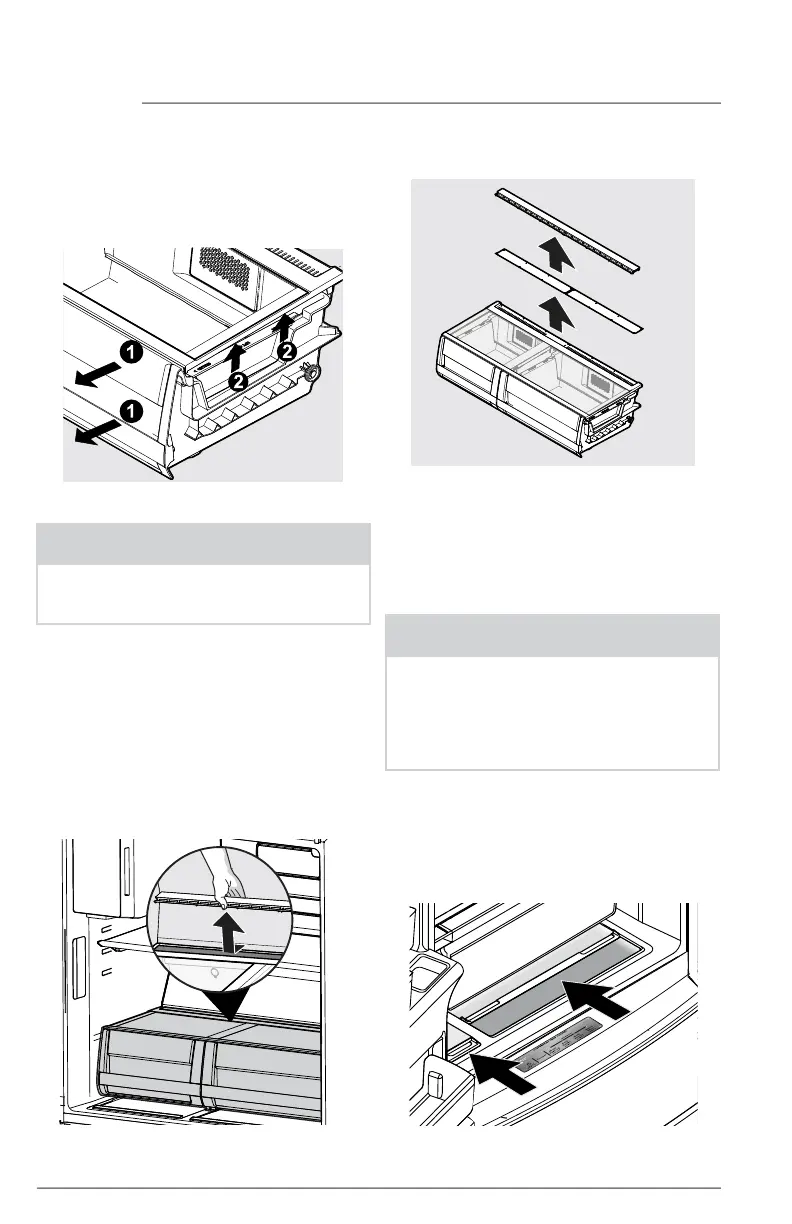
Removing CrispSeal Fresh Drawer
STORAGE FEATURES
Removing Auto Humidity
Control Membrane
Opening SnackZone
Recessed Snack Drawers
4. Remove the humidity membrane from
the housing by lifting up sliding over.
5. Clean humidity membrane with hot
soapy water.
6. Replace membrane in housing and
unit by reversing the steps above.
NOTE
Frigidaire does not recommend replac-
ing the auto-humidity membrane unless
it becomes damaged or ruined. If the
membrane becomes soiled, it can be
washed with soap and water. Ensure
membrane is dry before replacing in unit.
To remove the auto humidity control
membrane for cleaning:
1. Reach to back of humidity control
cover.
2. Place fingers between the humidity
control and the back wall, pull up on
cover.
3. Pull cover toward the front of
cabinet and remove.
Removing Auto Humidity
Control Membrane
To remove the CrispSeal Fresh drawer
for cleaning:
1. Pull the drawer out until it stops.
2. Lift the front slightly and remove
the drawer.
SnackZone - Recessed Snack Drawers
These drawers are ideal for storage of deli
meats and cheeses.
To open: slide back the cover to allow
access to the drawers.
NOTE
Remove the crisper insert and the
Produce Keeper Plus filter before
washing the crisper.



 To Next Page