24
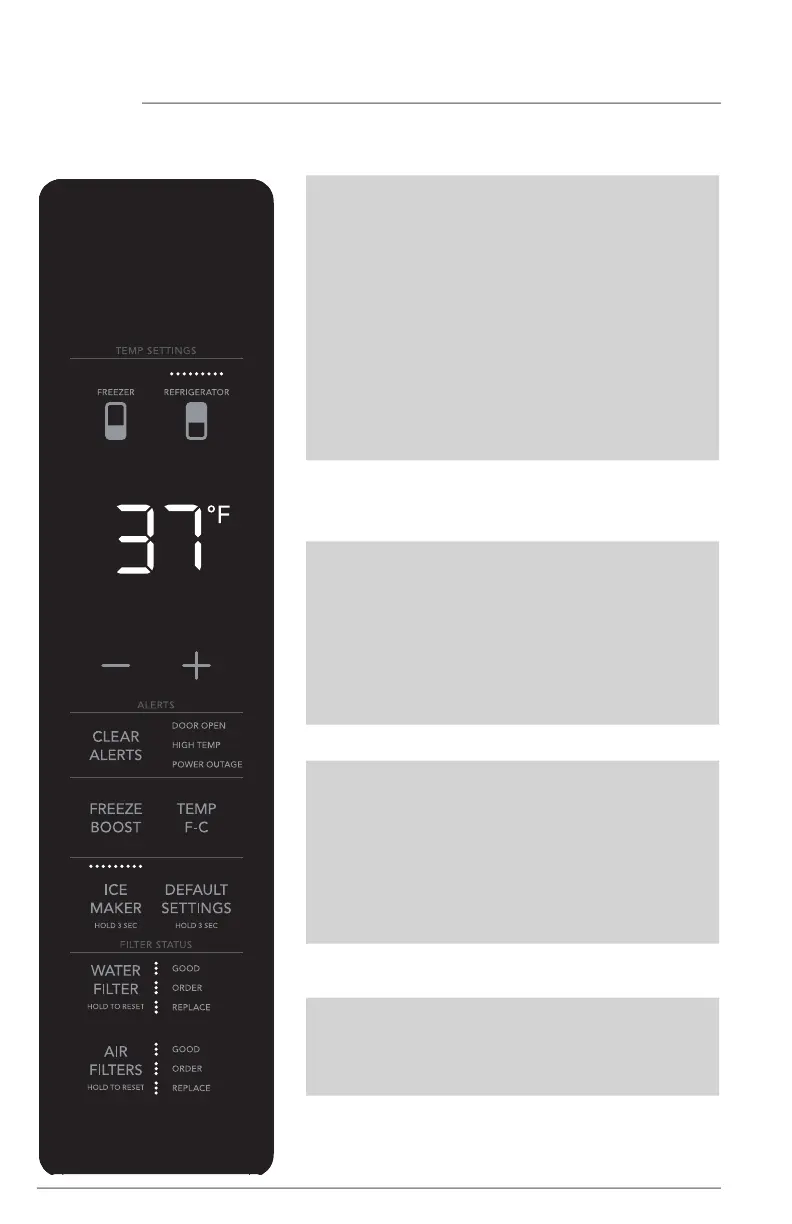
Frigidaire Professional Display (options may vary by model)
CONTROLS AND SETTINGS
TEMP
SETTINGS
Select compartment for
temperature change (FREEZER
or REFRIGERATOR). Press
either the + or - to adjust to
desired temperature setting.
Freezer temp - Control
temperatures range from -6°F
/ -21°C to +6°F / -15°C.
Refrigerator temp - Control
temperatures range from
+34°F / +1°C to +44°F / +7°C.
This unit is designed to operate
at 37°F Refrigerator/0°F
Freezer. Unit should stabilize
temperatures within 24 hours
of installation.
CLEAR ALERTS Resets any alarms that are
active and illuminated on the
display (DOOR OPEN, HIGH
TEMP, POWER OUTAGE).
FREEZE BOOST Prior to grocery shopping,
we recommend you activate
FREEZE BOOST to freeze
your food faster It will remain
active for up to 24 hours before
automatically deactivating or
you manually exit. Press FREEZE
BOOST to turn the function o.
This will reset the freezer to the
previous temperature setting.
TEMP F•C Press to toggle between F & C.
ICE MAKER For the ice maker inside the re-
frigerator, press and hold for 3
seconds to turn the ice maker
on/o. When indicator is lit, the
ice maker is on. When the indi-
cator is not lit, the ice maker is
OFF and will stop making ice.
While o, ice dispensing can
continue as long as there is ice
in the bucket.
DEFAULT
SETTINGS
Press and hold for 3 seconds to
reset to default settings.
WATER FILTER Status is shown at the right
of the button. After replacing
the filter, press and hold for 3
seconds to reset. Status will
reset to GOOD.
AIR FILTER Status is shown at the right of
button. After replacing the filter,
press and hold for 3 seconds to
reset. Status will reset to GOOD.



 To Next Page