FRITZ!Box 3370 18
Connecting Computers to the LAN Port
Connecting More Computers to the LAN Ports
Additional cables are required to connect further computers.
In purchasing a LAN cable, note the instructions in the sec-
tion Network Cable on page 107.
One computer can be connected to each network port of the
FRITZ!Box.
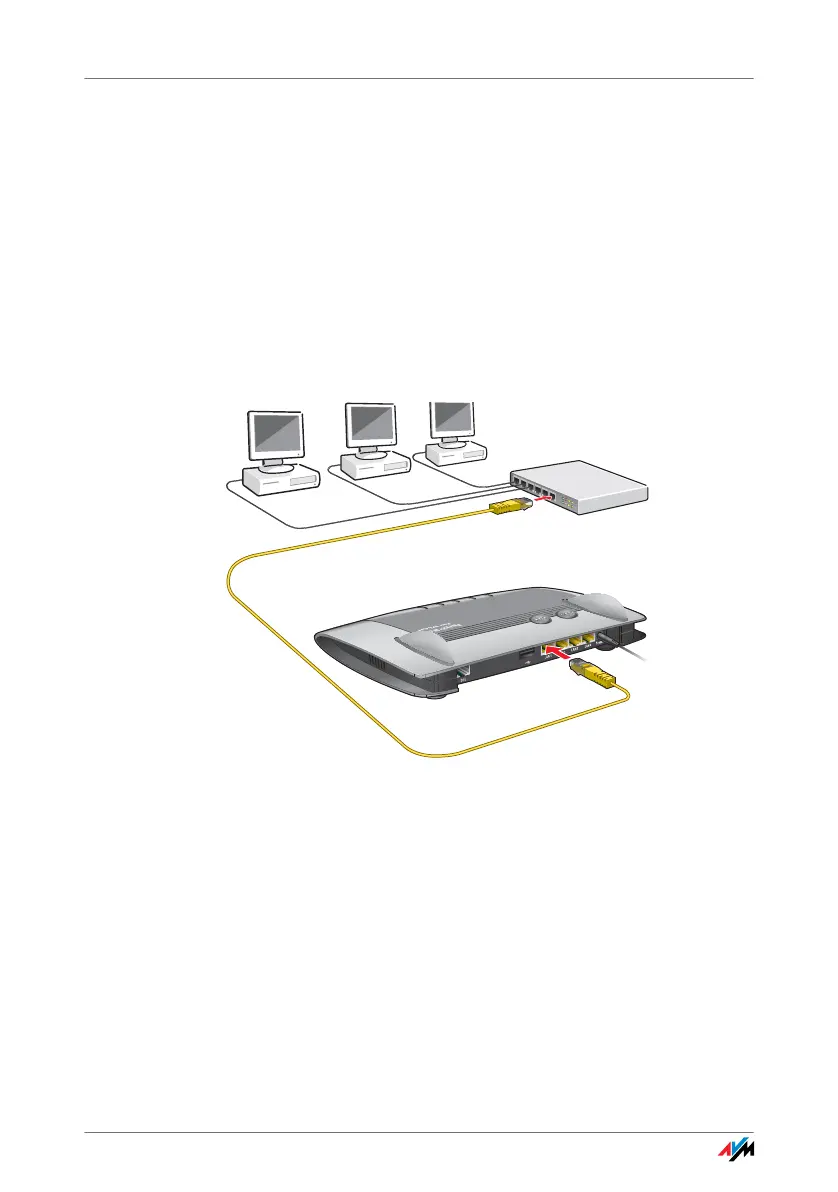
Connecting a Network Hub or Switch
You can also connect a network hub or switch to the LAN
ports on the FRITZ!Box.
Connecting the FRITZ!Box to a network hub
1. Set aside the network cable from the FRITZ!Box package.
2. Connect one end of the LAN cable to the uplink port (see
glossary) of the network hub or network switch.
3. Connect the other end of the cable to one of the LAN
ports on the FRITZ!Box.
The FRITZ!Box and the network hub are now connected with
each other.
InfoInfo
DSLDSL
WLANW
L
AN
LANLAN
PowerPower



 To Next Page