FRITZ!Box 3370 8
Ports, Interfaces, Buttons and LEDs
2 Ports, Interfaces, Buttons and LEDs
This chapter describes the ports, interfaces, buttons and LEDs of the
FRITZ!Box.
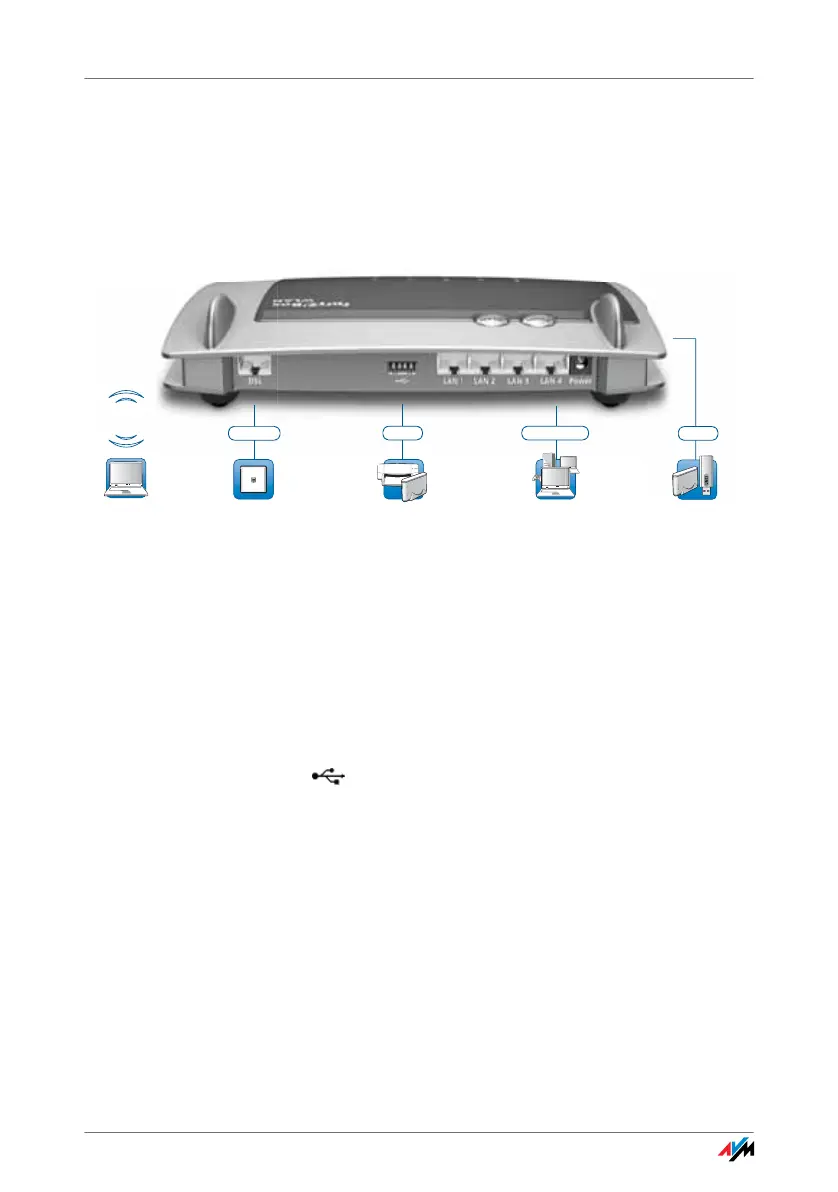
2.1 Ports and Interfaces
Possibilities for connecting the FRITZ!Box
• DSL
Socket for connecting to ADSL2+ and VDSL
• LAN1 – LAN4
4 gigabit Ethernet ports (10/100/1000 Base-T) for con-
necting computers and other network devices like game
consoles and network hubs
• USB
2 USB 2.0 ports for connecting USB devices like printers
or storage media
• WLAN base station
Integrated WLAN base station for connecting to WLAN
devices that use the radio standard IEEE 802.11a,
IEEE 802.11b, IEEE 802.11g or IEEE 802.11n (in the 2.4-
or 5-GHz frequency band)
Printer,
storage media
Computer, game
console, network
For DSL without
a telephone line
USB 2.0 4 x Gigabit LAN
UMTS/HSPA modem
and USB devices
Notebook, smartphone,
video/TV streaming
USB 2.0
WLAN
2.4 GHz/5 GHz
DSL/VDSL



 To Next Page