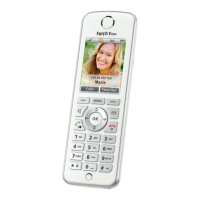
Speaker
(speaker for
hands-free calling on the reverse)
Display
Display key
changing features, active
feature on display above key
Hang up key
ending calls
switching on/off (press and hold)
canceling functions
Microphone
Display key
as right display key
Control ring
Volume
Call list
Telephone book
internal calls
Navigate
Hands-free
calling key
Call key
accepting calls
making calls
redialing
Notification key, flashes for
new calls
new messages on
the answering machine
new e-mails, podcasts, RSS
new software updates
Menu key
OK key
Port for headset
and headphone
0 key
rotate display to read e-mails, RSS messages
open Internet services (press and hold)
for text entry: spaces, special characters
* key
Do Not Disturb (press and hold)
for text entry: special characters
# key
key lock (press and hold)
for text entry: special characters,
capital letters (press and hold)


 To Next Page
 Loading...