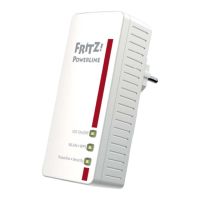
Meaning of the LEDs
FRITZ!Powerline 1000E 11
4.3 Meaning of the LEDs
The LEDs show you the status of FRITZ!Powerline:
4.4 LAN Port
FRITZ!Powerline 1000E has a LAN port (network port) for com-
puters and other network devices.
This port is a gigabit Ethernet port.
LED Behavior Meaning
Power on FRITZ!Powerline has electrical
power
flashing slowly FRITZ!Powerline is on standby
off FRITZ!Powerline has no electrical
power
LAN on the LAN port is in use
off no LAN cable is connected to
FRITZ!Powerline or the device on
the LAN cable is switched off
Powerline •
Security
on FRITZ!Powerline is connected with
the powerline network and ready
for data exchange
flashing FRITZ!Powerline resetting or config-
uring security settings
off FRITZ!Powerline did not detect any
compatible powerline devices or
did not detect any devices that use
the same network key
You can switch off the LEDs in the AVM FRITZ!Powerline soft-
ware or in the user interface of a connected FRITZ!Box.



 To Next Page
 Loading...