Connection Possibilities
You can connect the FRITZ!Repeater6000 with a FRITZ!Box via Wi-Fi or using
a LAN cable.
Wi-Fi connection to the FRITZ!Box if LAN connection to the FRITZ!Box if
the FRITZ!Repeater is to be deployed within
the Wi-Fi range of the FRITZ!Box
the FRITZ!Repeater is to be deployed out-
side the Wi-Fi range of the FRITZ!Box or
another repeater in the home network
multiple network devices without Wi-Fi are
to be integrated into the home network on
the LAN ports of the repeater
it is possible to establish a LAN con-
nection (for example using the existing
cabling in your home)
Info
Connect/WPS
Fon/DECT
WLAN
Power/DSL
LAN
Info
Connect/WPS
Fon/DECT
WLAN
Power/DSL
LAN
Continue reading at “Setting Up the Wi-Fi
Connection” on page8.
Continue reading at “Conguring a LAN
Connection” on page9.
Device Features
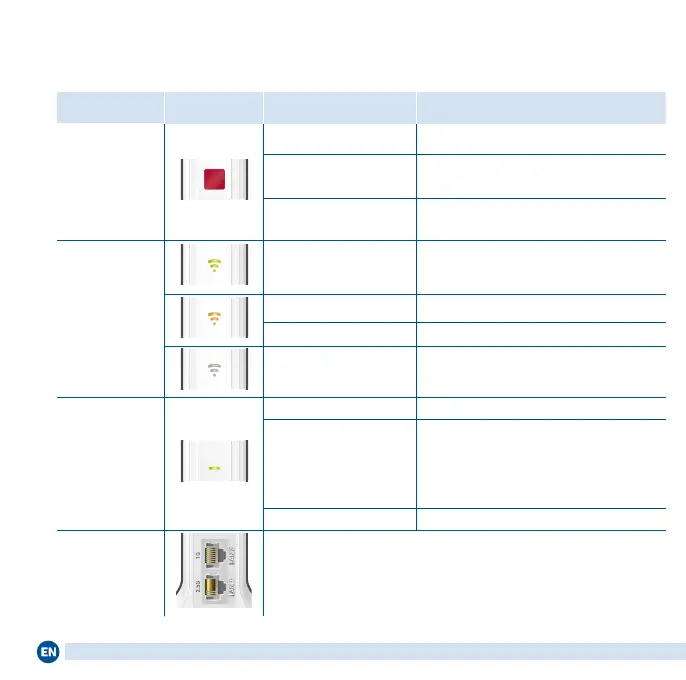
Name
Illustration
Function Action/Meaning
Connect
button
Establish connection Press and hold for 1second
Connect with another
access point
Press and hold for 6seconds
Load factory settings Press and hold for 15seconds
Connection
Quality
LED
on
Connection established, good con-
nection
on Weak connection
ashing Connection interrupted
o
Wi-Fi not enabled; a schedule may be
congured
Connect LED
Connect
on Connection good
ashing
slowly (2 second intervals):
not connected with FRITZ!Box,
no Wi-Fi connection congured
fast (twice per second):
WPS, restart or update in progress
o Schedule enabled (wireless bridge)
LAN ports Connect network devices by cable
6





 To Next Page