Page 3 of 4
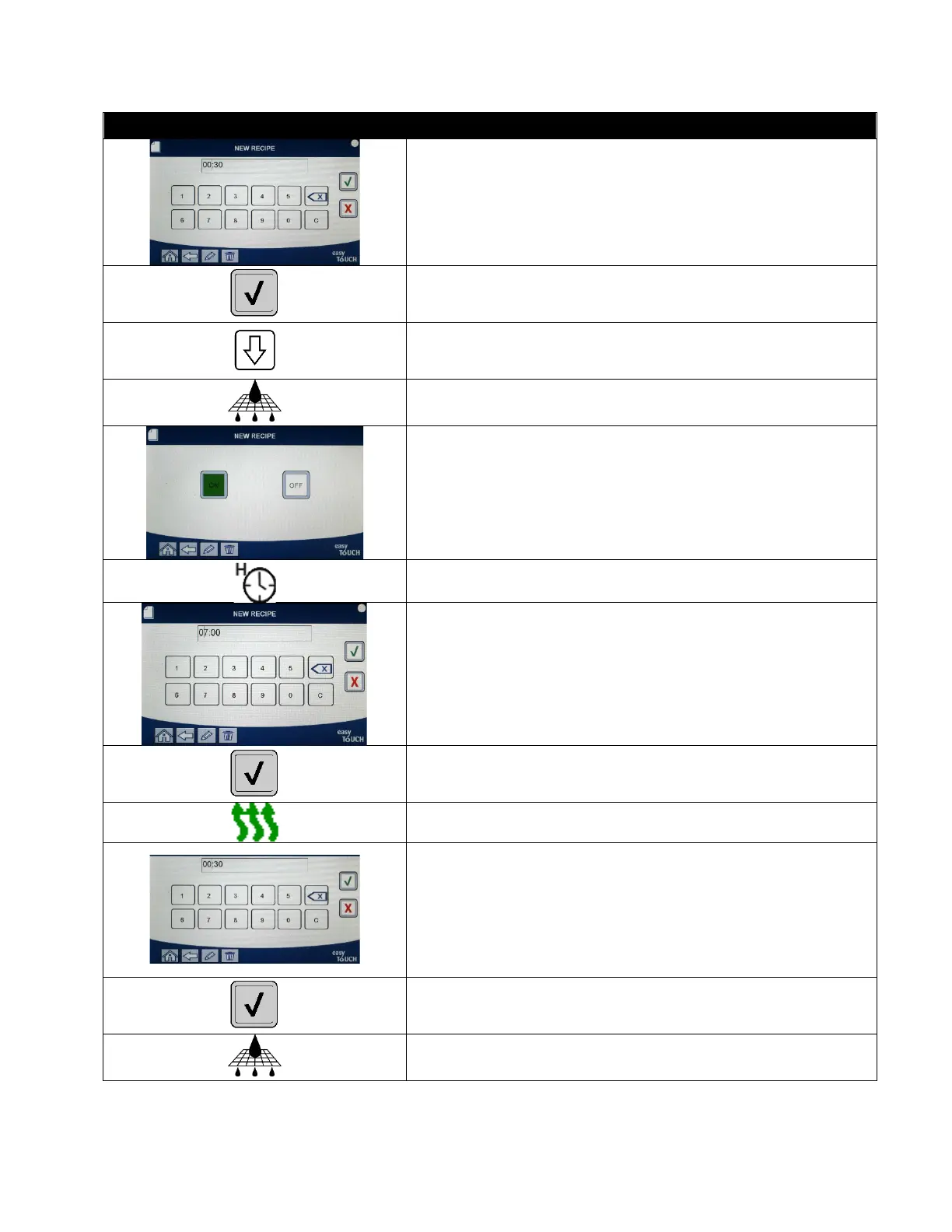
23. Enter the time in minutes and seconds for the second
shake to be performed.
24. Press the √ (check) button.
25. Press the down arrow to scroll to more settings.
26. Press the Filter button. (NOTE: ON or OFF is displayed
for current selection.)
27. Ensure that the filter button is ON to enable auto
filtration for this product. This setting is used to
prevent co-mingling of product specific oils. For
products such as FISH, select NO to prevent auto
filtration if desired.
28. Press the Hold Timer button.
29. Enter the time in minutes and seconds for the product
hold time.
30. Press the √ (check) button.
31. Press the Instant On button.
32. This is the time, in seconds, the fryer heats at 100%,
after the product button is pressed before the
controller adjusts the temperature. Enter the time in
minutes and seconds for the instant on time (ie.
00:30=30 seconds). (0=OFF). NOTE: Instant on time
may need to be adjusted for light cooking loads.
33. Press the √ (check) button.
34. Press the Filter Count button.



 To Next Page