Frymaster L.L.C., 8700 Line Avenue 71106, P.O. Box 51000, Shreveport, Louisiana 71135-1000
318-865-1711 FAX 318-862-2394
Printed in the United States Service Hotline
Page 5
1-800-24-FRYER
7. HLZ COMPUTER OPERATION AND PROGRAMMING
7. 1 Programming Temperature
You are able to program the setpoint temperature of both the air heater and the heater plate
via the computer interface. The heater plate can be set between 140°F to 180°F -- the factory
default is set to the McDonald’s standard of 160°F. The air heater can be set between 170°F
to 240°F -- the factory default is set to the McDonald’s standard of 220°F. If the factory default
temperature settings are acceptable, skip to Section 7.20, Page 6.
Ensure that the HLZ computer is in the OFF position (nothing in the display).
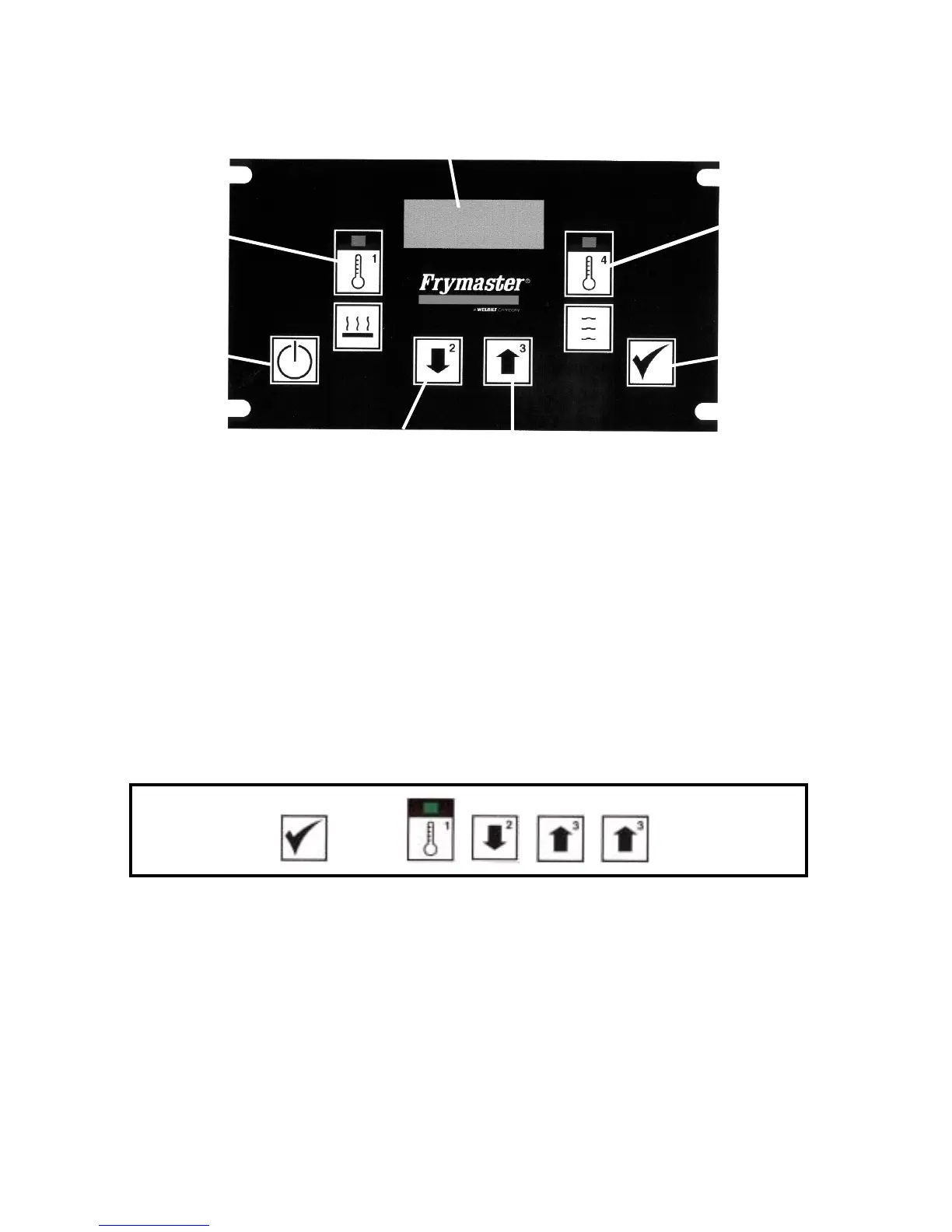
Press the check switch and enter the code (1,2,3,3). The numerals in the upper right-hand
corner represent the key number.
Press , then , , , in order
The display will read SET and the LEDs on both the Heater Plate Switch (1) and the Air Heater
Switch (4) will light. Press the switch that corresponds to the heater you wish to program.
Heater Plate
Temperature
ON/OFF Switch
Down Switch (2)
Up Switch (3)
Check or
Pro
ram Switch
ir Heater
Temperature
Switch
4
Displa



 To Next Page