EasyManua.ls Logo

Frymaster UHC-HD - User Manual

Frymaster UHC-HD
24 pages
Print Icon
To Next Page IconTo Next Page
Loading...
Frymaster, a member of the Commercial Food Equipment Service Association, recommends
using CFESA Certified Technicians.
24-Hour Service Hotline 1-800-551-8633
Email: fryservice@welbilt.com
www.frymaster.com
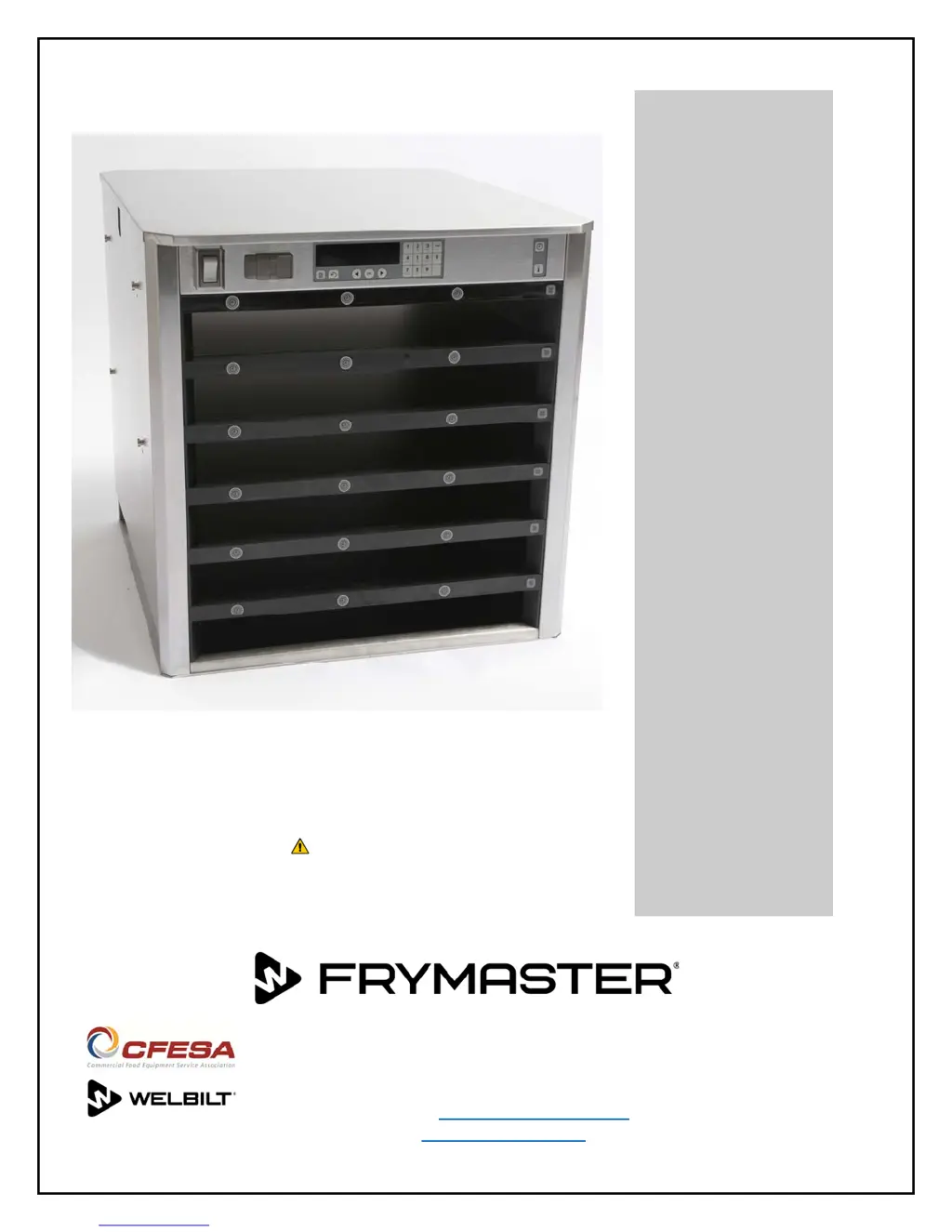
UHC-HD
Installation, Operating Manual
3,6-Row Models
*8196560*
12/2017
Original Instructions
CAUTION
READ THE INSTRUCTIONS BEFORE OPERATION

Other manuals for Frymaster UHC-HD

Questions and Answers

  • B
    brian36Aug 15, 2025
    What to do if my Frymaster UHC-HD Food Warmer unit fails to power up and the fans don't run?
    • J
      Jessica StevensAug 15, 2025
      If your Frymaster Food Warmer unit fails to power up and the fans don't run, check for line voltage at the switch and the transformer. Also, reset the circuit breaker. The possible causes are no power to the cord, a blown 20 amp fuse, or an open circuit breaker.
  • L
    Linda BakerAug 18, 2025
    What to do if the top row temperature is too high in my Frymaster UHC-HD Food Warmer?
    • T
      Tiffany ScottAug 18, 2025
      If the top row temperature is too high in your Frymaster Food Warmer, compare the plate temperature to the displayed temperature. Compare the plate RTD resistance to the chart on page 2?4. Use the service code to switch the plate on and off to ensure it responds to cabinet circuits. With the plate on and calling for heat, check the amp draw on leads between the distribution board and heater plate; a properly functioning plate should draw 1.67 amps. This issue may arise if the RTD sensor produces an out-of-range reading, potentially due to a failed RTD, heater, or distribution board.
  • J
    James BrandtAug 21, 2025
    What to do if my Frymaster Food Warmer rows heat improperly or not at all?
    • F
      floresericAug 21, 2025
      If the rows in your Frymaster Food Warmer heat improperly or not at all, ensure the heater leads and power inputs on the distribution boards are properly seated. Test for 208VAC input on the distribution board and 208VAC output from heater leads to the heater plate when the unit is calling for heat. Try switching power leads from a properly operating row to the faulty row to isolate the problem. Check the resistance of the RTD lead against the temperature chart on Page 2-4. Switch the RTD lead from a properly operating row to the faulty row to isolate the problem. Also, test the continuity of the heater plate. This may be due to improper wiring on the distribution board, a defective distribution board, a defective heater, or a defective sensor.
  • M
    mbradyAug 25, 2025
    What to do if I get a 'Call service distribution board 0 error' on my Frymaster Food Warmer?
    • W
      wmorenoAug 26, 2025
      If you see a 'Call service distribution board 0 error' on your Frymaster Food Warmer, it indicates that the master control board has lost communication with the top distribution board. This can be caused by a display connection issue. Before replacing the distribution board, remove power from the unit and disconnect the displays from the affected distribution board. Restore power, and then plug in the displays one at a time, cycling power each time. If the problem is display-related, it will disappear when the affected display is disconnected.
  • D
    Daniel ReyesAug 28, 2025
    What to do if I get a 'Call service row display error' with a row number displayed on my Frymaster UHC-HD Food Warmer?
    • A
      Alyssa HillAug 28, 2025
      If you encounter a 'Call service row display error' with a row number on your Frymaster Food Warmer, turn the cabinet off and back on. Ensure there are no software incompatibilities and inspect the ribbon cable connections. This error indicates that the master control board has lost communication with the specified board.
  • K
    Kimberly PooleAug 31, 2025
    What to do if I get a 'Call service rate of rise top' error on my Frymaster UHC-HD?
    • J
      Joy McdonaldSep 1, 2025
      If you get a 'Call service rate of rise top' error on your Frymaster Food Warmer, turn the cabinet off and on, which can resolve software-related issues. Check the top plate RTD output against the chart on page 2?4. Enter the service code (see page 2?1) and switch the top plate on and off to ensure it responds to cabinet circuits. This error indicates that the row’s top plate failed to reach the required temperature in the prescribed time window after startup or when switching between menus.
  • J
    Jacob JonesSep 4, 2025
    What to do if I get a 'Call service rate of rise bot' error on my Frymaster Food Warmer?
    • A
      Anthony WoodsSep 4, 2025
      If you get a 'Call service rate of rise bot' error on your Frymaster Food Warmer, turn the cabinet off and on, which can resolve software-related issues. Check the bottom plate RTD output against the chart on page 2?4. Enter the service code (see page 2?1) and switch the bottom plate on and off to ensure it responds to cabinet circuits. This error indicates that the row’s bottom plate failed to reach the required temperature in the prescribed time window after startup or when switching between menus.
  • J
    jonathan86Sep 7, 2025
    What should I do if my Frymaster UHC-HD Food Warmer powers up, the fans run, but all displays fail to light?
    • C
      Christopher JamesSep 7, 2025
      If your Frymaster Food Warmer powers up and the fans run, but all displays fail to light, check for 5VDC at the communication board and distribution boards. This issue is likely due to a failed power supply.
  • L
    Lindsey BergerSep 12, 2025
    What should I do if my Frymaster UHC-HD powers up, the fans run, but a display fails to light?
    • D
      Diana Smith PhDSep 12, 2025
      If your Frymaster Food Warmer powers up and the fans run, but a display fails to light, switch the ribbon cable from a functioning display to the failed component to isolate the problem. This issue may be caused by a broken or improperly seated ribbon cable, or a defective display.

Summary

1 Universal Holding Cabinet

Warranty Statement

Details Frymaster's limited warranties for the UHC-HD equipment and replacement parts.

Parts Ordering and Service Information

Provides details on how to order parts and obtain service for the UHC-HD unit.

Product Trays

Describes the available product tray sizes and provides operational tips.

Install Grill Clip

Instructions for attaching the grill clip to the grill for faster product transfer to the UHC-HD.

2 Power Up Procedures

Pre-Heating the Unit

Steps for pre-heating the UHC-HD cabinet before loading product.

3 Operational Overview

Control Panel and Displays

Explains the function of the unit's control panel buttons and row displays.

Cabinet Operation

Steps for operating the UHC-HD cabinet, including loading product and setting timers.

Timer Operation

Details how to use the timer function for product holding, including starting and stopping timers.

Changing Row Settings

Procedure to change menu, clean mode, or turn off individual rows.

Using Clean Mode

Instructions for activating and using the cabinet's clean mode.

Temperature Alarms

Describes the four types of temperature alarms and their meanings.

Alarm Details and Displays

Explains specific temperature, sensor, and rise-time alarms and error displays.

3 Programming Overview

Menus and Configurations

Overview of programming areas: Menus for configuration and items.

Locale Settings

Adjusting language and temperature display units (Fahrenheit/Celsius).

Items Management

Adding, editing, or deleting menu items and their parameters.

Settings Menu

Adjusting sound, display, importing/exporting configurations, and viewing software versions.

Change Modes

Globally changing the menu on the entire cabinet to a selected mode.

Changing Items in a Menu

Modifying menu items, including adding, editing, or deleting them.

Changing Menu on a Single Row

Selecting a different menu or mode for an individual row.

Add, Change, or Delete Menu Item

Step-by-step guide for managing menu items, including parameters like name, temperature, and hold time.

Change an Item

Procedure to modify existing menu items and their associated parameters.

Delete an Item

Process for removing a menu item from the cabinet's configuration.

Change Language

Selecting the desired language for the cabinet's interface and displays.

Change Temperature Range Display

Switching the temperature display between Fahrenheit and Celsius.

Settings Menu - Sound

Adjusting the sound level settings for the UHC-HD unit.

Display Settings

Configuring display mode between full product name and abbreviated name with hold time.

Import Configuration

Loading cabinet configurations from a flash drive.

Export Configuration

Saving cabinet configurations to a flash drive with a user-defined file name.

Version Information

Displaying firmware and USB version numbers for the unit.

4 Cabinet Configuration Transfer

Capture Cabinet Menus;Configurations

Saving current cabinet menus and configurations onto a flash drive.

Configure Cabinet from USB

Transferring saved configurations from a flash drive to another cabinet.

5 Cleaning and Preventive Maintenance

Clean Trays;Racks (Every Four Hours)

Procedure for cleaning product trays and racks using specified cleaning solutions.

Clean Cabinet (Daily)

Steps for cleaning the cabinet interior, including slots and surfaces, at the end of the day.

Frymaster UHC-HD Specifications

General IconGeneral
ModelUHC-HD
TypeFood Warmer
Power SourceElectric
Voltage120V
CapacityHalf-size sheet pan
Temperature Range190°F

Related product manuals