UHC-HD
3-5
Programming Overview
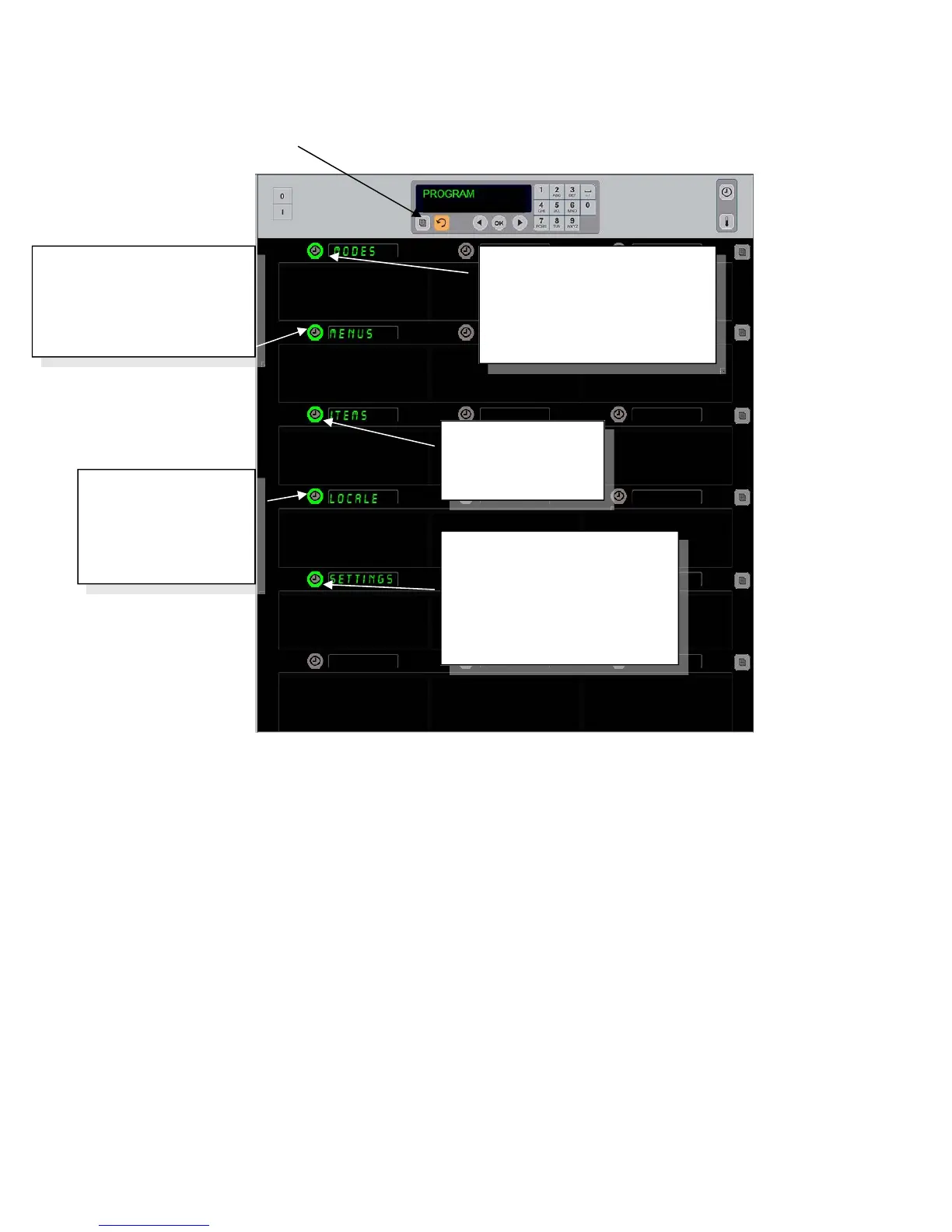
Programming requires use of the keypad and timer buttons on the left column of rows.
Press the keypad Program button, enter the code and the cabinet displays change (as shown
above).
With Program displayed on the master control:
Press the timer next to Modes to display menu configurations and clean.
Press the timer next to Menus to change the menu configuration.
Press the timer key next to Items to add a menu item or to delete or edit an existing
item.
Press the timer key next to Locale to change the displayed language or the
temperature range from Fahrenheit to Celsius.
Press the timer key next to Settings to adjust sound level, change row position display
to product and remaining hold time, access configuration exporting and importing
feature and see software versions numbers. In each case, as the button is pushed the
words on the cabinet row positions change. Items relevant to the chosen menu are
displayed. Instructions scroll on the keypad display.
MENUS
Displays configuration of
menus. Use to change
items in configurations
Pressing the programming key and entering a code accesses five areas of the cabinet,
annotated below.
Modes
Displays cabinet menus. Use
to change displayed
configuration or switch to
clean.
Items
Use to add items,
edit existing items.
Locale
Use to change
language and
temperature range
display.
Settings
Use to change sound level,
load or export configurations,
set displays to show product
and remaining hold time and
display software versions.


 To Next Page