2
INTRODUCTION
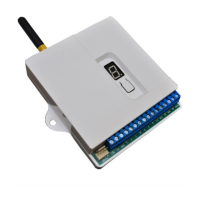
The FSK TX Cellular Plus (TXC+) is a highly featured GSM based unit which is used for the
transmission of Security and Telemetry messages over the GSM network.
The TXC+ can communicate via both GPRS and SMS messages and includes the universal Contact
ID interface to Alarm Control Panels as well as serial interfacing into some leading panels. It also
has seven dry contact input triggers
In addition, the TXC+ has two outputs (expandable to 10 outputs) which can be used to command
Alarm Panels and other devices.
FEATURES AND FUNCTIONS OF THE TXC +
Reporting Options
• Option of Single or Dual SIM card operation for enhanced security
• GPRS reporting to a control room
• Option of back-off to SMS (to control room) if GPRS is not available
• SMS directly to cell-phones (up to 10 cell phone numbers)
• SMS reporting to cell phones includes full user, zone and partition identication in plain text
Interfaces
• 7 Hardwired inputs with positive trip, negative trip or both
• Dedicated AC Supply monitoring input
• 2 on-board relay outputs which can controlled by SMS, missed call or via the remote control
• Optional Relay output expansion board (8 relays per board, giving a total of 10 outputs).
• Contact ID Tip and Ring Telephone interface to all leading control panels
• Serial alarm interface to leading control panels
• Over-the-air Panel Uploading and Downloading on the Texecom Premier control panels via the
serial interface
Remote controls
• Optional 433MHz code-hopping remote control receiver compatible with FSK remote transmitters
• 2 on-board relay outputs which can be activated by the remote controls
• Up to 200 remote controls can be programmed into the unit
Programming
• Full programming and software updating via a computer serial port
• User function programming via SMS
Indicators and Controls
• Status and error indication via a seven segment display
• Remote control programming via push-button


 To Next Page