18
11/2022
IN OUT
1
1
MONITOR
OUTPUT
INPUT SLOT 1-4 O
RS-232 UART AS
2
3
4
5
6
7
8
AUDIO
1
2
3
4
I
O
IN OUT
1 2 3 4
1
MONITOR
OUTPUT
INPUT SLOT 1-4 OUTPUT SLOT 5-8 OUTPUT SLOT 9-12
RS-232 UART AS
2
3
4
5
6
7
8
9
10
11
12
AUDIO
1
2
3
4
I
O
Connections
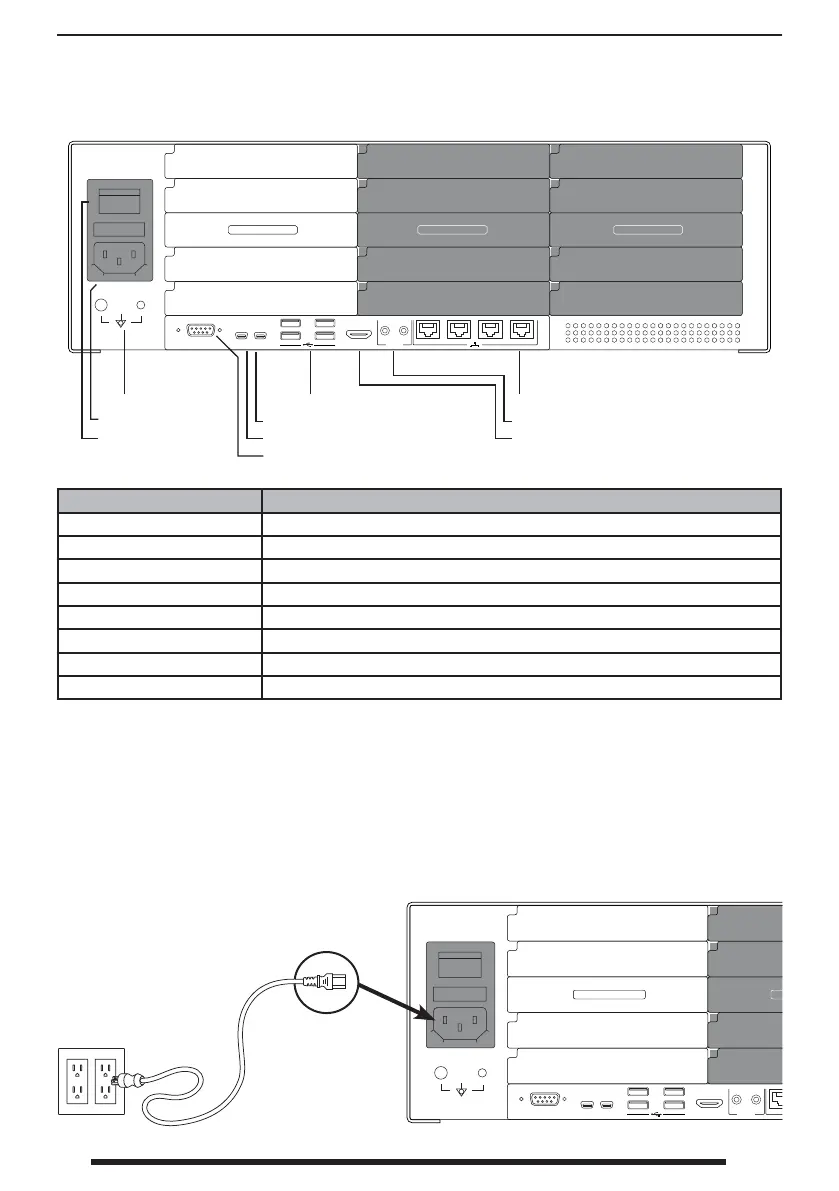
Connect Power
Only use the speci ed plug and voltage. Power requirements are: AC 100~240V / 50~60Hz ,
2A(max). Use the supplied 6 ft. hospital grade AC power cord. Improper power may cause electric
shock or equipment damage. To avoid the risk of electric shock, this equipment must only be
connected to a power supply with protective grounding.
Earth terminal
AC Inlet
AC On/O Switch
USB (USB 3.0)
Service port (Mini USB, A/S)
UART (Mini USB, Console terminal)
RS-232 (Dsub9)
Ethernet Ports (RJ45)
Audio in / out (3.5Ø phone)
Monitor output (HDMI 1.4 1080p@60)
Item Description
Earth terminal A direct physical connection to ground or earth.
USB Connects a keyboard, mouse, or memory stick, or rmware updating.
Service port For factory use.
UART Use for serial communication with other devices.
RS-232 Use for serial communication with other devices.
Monitor output Connects an external web or PC screen for interface viewing and controlling.
Ethernet ports For network streaming.
Audio in / out Connects audio.



 To Next Page