22
10/2021
External Monitor User Interface - Overview IPS710A
Task
A task in IPS710A is a group of captured or recorded images that have been created in the same
session or procedure. Patient and doctor information is associated with content in a task. After
a task has been closed, additional content can no longer be added to the task. A task number is
automatically given by IPS710A to each new task.
Understanding tasks within IPS710A will lead to faster understanding of the system and its fea-
tures. The external user interface is divided into three main sections.
• View all tasks stored in IPS710A
• View contents of a task
• Copy task content to USB
• Upload task content to FTP
• Store task content in DICOM
• View or play task content
• Print task content
• Delete task content
• Delete task
• AV settings
• Record settings
• FTP settings
• DICOM settings
• Network settings
• System settings
• Create new task
• Enter patient details
• Capture still images
• View four most recent captures
• Record video
• Access modality worklist
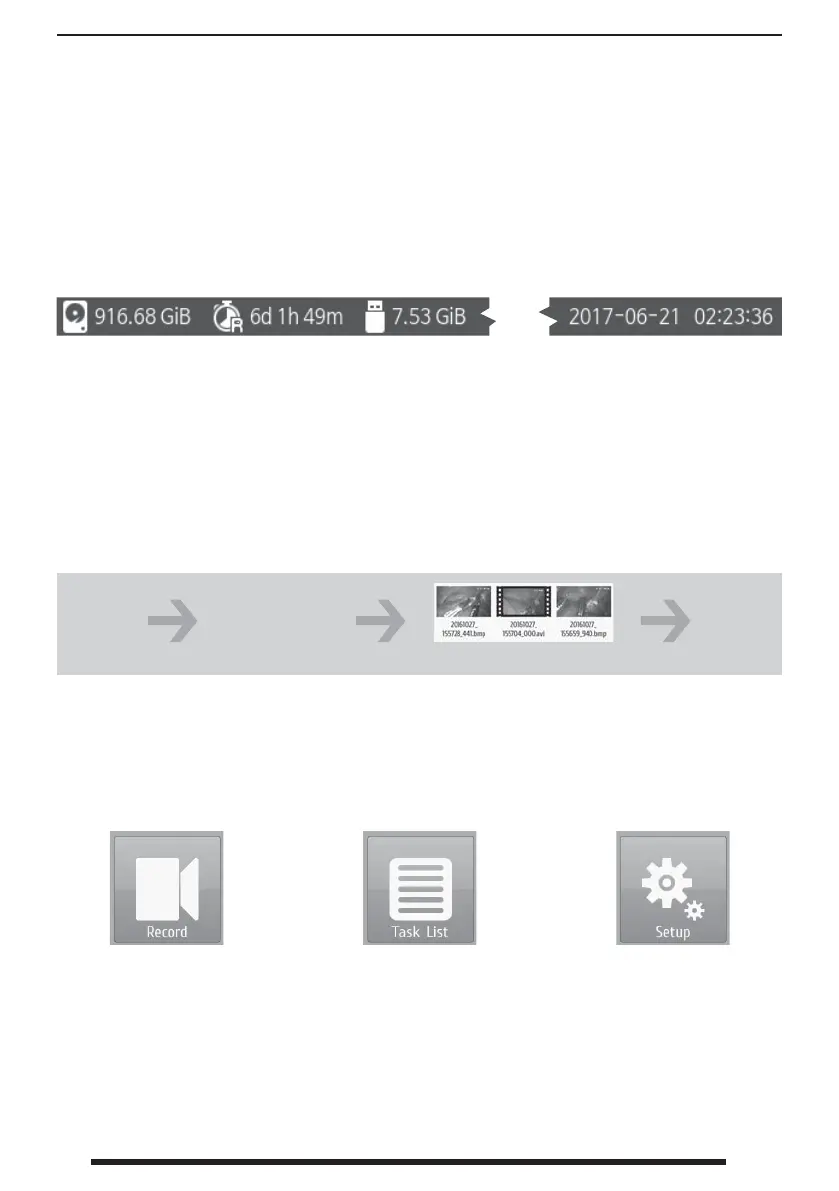
Top Status Bar
Each screen in the user interface shows a top bar with current information for available memory,
available recording time remaining, and the system’s set date and time.
Dashboards
There are 3 main screens that control most of the functions within IPS710A.
Hard disk
drive memory
available.
Date and time set in
the system.
Connected USB
stick memory
available.
Recording time
available using
current settings.
Choose
Create
Task
Choose
Close
Task
Add patient and
doctor information
where prompted.
Click capture or record icons.
The external user interface controls IPS710A and manages all captured or recorded images.
Below are brief start-up introductions to general features of the interface.


 To Next Page