6. Trouble Shooting
No words on the front
LCD panel display.
Charge the UPS at least 6 hours.
Replace the battery with the same
type of battery.
The UPS is not turned on.
Press the power switch again to turn
on the UPS.
Alarm continuously
sounds although
mains supply is
normal.
Remove some devices. Before
reconnecting equipment, please
check that the load matches the UPS
capacity specified in the specs.
When power fails,
back-up time is
shorten.
Remove some critical load.
Battery voltage is too low.
Charge the UPS at least 6 hours.
Battery defect. Operating
temperature could be too
high, or battery is not
correctly used.
Replace the battery with the same
type of battery.
The mains is normal
but the unit is on
battery mode.
Check and reconnect the power cord.
7 Specifications
110/120 VAC or 220/230/240 VAC
Typical 2-6 ms, 10 ms max.
4-6 hours recover to 90% capacity
0-90 % RH @ 0-40° C (non-condensing)
Supports Windows® 98/2000/2003/XP/Vista/2008, Windows®
7, Linux, and MAC
1. Lieferumfang
Im Lieferumfang sollten Sie folgendes finden:
- USV Einheit
- Kurzanleitung
- Kommunikationskabel (nur für Modelle mit USB/RS-232 Schnittstelle)
- Netzkabel (nur für Modelle mit IEC-Eingang)
2. Produktübersicht
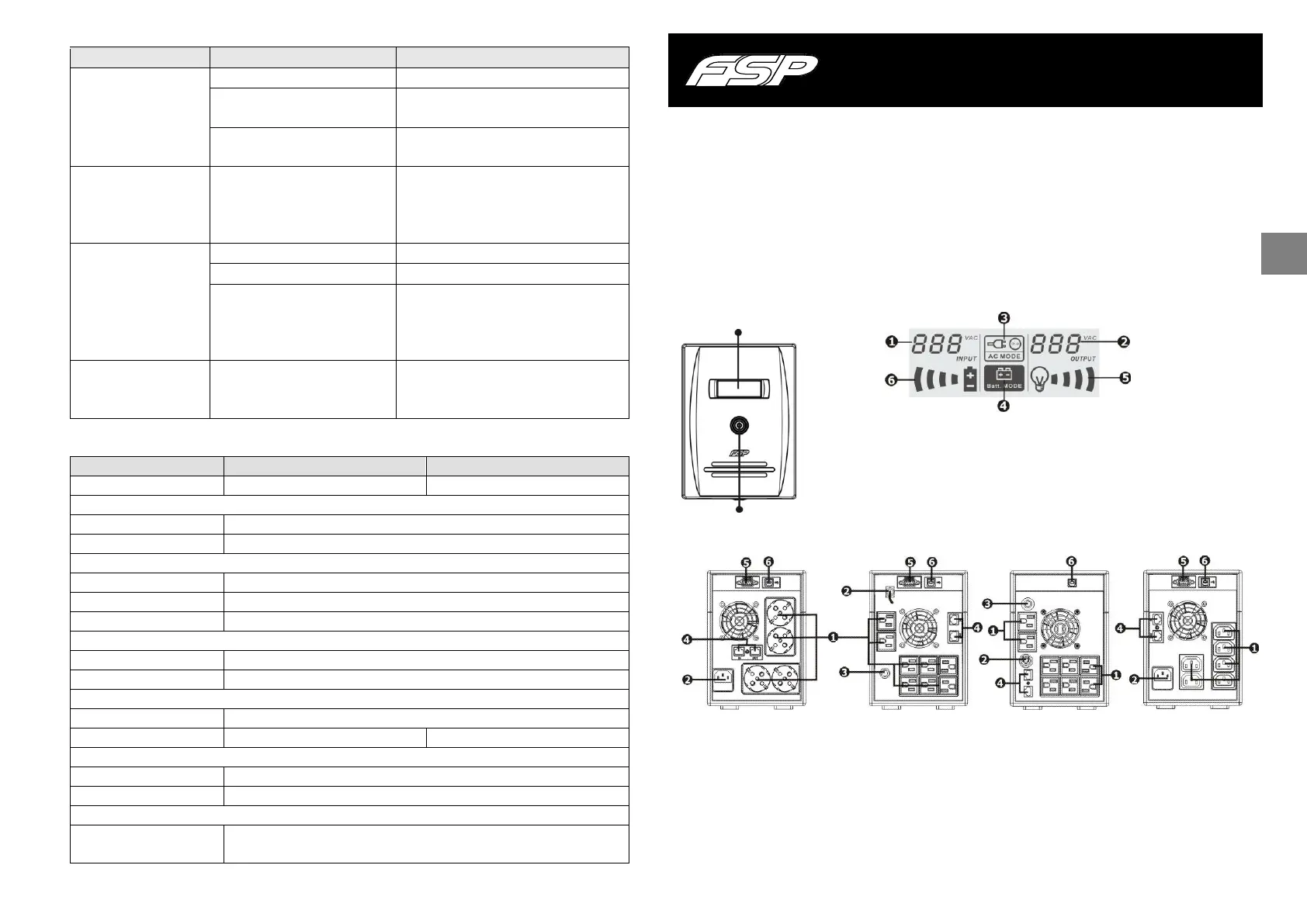
Vorderansicht: LCD panel:
Rückansicht:
Schuko Typ NEMA Typ I NEMA Typ II IEC Typ
Ausgänge Modem / Telefon / Netzwerk Überspannungsschutz
AC Eingang RS-232 com. Schnittstelle
Schutzschalter USB com. Schnittstelle
Line Interactive UPS Kurzanleitung V. 1.1
Eingangsspannung
Lade Status Anzeige, Blinken
Ausgangsspannung
zeigt Überladung an
AC Modus Anzeige
Batteriekapazitätsanzeige, Blinken
Batterie Modus Anzeige zeigt niedrigen Batteriestatus an



 To Next Page