49
COMPUTER OPERATION
Functions
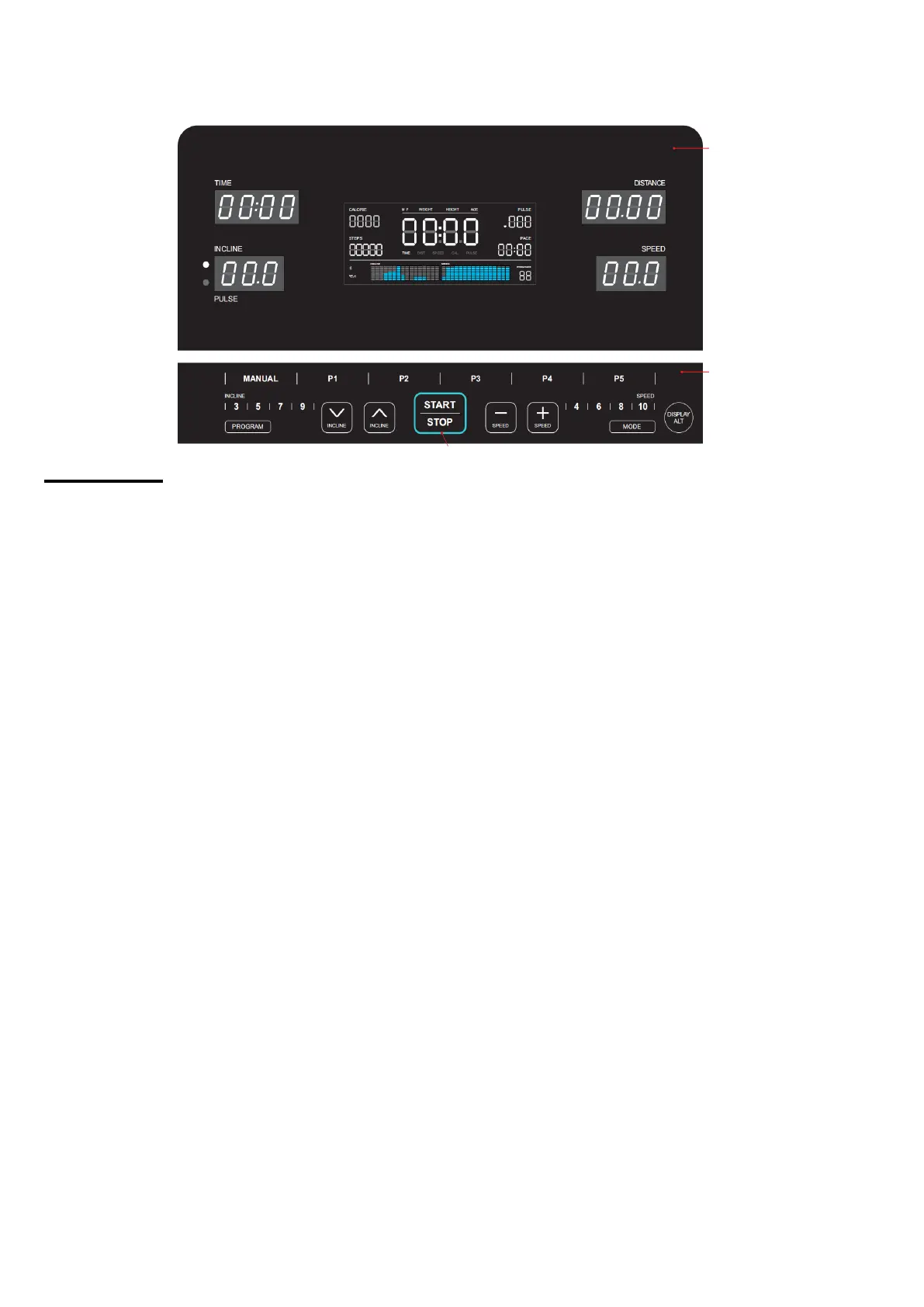
1) "TIME" window: Display of exercise time (display range: 0:00-18 hours). In countdown mode
the display range is 99 – 0 minutes. When 0:00 is reached, the window will show "END" and
after 5 seconds it will stop and enter into standby mode. TIME and PACE will be displayed
alternately every 5 seconds.
2) "DISTANCE" window: Displays the running distance. The display range is 0.00-99.99. When
0.00 in countdown mode is reached, the window will show "END" and after 5 seconds it will
stop and enter into standby mode.
3) "INCLINE/PULSE" window: Displays incline levels (display range: 0.0-15.0). Hold the pulse
sensors with both hands for 5 seconds to display the user’s heart beats per minute (display
range: 50-200 beats/min). Alternatively, you may wear a chest-belt to measure your pulse
(see respective chapter in this manual). All pulse data is just for reference and cannot be
used as a medical indication.
4) "SPEED" window: Displays current speed (display range: 0.8—18.0 km/h).
5) "CALORIES" window: Calories display range is 0.0-999. When 0.0 in countdown mode is
reached, the window will show "END" and after 5 seconds it will stop and enter into standby
mode.
6) "STEPS" window: Displays running steps (display range: 0-99999). When 0 in countdown
mode is reached, the window will show "END" and after 5 seconds it will stop and enter into
standby mode.
7) "PACE" window: Displays the present pace (minutes needed per kilometer).
8) "MATRIX" window: Displays running speed and incline of each section during a program. In
speed window one square represents 2 km/h and in incline window one square represents 2
sections.
9) Middle LCD square window: Displays TIME, DISTANCE, SPEED, CALORIES and PULSE
in turns. Press DISPLAY-ALT button to change. Displays also “FAT” in FAT mode.


 To Next Page