EasyManua.ls Logo

FUJICA HALF - Viewfinder Information; Viewfinder Display Elements; Automatic Exposure Indication; Low Light Indicator

Default Icon
24 pages
Print Icon
To Next Page IconTo Next Page
To Previous Page IconTo Previous Page
Loading...
What
you
see
in
the
vi
ewf
i
nder
.
..
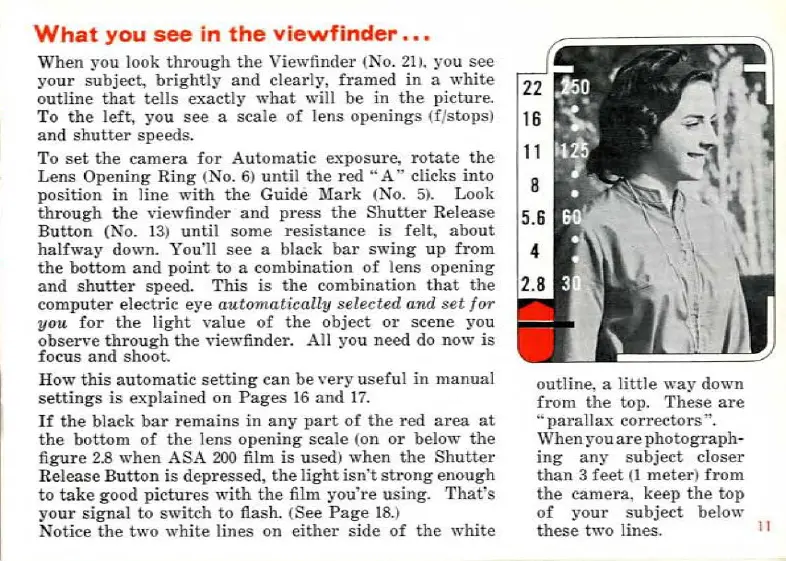
When
you
look
through
the
Viewfinder
(No. 21
).
you
see
your
subject,
brightly
and
clearly
,
framed
in
a
white
outline
that
tells
exactly
what
will
be
in
the
picture.
To
the
left,
you
see
a
scale
of
lens
openings
(f
/
stopsJ
and
shutter
speeds.
To
set
the
camera
for
Automatic
exposw·e,
rotate
the
~
ns
Opening
Ring
(No. 6)
until
the
red
"
A"
clicks
into
position
in
line
with
the
Guide
Mark
(No.
5).
Look
thro
u
gh
the
viewfinder
and
press
the
Shutter
Release
Button
(No. 13)
until
sorne
resistance
is
felt,
about
halfway
down.
You
'
ll
see
a bl
ack
bar
swing
up
from
the
bott~m
and
point
to
a
combination
of
lens
opening
and
shutter
speed.
This
is
the
combination
that
the
comp
u
ter
electric
eye
automatically
selected
and
set
for
you
for
the
light
value
of
the
obje
ct
or
scene
you
observe
through
the
viewfinder.
Ail
you
need
do
now
is
focus
and
shoot.
H
o'"
this
auto
ma
tic
setting
can
be
very
useful
in
manual
settings
is
explained
on
Pages
16
and
1
7.
If
the
black
bar
r
emains
in
any
part
of
the
red
area
at
the
bottom
of
the
lens
opening
scale
(on
or
below
the
figure
2.8
when
ASA
200
film
is
used)
when
the
Shutter
R
elease
Button
is
depressed
,
the
light
isn't
strong
enough
to
ta
ke
good
pictures
with
the
film
you
'
re
using.
Thafs
your
signal
to
switch
to
flash.
(See
Page
18.
)
Notice
the
two
white
tines
on
either
side
of
the
white
o
utline.
a
little
way
down
from
the
top.
These
are
'·paralla..x
correctors"'
.
\Vhen
youa
r e
photograph
-
ing
any
subject
closer
than
3
feet
(1
meter)
from
the
camera
,
keep
the
top
of
your
subject
below
these
two
lines.
Il
Ce mode d'emploi est un cadeau d'un visiteur du site.

Related product manuals