EasyManua.ls Logo

FUJICA HALF - How to Unload Film; Signaling Film End; Rewinding Film; Removing Film Cartridge

Default Icon
24 pages
Print Icon
To Next Page IconTo Next Page
To Previous Page IconTo Previous Page
Loading...
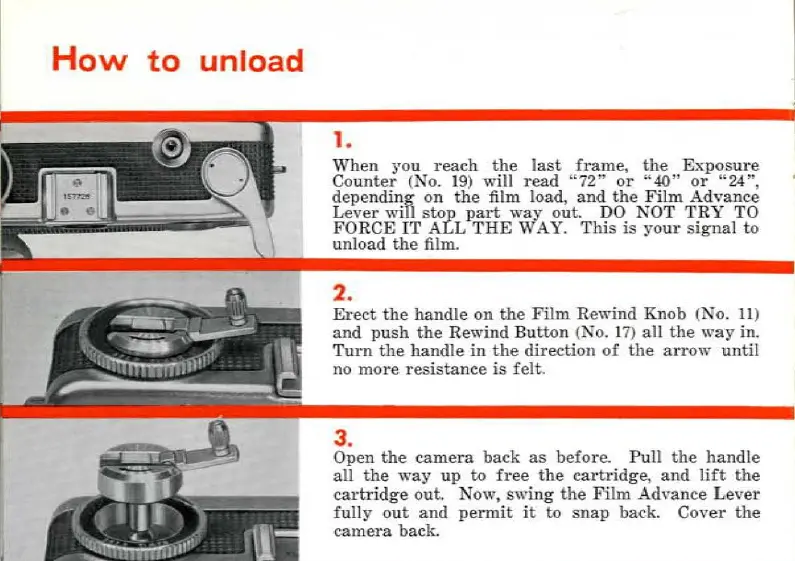
How
to
unload
1.
When
you
reach
the
last
frame,
the
Exposure
Counter
(No.
19)
wi
ll
read
"72"
or
" 40"
or
"24",
depending
on
the
film load,
and
the
Film
Advance
Lever
wi
ll
stop
part
way
ou
t.
DO
NOT
TRY
TO
FORCE
IT
ALL
THE
WAY.
This
is
your
si
gnal
to
unload
the
fi
lm
.
2.
Erect
the
handle
on
the
Film
Rewind
Knob
(
No.
11
)
and
push
the
Rewind
Button
(
No
.
17
)
ail
the
way
in.
Turn
the
handle
in
the
direction
of
the
arrow
until
no
more
resistance
is
felt
.
3.
Open
the
camera
back
as
before.
Pull
the
handle
ali
the
way
up
to
free
the
cartrid
ge
,
and
lüt
the
cartridge
out.
Now
,
swing
the
Film
Advance
Lever
fully
out
and
permit
it to
sna
p baek.
Cover
the
came
ra
back.
Ce mode d'emploi est un cadeau d'un visiteur du site.

Related product manuals