EasyManua.ls Logo

FUJICA HALF - Completing Film Loading; Inserting Film Roll; Inserting Film End; Advancing Film

Default Icon
24 pages
Print Icon
To Next Page IconTo Next Page
To Previous Page IconTo Previous Page
Loading...
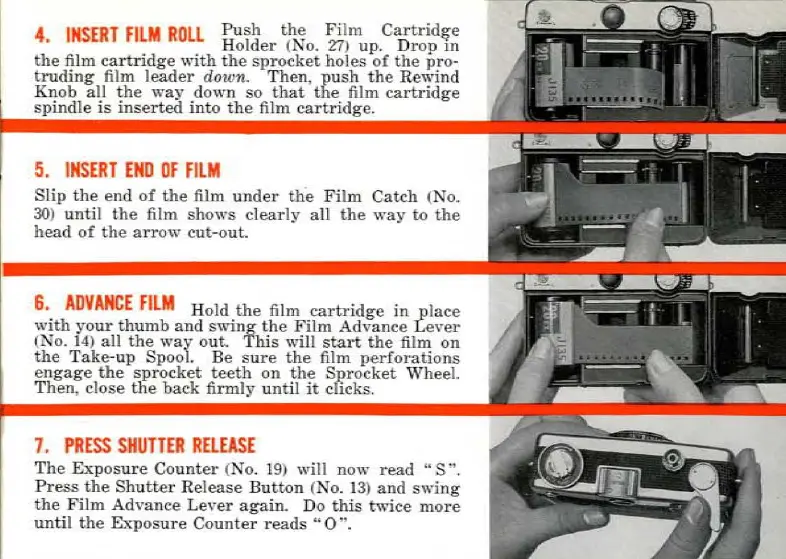
4
INSERT
FILM
ROLl
Push
the
Film
Cartrid
~e
Bolder
(No.
27)
up.
Drop
m
the
film
ca
r
tr
idg
e
"ith
the
sprocket
ho
les
of
the
pro
-
truding
film
leader
down
.
Then,
push
the
Rewind
Knob
ali
the
way
d
own
so
tha
t
the
film
cartridge
spindle
is
inserted
into
the
film
cartridge
.
5.
INSERT
END
OF
FilM
Slip
the
end
of
the
film
under
the
Film
C
atch
(No.
30)
until
the
fi
lm
shows
clearly
ail
the
way
to
the
head
of
the
arrow
eut
-o
ut.
6.
ADVANCE
FILM
Hold
the
film
cartridge
in
_place
with
your
thumb
and
swing
th
e
Fil
m
Ad
vance
L
ever
(No.
14)
ali
th
e
way
out.
This
,.,"ill
start
the
film
on
the
T
ake-
up
Spool.
Be
s
ur
e
the
film
perforations
enga
ge
the
sp
rocket
teeth
on
the
Sprocket
Wheel.
Then
,
close
the
back
firmly
un
til it
cl
icks.
7.
PRESS
SHUTTER
RELEASE
The
Ex
posu
re
Counter
(No. 1
9)
will n
o\Y
read
"S
~.
Press
the
Sh
utter
Re
lease
Button
(No.
13
)
and
swing
the
Film
Advan
ce
Le
ver
again.
Do
th
is
tw
i
ce
more
un
til
the
Exposure
Counter
reads
"0
".
Ce mode d'emploi est un cadeau d'un visiteur du site.

Related product manuals