EasyManua.ls Logo

FUJICA HALF - How to Load Film; Setting Film Speed for Loading; Opening the Camera Back; Rotating Film Take-up Spool

Default Icon
24 pages
Print Icon
To Next Page IconTo Next Page
To Previous Page IconTo Previous Page
Loading...
How
to
load
film
into
the
Fujica
Half
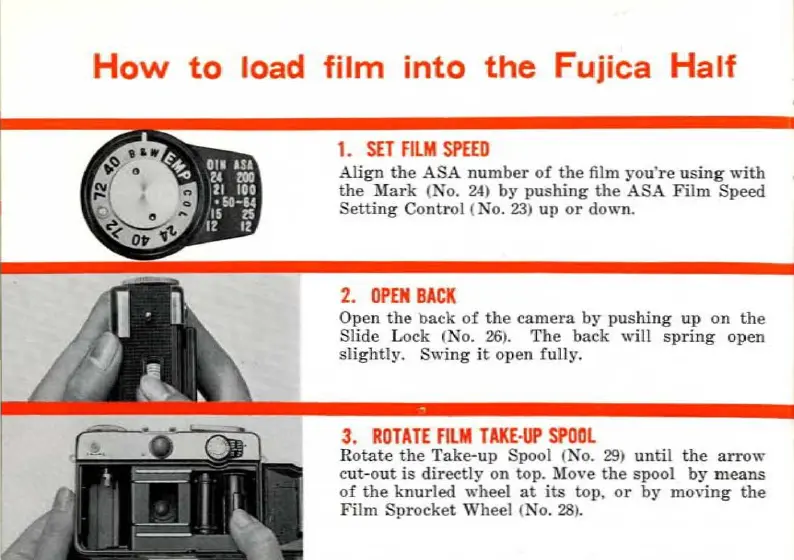
1.
SET
FilM
SPEED
Align
the
ASA
number
of
the
film
you·re
using
'''Ïth
the
Mark
(No.
24
)
by
pushing
the
ASA
Film
Speed
Setting
Control
(No.
23)
up
or
down.
2.
OPEN
BACK
Open
the
back
of
th
e
camera
by
pushing
up
on
the
Slide
Lock (No.
26
).
The
back
"ill
spring
open
slightly.
Swing
it
open
fully.
3.
RO
TA
TE
fi
LM
TAKE
·
UP
SPOO
L
Rotate
the
Take-up
Spool (No.
29)
until
the
arrow
e
ut-
out
is
direct!
y
on
top.
Mo,
·e
the
spool
by
means
of
the
knurled
wheel
at
its
top,
or
by
moving
the
Film
Sprocket
Wh
eel <No.
28
).
Ce mode d'emploi est un cadeau d'un visiteur du site.

Related product manuals