EasyManua.ls Logo

FUJICA HALF - Manual Exposure Settings; Switching to Manual Control; Selecting Lens Openings Manually; Selecting Shutter Speeds Manually

Default Icon
24 pages
Print Icon
To Next Page IconTo Next Page
To Previous Page IconTo Previous Page
Loading...
16
How
to
switch
from
automatic
operation
to
manual
control
and
set
any
combinÇ~tion
of
shutter
speeds
and
' lens
openings
you
wish
To
switch
from
Automatic
operation
to
1\Ianual
Control,
simply
move
the
L
ens
Opening
Ring
anywhe
e off ·•
A.
, position.
Y
ou
now
have
a
range
of
7
lens
openings
and
4
shutter
speeds
to
form
any
com-
bination
you
desire.
For
instance,
you
might
want
to
sim
ula
te
a
nigh
t
shot
in
broad
daylight
by
und
erexposing
i
ndoor
color
film
outdoors.
Or
you
may
want
to
get
a
sharp
fore-
ground
with
a
soft,
out-of-focus
back
-
ground,
while
maintaining
correct
ex
-
posure.
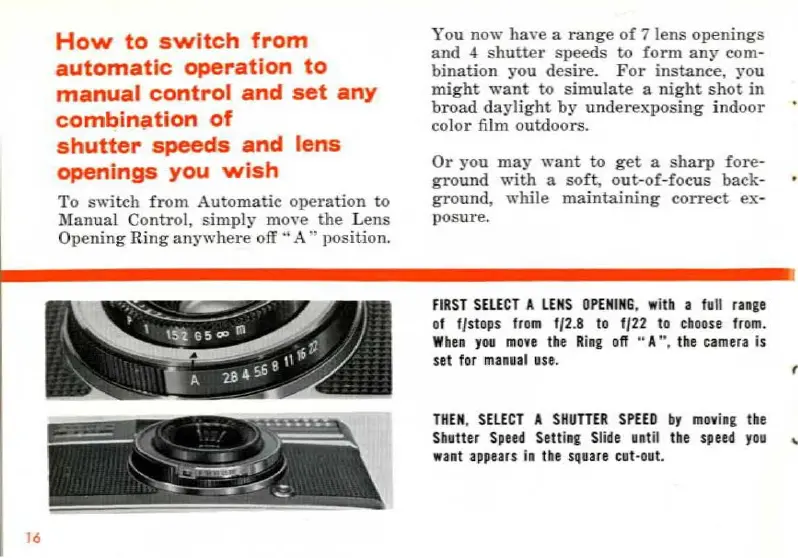
FI
RST
SELECT
A
LENS
OPENING
, witb a full
range
of f/stops from f/2.8 to f/22 to
cboose
from.
W
be
n
you
move
tbe R
ia
g o
fl
" A
",
the
camera
is
set for
ma
aual
use
.
THEN
,
SELECT
A
SHUTTER
SPEED
br
movi
ag
the
Sh
atter
Sp
eed
Se
tt
iag
Sl
ide
until t
he
speed
yoa
want
appear
s in
the
square
eut
-
out.
(
..
Ce mode d'emploi est un cadeau d'un visiteur du site.

Related product manuals